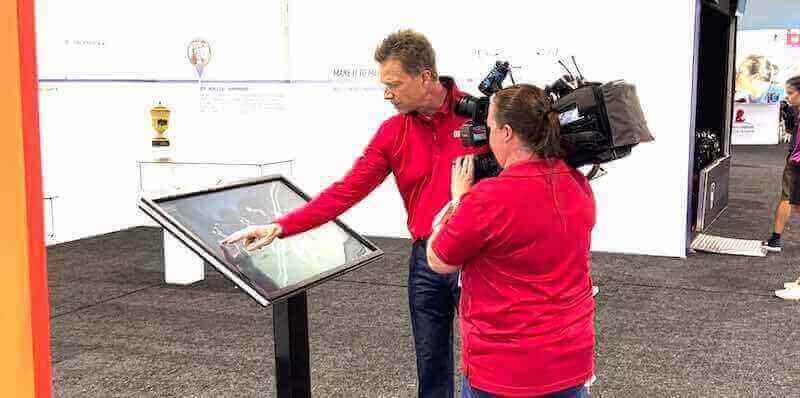




Athletic directors and school administrators face a persistent challenge: traditional recognition methods consume space, age poorly, and exclude most achievements due to physical constraints. A single trophy case holds perhaps fifty items. Wall plaques require constant expansion. Championship banners crowd gymnasiums until no space remains.
Touchscreen augmented reality displays eliminate these limitations by merging physical touchscreen interaction with extended digital experiences accessible from personal devices. This combination creates recognition systems displaying unlimited achievements while enabling visitors to explore content both at the physical display and later from their phones—preserving institutional memory without space restrictions while extending engagement beyond the initial visit.
Understanding Touchscreen AR Display Technology
Touchscreen augmented reality displays combine direct touch interaction at physical kiosks with AR extensions accessible through mobile devices. Visitors explore achievements at the touchscreen itself or scan QR codes to continue discovery on personal phones—reviewing profiles, sharing accomplishments, and diving deeper into content without time pressure at the physical display.
This dual-mode approach serves schools particularly well. Public touchscreens provide immediate impact in high-traffic areas. Mobile extensions enable private exploration without crowds, alumni access from anywhere, and social sharing extending recognition reach. Solutions like Rocket Alumni Solutions deliver both experiences from single platforms—physical kiosks displaying achievements locally and web portals enabling worldwide access to identical content.
What Makes Touchscreen AR Displays Different
Touchscreen augmented reality displays differ fundamentally from both traditional static displays and standard digital signage. Understanding these distinctions helps schools select technology matching their recognition objectives.
Standard Digital Signage Limitations
Digital signage systems display rotating content on screens—announcements, schedules, promotional materials. These passive displays show predetermined content sequences without user control. Viewers see whatever appears when they look, with no ability to search for specific information, explore deeper content, or control their experience.
Digital signage serves announcement purposes adequately. Schools use these systems for daily schedules, event promotions, and general information. However, they fail recognition applications requiring exploration, search, and personalized discovery. Visitors cannot find their own achievements, search classmates, or explore historical records when systems simply cycle through predetermined slides.
Basic Touchscreen Interactive Displays
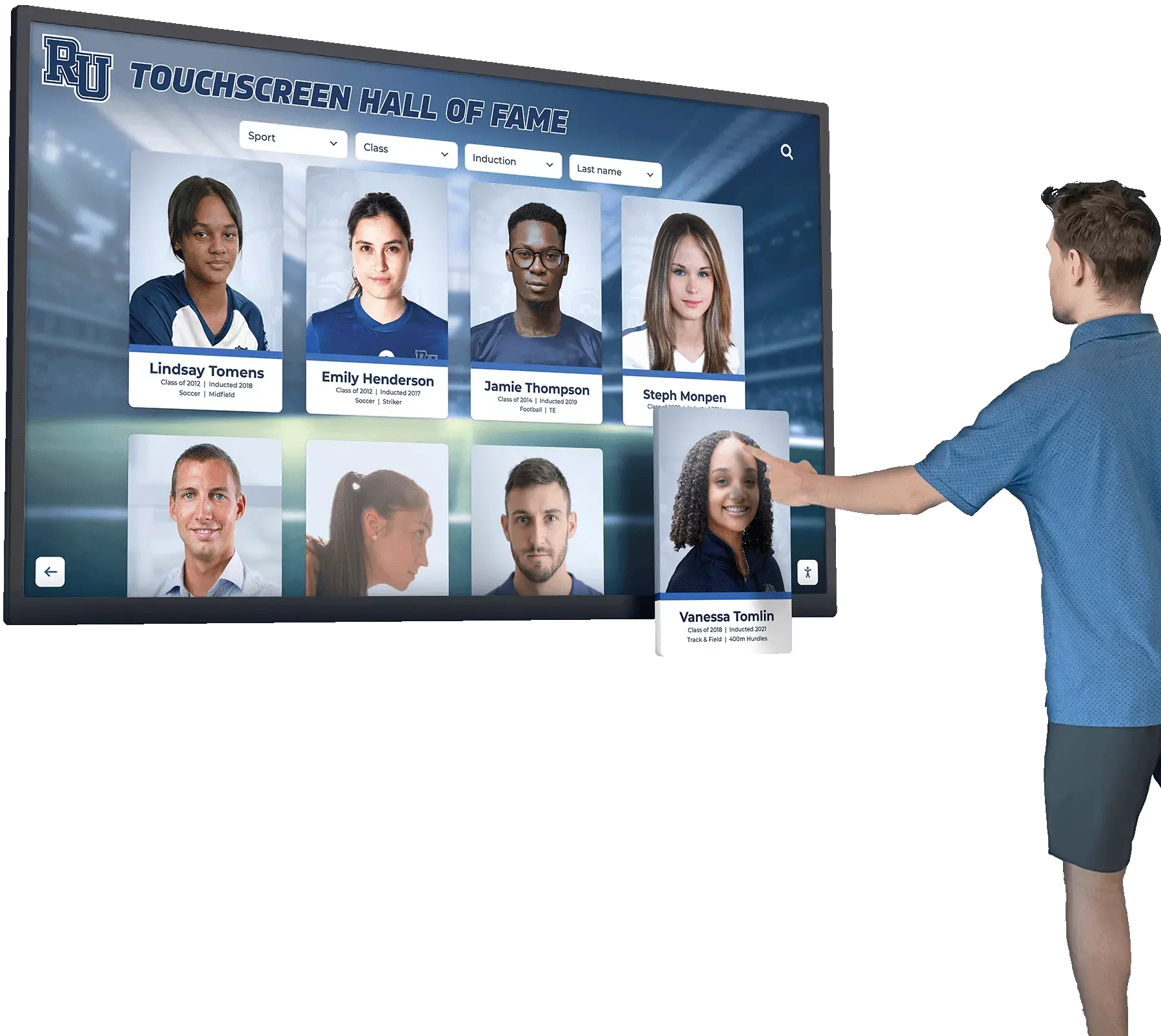
Standard touchscreen displays add interactivity allowing users to control their experience. Visitors tap navigation buttons, search databases, and explore content at their own pace. These systems serve recognition purposes far better than passive digital signage because they enable personal discovery.
Most touchscreen recognition systems stop here—providing on-screen interaction but no extended experience beyond the physical display. Once visitors walk away, the engagement ends completely. They cannot continue exploration, share discoveries, or reconnect with content later.
AR-Enhanced Touchscreen Systems
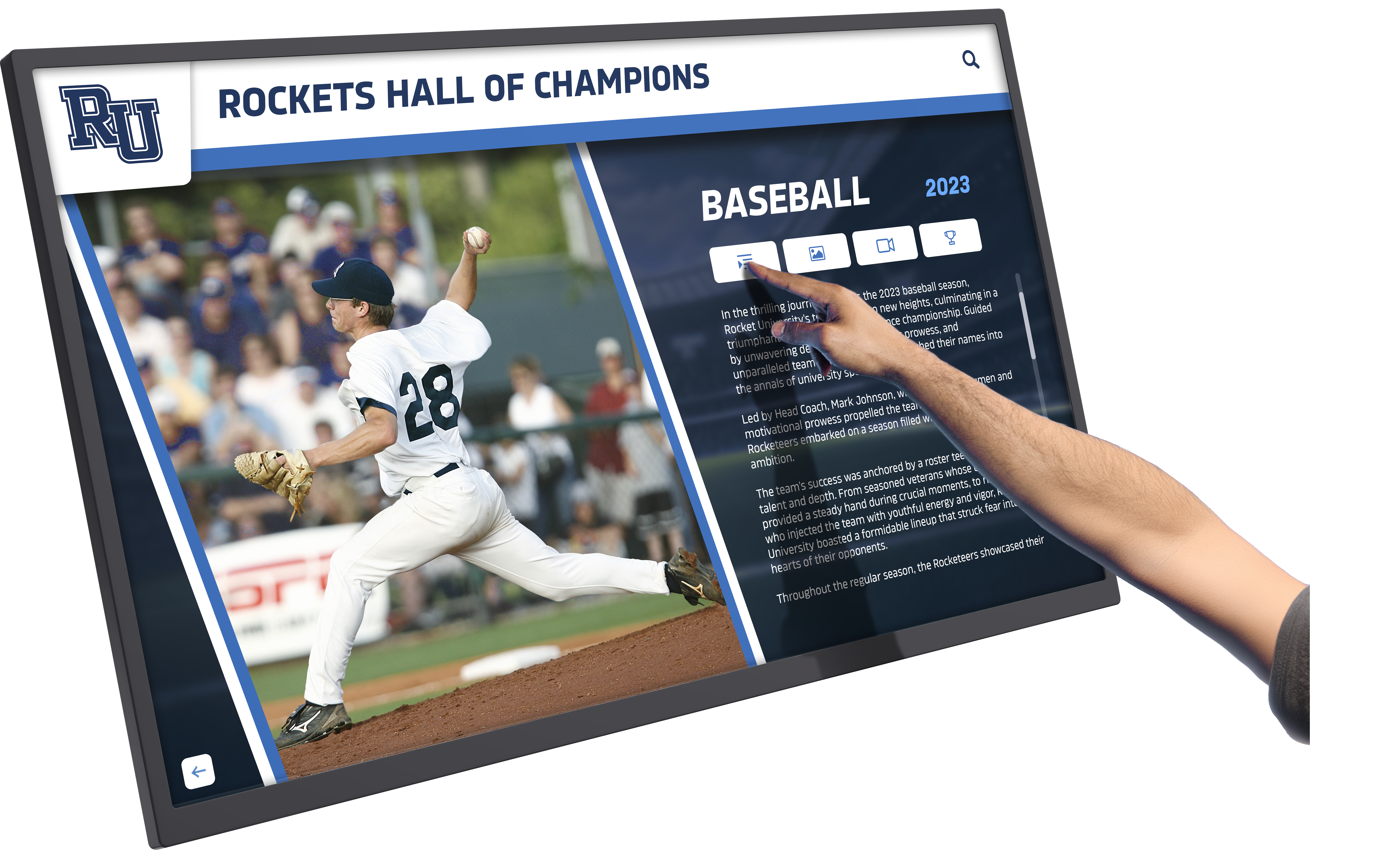
Touchscreen augmented reality displays extend interaction beyond physical kiosks by integrating mobile device access to identical content. Visitors explore at the touchscreen and then continue discovery on personal devices—reviewing athlete profiles at leisure, sharing achievements with family, or returning to content months later during reunions.
This augmentation occurs through several mechanisms:
QR Code Integration: Touchscreens display QR codes linking specific content to mobile browsers. Visitors scan codes to access individual athlete profiles, team rosters, or achievement categories directly on phones. This eliminates the need to replicate on-screen search on mobile devices—QR codes provide instant direct access to specific content discovered at the kiosk.
Web Portal Access: Complete touchscreen databases exist simultaneously as responsive websites accessible from any device anywhere. Alumni exploring achievements at homecoming can continue discovery from home. Parents at competitions can review records before arriving. Recruits can study program history remotely before campus visits.
Social Sharing Features: Mobile-accessible content enables social media sharing extending recognition reach exponentially. Alumni share their profiles with personal networks. Parents post athlete achievements to family groups. Current students celebrate teammates’ accomplishments across platforms. Each share amplifies recognition value and strengthens community connections.
Personal Device Continuity: The augmented reality aspect emerges from smooth transitions between physical and digital experiences. Visitors discover content on large touchscreens providing impactful first impressions, then continue exploration on familiar personal devices without barriers or separate logins. Physical and digital experiences blend naturally, extending engagement temporally and spatially beyond single kiosk visits.
Core Features of AR Touchscreen Recognition Systems
Effective touchscreen augmented reality displays for school recognition require specific capabilities optimizing both kiosk interaction and mobile access. Schools should prioritize these features when evaluating systems.
Intuitive Public Interface Design
Recognition touchscreens serve visitors unfamiliar with your school who need interfaces requiring no instruction. Large touch targets accommodate varying precision abilities. Clear visual hierarchy guides attention to primary navigation. Obvious search functionality enables finding specific content immediately.
Home screens should communicate available content within seconds. Prominent category tiles—All-State Athletes, Championship Teams, Academic Honors, Alumni Spotlights—show visitors what they can explore. Search bars with placeholder text (“Search by name, year, or sport”) clarify functionality without explanation. The best interfaces match consumer technology patterns visitors already understand from smartphones and tablets.
Automatic timeout features ensure displays return to home screens after periods of inactivity. This prevents kiosks from remaining on specific profiles when visitors finish, presenting clean starting points for next users. Configuration should balance timeout duration—long enough that users don’t experience interruption during legitimate exploration, but short enough that displays don’t remain dormant on interior screens.

Comprehensive Search and Discovery
Search functionality determines whether visitors successfully find personally relevant content. Recognition systems may contain thousands of profiles spanning decades. Without powerful search, this comprehensiveness becomes a liability—overwhelming content volumes preventing discovery rather than enabling it.
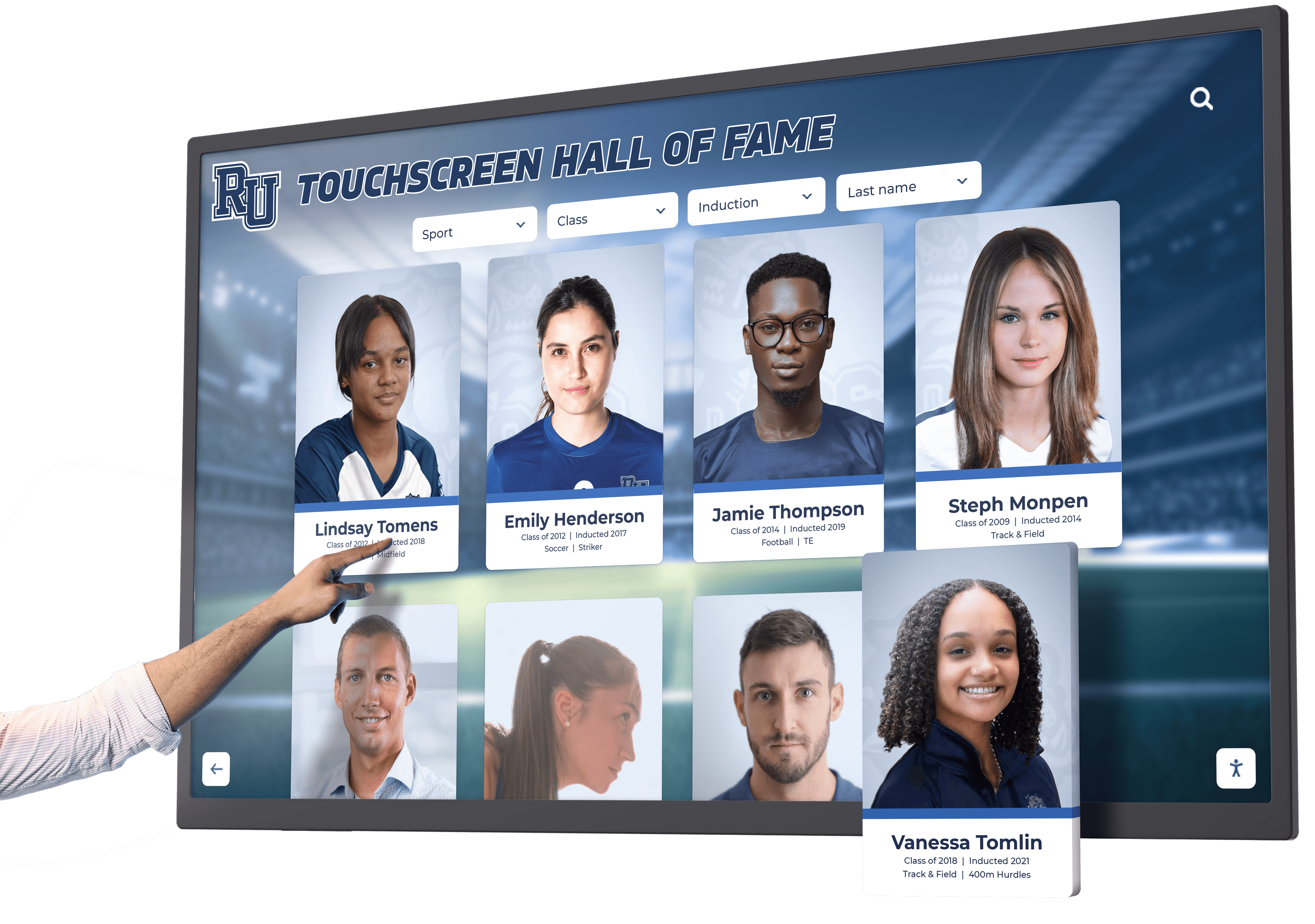

Name search represents the most common query type. Visitors search for themselves, classmates, family members, or specific notable athletes. Auto-complete functionality improves search success by suggesting matches as users type—reducing spelling errors and clarifying which “Mike Johnson” appears in results when multiple exist.
Year-based filtering narrows results to relevant time periods. Alumni seeking classmates select graduation years. Parents exploring current athletes filter to recent seasons. Historical researchers focus on specific decades. Effective systems combine name search with year filters—“Show me athletes named Johnson who competed in the 1990s.”
Category and sport organization enables browsing without specific search terms. Visitors exploring All-State selections or state championship teams navigate category tiles accessing grouped content. Sport-specific organization serves athletic facilities where visitors want to see all basketball records or track & field achievements regardless of athlete names.
Advanced systems include full-text search across complete profile content—finding mentions of specific coaches, opponent schools, competition venues, or achievement details within narrative descriptions. This deep search uncovers unexpected connections and enables research beyond simple name and category queries.
Unlimited Content Capacity
Recognition value depends entirely on comprehensive inclusion. Systems accommodating only “top” achievements or “recent” records inevitably exclude deserving individuals, undermining recognition’s core purpose—honoring excellence.
Digital recognition displays eliminate capacity constraints entirely. A single touchscreen can showcase detailed profiles for thousands of individuals—content requiring dozens of physical trophy cases or hundreds of wall plaques. This unlimited capacity enables schools to honor every All-State athlete, every championship team member, every academic achievement, and every notable accomplishment regardless of when it occurred.
Unlimited capacity transforms recognition philosophy from selective highlighting to comprehensive celebration. Schools stop choosing between achievements competing for limited space and instead preserve complete institutional memory. Every athlete who earned All-Conference recognition receives equal profile space. Every championship team from 1950 forward appears with complete rosters, photos, and season summaries. Every valedictorian, every perfect attendance record, every student achievement receives permanent digital recognition.
This comprehensiveness matters particularly for sports receiving less traditional attention. Basketball and football programs historically dominated physical recognition because their championships and stars justified trophy case space. Swimming, track, tennis, wrestling, and other programs often received minimal recognition despite producing state champions and record-setters. Digital capacity eliminates these inequities—every sport receives equal presentation regardless of spectator popularity.
Rich Multimedia Storytelling
Text-only profiles fail to capture achievement significance or create emotional connections. Comprehensive multimedia capabilities transform recognition from basic information display into engaging storytelling that inspires current students while honoring past excellence.
High-resolution photography creates immediate visual impact. Individual athlete portraits, team photos, action shots from competitions, and candid images from celebrations bring achievements to life. Multi-image galleries enable displaying athletes across their careers—freshman portraits through senior seasons, regular season photos through championship celebrations.
Video integration adds powerful storytelling dimensions impossible with static displays. Championship game highlights, athlete interviews, season recap videos, and historical footage create rich content capturing achievement contexts. A thirty-second video of a record-breaking high jump conveys drama and skill impossible to communicate through text descriptions or still photos.
Detailed narrative descriptions complement visual media by providing context, statistics, and recognition details. Well-written profiles describe achievement significance, competitive contexts, team contributions, and lasting impact. These narratives transform lists of accomplishments into compelling stories celebrating not just what athletes achieved but how they did it and what it meant to their teams and schools.
Document integration enables displaying award certificates, newspaper clippings, program covers, and historical materials preserving primary sources alongside modern digital content. Schools with extensive archives transform these materials from storage boxes into accessible historical resources through digitization and touchscreen presentation.
Cloud-Based Content Management
Athletic directors, activities coordinators, and administrative staff managing recognition content typically lack technical expertise. Cloud-based content management systems accessible from any device enable non-technical staff to confidently add achievements, upload media, and organize content without programming knowledge or IT department dependence.
Web-based administrative interfaces accessible through standard browsers eliminate software installation requirements. Authorized staff log in from office computers, home laptops, or tablets to manage content. This accessibility ensures content stays current—staff can add new achievements immediately after competitions rather than waiting for IT availability or physical plaque production.
Intuitive content creation workflows guide users through profile development with form-based templates. Fields prompt for essential information—athlete name, graduation year, sport, achievements, statistics. Drag-and-drop media uploading simplifies photo and video additions. Preview capabilities let content managers verify appearance before publishing.
Permission structures ensure appropriate access control. Athletic directors manage sports recognition. Activities coordinators handle academic achievements. Administrators maintain alumni content. Each role receives permissions matching responsibilities—creating content for their areas while viewing others’ contributions for coordination but lacking editing rights to prevent conflicts.
Version history and change tracking provide accountability and recovery options. If content accidentally gets deleted or incorrect edits occur, administrators can review change history and restore previous versions. This safety net encourages confident content management without fear that mistakes create permanent damage.
Applications for Schools and Athletic Facilities
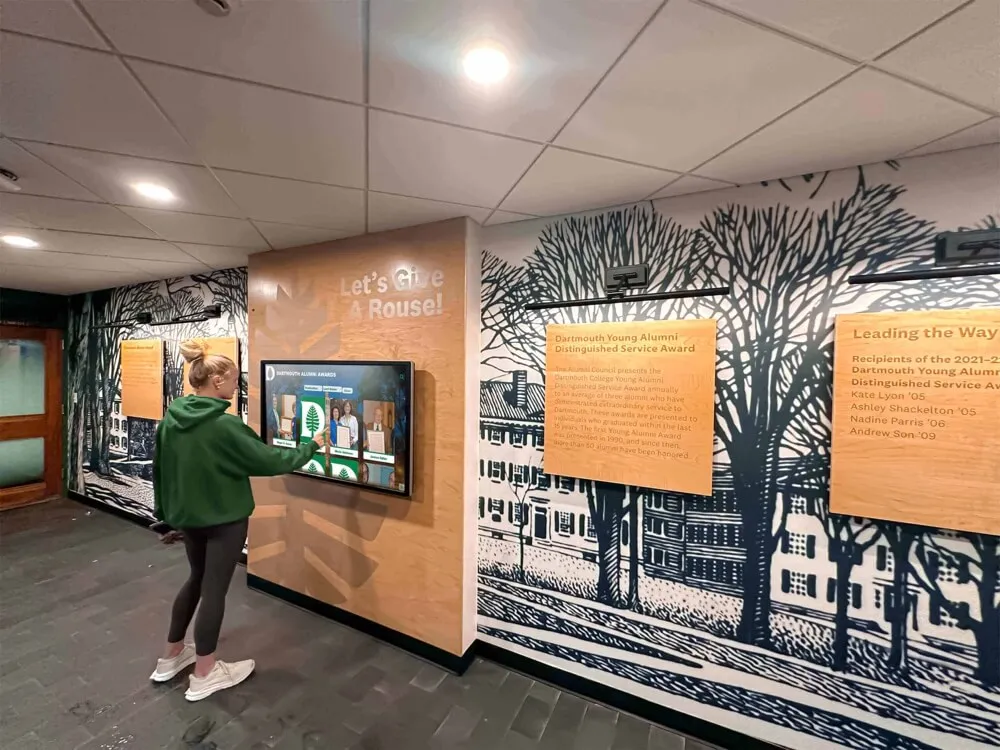
Touchscreen augmented reality displays serve multiple recognition and engagement purposes throughout schools and athletic facilities. Strategic placement maximizes impact and accessibility.
Building Entrance Recognition
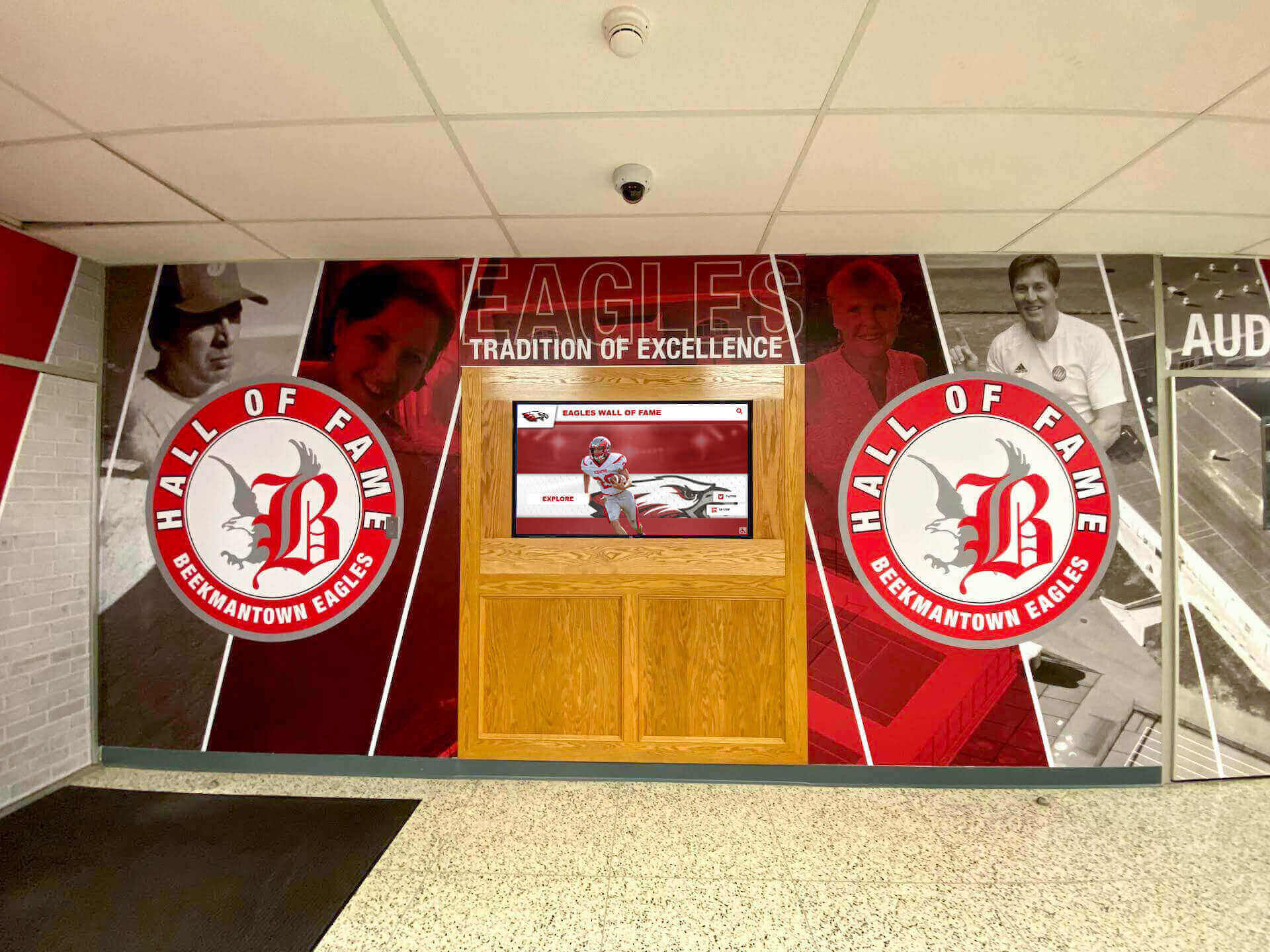
Entry locations provide maximum visibility capturing all visitors—prospective families evaluating schools, daily student traffic, event attendees, and community members. Entrance placement establishes recognition prominence and signals institutional pride immediately upon arrival.
Entrance touchscreens should showcase comprehensive institutional achievements spanning athletics, academics, arts, and activities. This breadth communicates well-rounded excellence rather than single-focus success. Prospective families exploring during admission tours see evidence of diverse opportunities. Alumni returning for events discover their achievements preserved regardless of activity type.
Physical kiosk placement at entrances creates powerful first impressions through size, professional presentation, and prominent positioning. However, entrance touchscreens must accommodate rapid traffic flows. During events, dozens of visitors may want to explore content simultaneously. QR codes enabling mobile access solve this bottleneck—individuals can quickly scan codes for later exploration rather than waiting for kiosk availability.
Athletic Facility Installations
Gymnasiums, field houses, and training facilities serve as natural locations for athletic recognition displays. Current athletes see displays during practice creating aspirational goals. Families view displays during competitions. Recruits explore achievements during facility tours. Alumni reconnect during events.
Athletic facility touchscreens should emphasize achievement depth within sports—individual records, championship teams, All-State selections, career statistical leaders. This focus creates competitive cultures where current athletes know exactly what records they chase and what achievements earn permanent recognition.
Record tracking represents particularly valuable athletic facility content. Digital displays showing all-time leaders in scoring, rebounds, tackles, times, distances, or sport-specific metrics create transparent competition. Athletes know where they rank, what records remain within reach, and whose achievements they attempt to surpass. This visibility motivates performance while honoring past excellence.
Auto-ranking capabilities ensure record boards stay current as performances evolve. When athletes break records, systems automatically update rankings reflecting new leaders. This eliminates manual maintenance while ensuring accuracy—current athletes receive immediate recognition for record-setting performances rather than waiting for physical plaque updates.
Championship team content creates powerful inspiration for current programs. Complete rosters showing every team member, season statistics, playoff results, and championship game details honor those teams comprehensively. Photos from title celebrations, video highlights from crucial games, and narrative descriptions capturing season significance preserve complete team stories rather than simply listing years and scores.
Commons Area and Hallway Displays
Locations where students gather daily—cafeterias, student centers, main hallways—provide extended viewing opportunities. Casual exploration during lunch or between classes creates repeated exposure building familiarity with content and encouraging discovery.
Commons area displays should feature content relevant to current students—recent championships, current record holders, classmates’ achievements. This currency creates personal connections. Students discover friends’ accomplishments. Athletes see teammates recognized. Academic achievers find their honors displayed alongside athletic excellence.
Historical content remains valuable in commons locations but should balance with contemporary achievements. Displays emphasizing only past glory risk alienating current students who seek their own generation’s recognition. Effective systems showcase recent achievements prominently while maintaining historical context through search and category navigation enabling interested visitors to explore decades of institutional memory.
Hallway displays benefit from portrait orientation matching wall space constraints. Vertical touchscreen configurations fit between lockers and doorways where horizontal screens would overwhelm narrow corridors. Many athletic recognition displays use portrait orientation effectively, presenting content naturally in vertical scrolling formats matching smartphone conventions students know intuitively.
Specialized Recognition Spaces
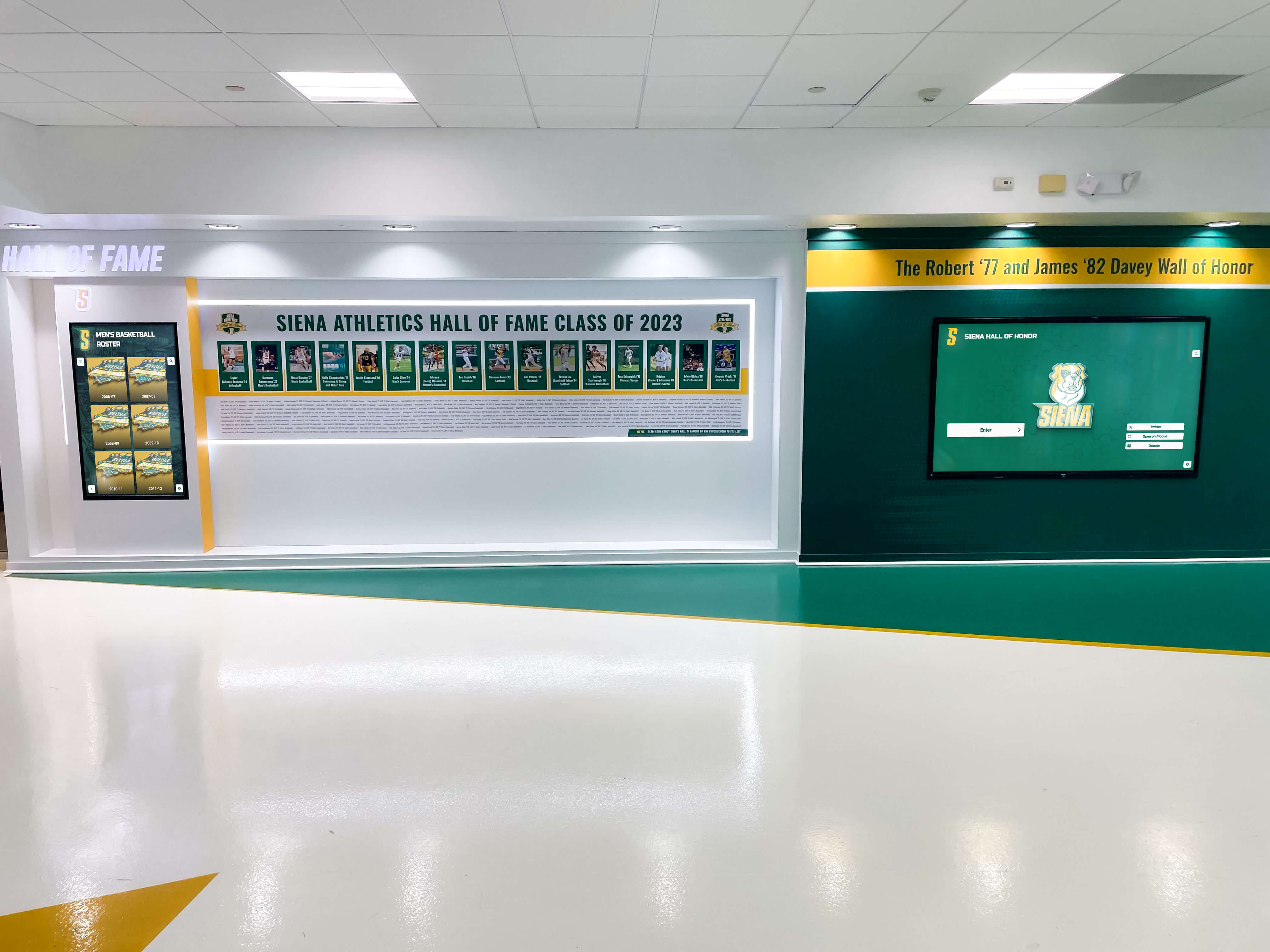
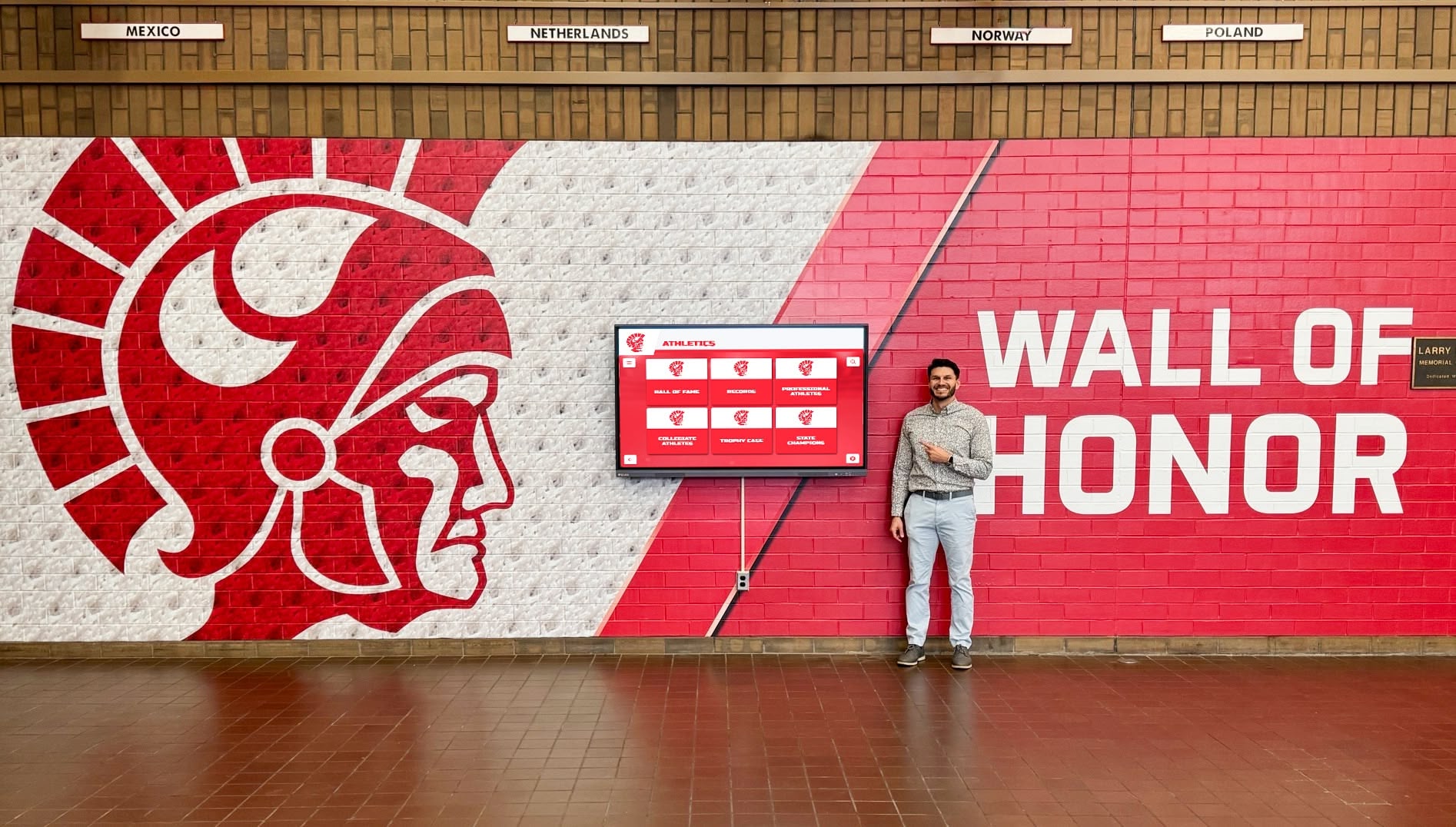
Some schools create dedicated recognition areas functioning as institutional museums or halls of fame. These spaces combine touchscreen technology with physical memorabilia, creating immersive environments celebrating history and achievement comprehensively.
Dedicated recognition spaces enable extensive content presentation impossible in high-traffic hallways. Multiple touchscreens serve different content categories—athletics, academics, arts, alumni. Physical displays showcase championship trophies, game balls, uniforms, and historical artifacts. Wall murals provide visual impact and branding. Seating areas enable extended exploration.
These specialized spaces serve particular audiences effectively. Alumni returning for reunions spend significant time exploring classmates’ achievements and recalling shared experiences. Prospective families receive guided tours through recognition spaces learning about school culture and opportunity. Advancement staff bring potential donors through spaces demonstrating institutional excellence and celebrating giving impact through donor recognition integration.
Technical Implementation Considerations
Successful touchscreen augmented reality display deployment requires addressing both hardware selection and software platform integration. Schools should evaluate these technical dimensions carefully to ensure long-term satisfaction.
Hardware Selection for Recognition Applications
Recognition displays don’t require all the educational features built into classroom interactive panels. This allows schools to optimize investments by selecting displays specifically suited for public recognition rather than overpaying for unnecessary classroom capabilities.
Display Size and Resolution: Screen size should match viewing distances and traffic patterns. Hallway installations with 6-10 foot viewing distances work well with 55-65 inch displays. Lobby installations in larger open spaces benefit from 70-75 inch screens readable from greater distances. Athletic facilities with viewing from across gymnasiums may warrant 75-86 inch displays.
Resolution must support crisp text readability and high-quality image presentation. 4K displays (3840 x 2160 pixels) represent current standards providing excellent clarity. Higher resolutions offer minimal recognition value since visitors view from several feet away rather than close reading distances requiring maximum text sharpness.
Touch Technology: Capacitive multi-touch technology provides responsive, accurate interaction matching smartphone experiences visitors know intuitively. Commercial-grade touch overlays withstand years of public use without degradation. Avoid resistive touch technology found on older systems—these require harder pressure and feel outdated compared to modern consumer device expectations.
Touch responsiveness should feel immediate with minimal latency between tap and on-screen response. Systems with noticeable lag create frustrating experiences discouraging exploration. Quality touchscreens respond within 10-15 milliseconds matching smartphone performance.
Commercial vs Consumer Displays: Purpose-built commercial displays designed for 16+ hour daily operation provide reliability consumer televisions cannot match. Commercial displays include heavy-duty power supplies, enhanced cooling systems, and reinforced mounting points supporting permanent installations. They lack consumer television features schools don’t need—built-in tuners, smart TV platforms, multiple video processing modes—focusing instead on core display and touch functionality.
Consumer televisions may appear attractive due to lower initial costs, but they lack durability for continuous public use. Backlights designed for residential viewing fail under constant operation. Power supplies overheat during extended use. Warranties exclude commercial applications. The apparent cost savings disappear through premature failures and replacement expenses.
Mounting and Installation: Wall-mounted displays create clean, modern appearances saving floor space while positioning screens at optimal viewing heights. Wall mounting requires adequate structural support—commercial displays weigh 60-100+ pounds depending on size. Mounting to drywall without proper backing proves inadequate; installations must anchor to studs or reinforced mounting plates.
Freestanding kiosks offer placement flexibility enabling repositioning as needs evolve. Kiosk enclosures provide professional appearances while housing computing components, cable management, and structural support. Some kiosks include lockable bases securing displays and preventing tampering. Kiosk solutions work particularly well for spaces where wall mounting proves impractical due to architectural constraints or future remodeling uncertainty.
Computing and Connectivity Requirements
Touchscreen displays require connected computing to drive interactive content. Several approaches serve recognition applications depending on technical preferences and existing infrastructure.
Integrated Computing: Some commercial touchscreens include built-in computing modules running Android or Windows operating systems. These integrated solutions simplify installations by eliminating separate computer requirements. Built-in computing works adequately for many recognition applications, though it may limit customization compared to external computer options.
Mini PC Solutions: Small form factor computers (NUC-style mini PCs) provide capable performance while remaining hidden behind displays or within kiosk enclosures. Modern mini PCs offer sufficient processing power for smooth touchscreen recognition applications while consuming minimal power and producing little heat. This approach provides flexibility—schools can upgrade computing independently from displays as needs evolve.
Network Connectivity: Recognition displays require network access for content updates and cloud platform communication. Wired Ethernet provides optimal reliability and performance. Wireless connectivity works acceptably in locations where running Ethernet cables proves difficult or expensive, though wired connections reduce potential connectivity problems.
Power considerations often get overlooked during planning. Displays, computers, and networking equipment all require power. Installation locations must provide accessible power outlets, ideally on dedicated circuits preventing overload when displays operate continuously. Battery backup (UPS) systems protect against data corruption and graceful shutdown during power interruptions.

Software Platform Evaluation
Hardware provides the interface; software determines the experience. Schools should evaluate recognition software platforms based on capabilities directly impacting long-term value and user satisfaction.
Content Management Accessibility
Recognition platforms succeed or fail based on whether non-technical staff can confidently manage content without constant IT support. Cloud-based systems accessible through web browsers enable athletic directors, activities coordinators, and administrators to maintain current content independently.
Look for intuitive administrative interfaces with form-based content creation guiding users through profile development. Drag-and-drop media uploading should accept common image and video formats without requiring file conversion. Preview capabilities let content managers verify appearance before publishing. Auto-save functionality prevents content loss during creation.
Template systems speed content creation by providing pre-formatted layouts. Rather than designing each profile from scratch, managers select templates, fill in specific information, and publish. Templates ensure consistent professional appearance while simplifying content development for staff managing hundreds or thousands of profiles.
Bulk import capabilities matter for schools digitizing extensive historical content. Systems should support spreadsheet uploads creating multiple profiles simultaneously from structured data. This bulk creation dramatically reduces time requirements when launching new displays with decades of historical achievements.
Search and Discovery Capabilities
Recognition value depends entirely on visitors successfully finding personally relevant content. Platforms must provide powerful search functionality accommodating various query types visitors use naturally.
Name search with auto-complete represents baseline functionality. As users type, systems should suggest matching profiles helping visitors find correct individuals when names include common spellings or multiple people share similar names.
Advanced filtering enables narrowing results by year, sport, achievement type, or custom categories. Visitors exploring “All-State basketball players from the 1990s” combine filters finding specific subsets within comprehensive databases containing thousands of total profiles.
Related content recommendations encourage extended exploration. When viewing individual athlete profiles, systems should suggest teammates, competitors from the same era, or others with similar achievements. These recommendations create browsing pathways keeping visitors engaged beyond initial queries.
Full-text search across complete profile content finds mentions within narrative descriptions, achievement details, and statistics. This deep search enables research-style queries—“Which athletes competed at the state championships at the University Dome?"—finding answers embedded in profile narratives even when those details don’t appear in primary search fields.
Mobile Access and Responsive Design
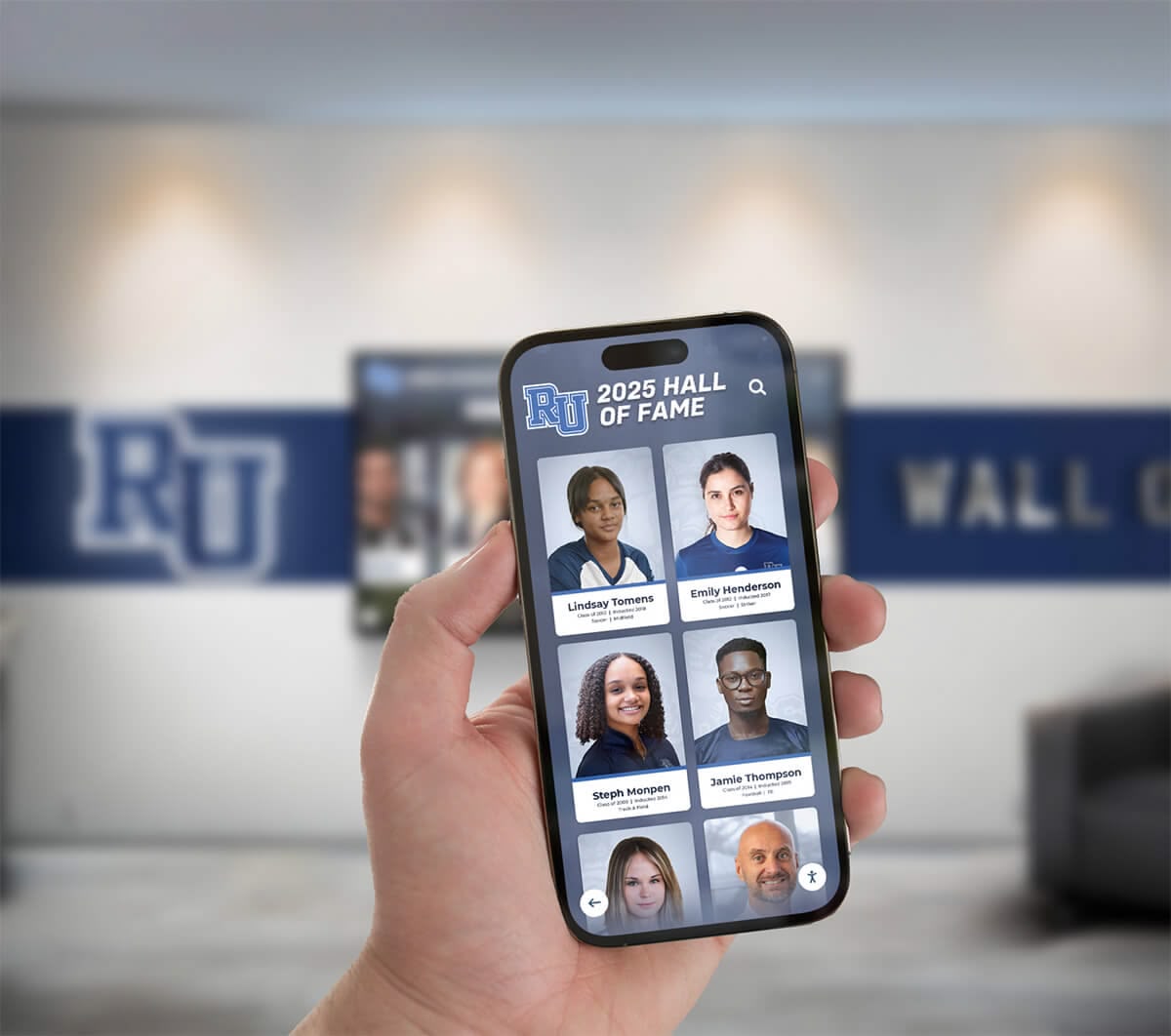
Touchscreen augmented reality displays deliver value beyond physical kiosks through mobile access enabling exploration from personal devices. Web-based platforms with responsive designs function seamlessly on smartphones, tablets, laptops, and desktop computers without requiring separate mobile apps.
Mobile access extends recognition temporally and geographically. Alumni anywhere can explore achievements anytime—at home, during travels, or while reminiscing with former classmates. Parents can preview athlete profiles before games. Recruits can study program history remotely before campus visits. This extended access amplifies recognition value exponentially compared to kiosk-only systems limiting engagement to physical presence.
QR code integration provides bridges between physical and digital experiences. Touchscreens display QR codes linking specific content to mobile devices. Visitors discovering interesting profiles scan codes to save links for later review. This capability prevents bottlenecks when multiple visitors want to explore content simultaneously—individuals quickly capture links rather than waiting for kiosk availability or trying to remember specific search terms for later mobile access.
Social sharing features extend recognition reach through personal networks. Mobile-accessible content enables sharing via text, email, and social media. Alumni share their profiles with family and friends. Parents post athlete achievements to community groups. Each share amplifies recognition value while marketing school excellence to extended networks.
Analytics and Engagement Insights
Data on how visitors use recognition displays provides valuable insights informing content priorities and measuring impact. Platform analytics should track search queries, most-viewed content, session duration, and traffic patterns.
Search query analysis reveals what content visitors seek. If searches for specific sports or achievement types receive high volume, schools can prioritize expanding content in those areas. Common searches returning no results identify gaps—missing athletes or achievements visitors expect to find.
Most-viewed content data shows what profiles attract attention. These insights help schools understand which achievements resonate most strongly with audiences. High view counts might reflect recent relevance, historical significance, or individual popularity. Schools can study highly viewed content identifying characteristics worth replicating in other profiles.
Session duration and interaction depth indicate engagement levels. Extended sessions with multiple searches and profile views suggest compelling content and intuitive navigation. Brief sessions might indicate usability problems, uninteresting content, or difficult navigation requiring improvement.
Traffic pattern analysis shows when visitors use displays most heavily. Schools can correlate traffic spikes with events—competitions, reunions, admission tours—understanding how recognition displays support these occasions. Traffic data also reveals whether displays receive casual daily use or primarily serve special event audiences.
Cost Considerations and Budget Planning
Touchscreen augmented reality display investments require careful financial planning addressing both initial implementation and ongoing operational costs. Understanding complete lifecycle expenses enables realistic budgeting and accurate value assessment.
Initial Investment Components
Complete touchscreen recognition systems include multiple cost components beyond display hardware:
Hardware Costs: Commercial touchscreen displays suitable for recognition applications typically cost $3,000-$8,000 depending on size, with 55-65 inch displays ranging $3,000-$5,000 and larger 70-75 inch screens reaching $6,000-$8,000. Computing components add $500-$1,200. Mounting hardware or kiosk enclosures contribute $500-$3,000 depending on installation approach and customization.
Software Platform Licensing: Recognition-specific software platforms charge initial setup fees and ongoing subscriptions. Implementation costs covering system configuration, template customization, and initial training typically range $5,000-$15,000. Monthly or annual subscription fees supporting cloud hosting, software updates, and technical support vary by platform and institution size—expect $200-$800 monthly for comprehensive platforms.
Installation and Integration: Professional installation ensures proper mounting, power, networking, and configuration. Installation costs vary dramatically based on facility readiness—simple installations in prepared spaces with existing power and network access might cost $1,000-$2,000, while complex installations requiring electrical work, network drops, or structural reinforcement can reach $5,000-$10,000.
Content Development: Initial content creation represents substantial effort. Schools with organized historical records and digital photo libraries can self-develop content with reasonable time investment. Those with extensive physical archives requiring digitization might engage professional services—scanning historical photos, organizing materials, and creating initial profile databases. Professional content development costs vary based on scope—expect $5,000-$25,000 for comprehensive historical content digitization and profile creation.
Training and Support: Staff training ensures confident content management. Initial training typically includes in implementation costs, though some platforms charge for extended training or ongoing support beyond basic technical assistance.
Total system costs for single installations typically range $15,000-$35,000 including hardware, software, installation, and basic content development. Schools deploying multiple displays benefit from shared software costs—additional installations add primarily hardware and installation expenses ($8,000-$15,000 per additional location) while software licensing covers all displays.
Ongoing Operational Costs
Beyond initial implementation, schools should budget for ongoing operational expenses:
Software Subscriptions: Recognition platforms charge recurring fees supporting cloud hosting, software updates, security patches, and technical support. These subscriptions typically cost $2,400-$9,600 annually depending on platform sophistication and included support levels.
Content Maintenance: Staff time maintaining current content represents ongoing operational cost. Adding new achievements, updating photos, and expanding historical content requires consistent effort. Most schools assign these responsibilities to existing athletic directors, activities coordinators, or administrative staff as extensions of current duties rather than creating dedicated positions.
Hardware Maintenance: Commercial displays operate reliably for years with minimal maintenance. Occasional cleaning maintains appearance. Rare component failures might require professional service—budget conservatively for potential repairs. Extended warranties available with many commercial displays provide defined service costs eliminating uncertainty.
Electrical Costs: Touchscreen displays consume 150-300 watts during operation depending on size and brightness settings. Annual electrical costs typically reach $75-$150 per display at average commercial electricity rates—minimal expense compared to overall operational budgets.
Return on Investment Analysis
Quantifying touchscreen recognition display ROI proves challenging because primary benefits—comprehensive achievement celebration, community pride, alumni engagement—resist simple financial measurement. However, several frameworks help evaluate value:
Replacement Value Comparison: Consider what schools would spend achieving similar recognition through traditional methods. Adding one champion team plaque costs $200-$500. Fifty plaques over ten years cost $10,000-$25,000 while accommodating only fifty achievements. Digital systems display unlimited achievements for similar initial investment plus modest subscriptions.
Space Value Recovery: Trophy cases and wall displays consume valuable space. A single touchscreen replacing six trophy cases recovers 150-200 square feet of floor space. Schools can repurpose this space for functional uses or reduce required facility square footage during renovations. Real estate and construction costs vary tremendously, but recovered space holds tangible value.
Advancement Impact: Recognition displays supporting advancement objectives create measurable value through donor cultivation and alumni engagement. While difficult to attribute specific giving directly to recognition displays, advancement professionals consistently identify recognition as important relationship-building tool. Quantifying this impact requires tracking advancement metrics before and after implementation.
Recruitment Value: Athletic programs use recognition displays as recruiting tools displaying program history and achievement culture to prospective student-athletes. Coaches report displays provide talking points differentiating programs. Admissions offices include displays on campus tours presenting evidence of institutional excellence. These applications create value through enrollment impact, though isolating specific attribution proves difficult.

Implementation Best Practices
Schools implementing touchscreen augmented reality displays benefit from systematic approaches addressing both technical and organizational dimensions. These best practices reduce implementation friction and increase long-term satisfaction.
Assessment and Planning Phase
Begin implementation by clearly defining objectives. What problems are you solving—space constraints, recognition capacity, historical preservation, alumni engagement? Who will manage content ongoing—athletic directors, activities coordinators, IT staff? What budget constraints and timeframes exist?
Conduct stakeholder engagement early. Athletic directors provide input on sports recognition priorities. Activities coordinators identify academic achievement and non-athletic recognition needs. IT departments assess technical infrastructure and support capabilities. Administration provides budget guidance and approves expenditures. Facilities managers coordinate installation logistics.
Document current recognition approaches and their limitations. Photograph existing trophy cases, plaques, and banners. Count how many achievements receive recognition and estimate how many deserving accomplishments lack visible celebration due to space constraints. This baseline documentation justifies investment by quantifying problems solutions address.
Technical Infrastructure Preparation
Evaluate facilities before purchasing equipment. Confirm adequate network connectivity exists or plan network infrastructure additions. Verify power availability at proposed installation locations. Assess structural support for wall-mounted displays or confirm floor space for kiosk installations.
Security requirements deserve attention during planning. Recognition displays need kiosk lockdown configurations preventing unauthorized system access while allowing appropriate touchscreen interaction. Content management systems require authentication and permission structures. Consider whether displays should operate continuously or on automated schedules powering down overnight.
ADA accessibility compliance matters legally and morally. Install displays at appropriate heights enabling wheelchair users to reach touch controls. Ensure sufficient clear space around displays for maneuvering. Evaluate whether screen brightness and contrast accommodate visual impairments. Consider whether audio features benefit visitors with low vision.
Content Development Strategy
Systematic content development ensures comprehensive achievement coverage without overwhelming initial implementation. Begin with well-documented recent achievements from the past 5-10 years where digital photos and records exist. This recent content proves easiest to develop and holds greatest relevance for current students and families.
Systematically expand backward through historical content as time permits. Engage alumni, community members, and local historians contributing historical materials and memories. Historical content requires more effort as photo quality declines, documentation becomes sparse, and living memory fades. Accepting that historical content development continues over years rather than completing before launch prevents delays while ensuring systems launch with meaningful content.
Establish sustainable processes for ongoing additions. Define who adds new achievements after competitions, when additions occur, and what approval processes apply. These processes ensure content stays current without requiring heroic efforts during busy seasons.
Consider engaging students in content development as authentic learning experiences. Student photographers document events. Technology students assist with photo editing and profile creation. History students research archival materials. This engagement develops skills while distributing content development workload.
Professional Photography Standards
Photo quality dramatically affects recognition impact. Establish consistent standards for trophy documentation, achievement photography, and portrait requirements. Well-lit, properly composed photos create professional presentations. Poor quality photos undermine recognition value regardless of technical platform sophistication.
For historical materials, professional scanning preserves aging photographs and documents digitally. Consumer-grade scanning works adequately for recent materials in good condition. Historical photos requiring careful handling benefit from professional digitization services with specialized equipment and preservation expertise.
Standard portrait backgrounds and compositions create consistent aesthetics across hundreds of profiles. Schools might establish photo days where all recognized athletes receive professional portraits using identical setups. This standardization builds brand identity and elevates overall presentation quality.
Training and Support Systems
Comprehensive training ensures all users can confidently operate systems matching their roles. Content managers need training on profile creation, media uploading, category organization, and publishing workflows. Athletic directors require sport-specific content management training. IT staff need technical maintenance and troubleshooting training addressing networking, hardware issues, and platform administration.
Create documentation libraries with step-by-step procedures for common tasks—adding new athlete profiles, uploading photos, organizing categories, searching content. Video tutorials proving particularly effective for visual learners. Documentation enables staff to reference procedures independently rather than requesting repeated IT support.
Establish clear support procedures defining who handles different issue types. IT departments might manage networking and hardware problems. Platform vendors provide software support. Content questions might route to experienced content managers. Clear support paths prevent confusion when issues arise.
Schedule regular check-ins ensuring systems meet needs and identifying improvement opportunities. Quarterly reviews with content managers surface usability challenges and feature requests. Annual reviews assess whether platforms continue meeting needs as requirements evolve. Regular evaluation prevents gradual dissatisfaction from unaddressed small problems accumulating into major concerns.
Integration with Broader School Systems
Touchscreen augmented reality displays deliver maximum value when integrated thoughtfully with broader school technology and communication systems rather than functioning as isolated standalone installations.
Website and Digital Communications Integration
Recognition platforms with web portals should integrate with school websites providing smooth navigation between marketing content and achievement databases. Link website athletic program pages to sport-specific recognition content. Connect alumni pages to alumni spotlights and class profiles. Embed recent achievement highlights on homepages displaying current success.
Social media integration extends recognition reach dramatically. Configure platforms to generate social-ready content when publishing new profiles—automatically formatted posts with photos and achievement summaries ready to share across school social channels. Enable staff to easily share individual profiles celebrating specific athletes or teams at relevant moments—championship wins, recruitment announcements, or milestone achievements.
Email communications can incorporate recognition content through automated digests highlighting recently added profiles or featuring historical achievements tied to current dates—“On this date twenty years ago, the 2005 championship basketball team captured the state title.” These communications maintain engagement with recognition content between physical visits.
Student Information System Connections
Advanced implementations integrate recognition platforms with student information systems automatically populating basic profile information—names, graduation years, photos. This integration reduces manual data entry while ensuring accuracy and consistency between systems.
Athletic management software integrations can automatically feed statistics, rosters, and results into recognition platforms. When season statistics finalize, they flow directly to athlete profiles without manual re-entry. Championship team rosters automatically generate profiles for all team members. This automation ensures currency while reducing content management workload.
Academic achievement integrations pull honor roll designations, academic awards, and graduation honors into recognition platforms automatically. These connections ensure academic excellence receives equal technological recognition as athletics rather than requiring parallel manual processes.
Advancement and Alumni Relations Systems
Development databases track giving history, alumni engagement, and relationship management. Integrating recognition platforms with advancement systems creates powerful donor stewardship tools. Donors can view recognition displays celebrating their giving impact. Alumni profiles can link to advancement portals encouraging continued engagement.
Advancement professionals use recognition displays during donor meetings demonstrating institutional excellence and celebrating giving impact through integrated donor walls. These applications position recognition technology as advancement tools rather than solely athletic or student-focused systems, potentially shifting budget responsibility and expanding implementation justification.
Alumni relations benefits from digital recognition access enabling worldwide engagement. Alumni anywhere can explore achievements, search classmates, and share memories. This access maintains connections across geography and time, supporting alumni relations objectives while delivering recognition value.
Future Trends in AR Touchscreen Recognition
Touchscreen augmented reality display technology continues evolving with emerging capabilities enhancing both kiosk and mobile experiences. Schools implementing systems today should consider future trajectories informing platform selection and ensuring long-term relevance.
Artificial Intelligence Integration
AI capabilities will enable increasingly sophisticated features transforming static databases into intelligent systems understanding context and personalizing experiences. Natural language search will interpret conversational queries—“Show me basketball players from the 1990s who scored over 1,000 points”—finding relevant profiles without requiring users to master specific search syntax or category navigation.
Automated content recommendations based on viewing patterns will suggest related profiles visitors might find interesting. Someone viewing a 2015 championship team might receive recommendations for other championship teams from similar eras or individual profiles of that team’s standout players. These intelligent recommendations encourage extended exploration beyond initial queries.
AI-assisted content generation might assist with profile creation by suggesting achievement descriptions based on statistics, generating narrative summaries from structured data, or recommending appropriate achievement categories. These tools won’t replace human content management but could speed profile development while maintaining quality and consistency.
Voice interaction will support hands-free exploration particularly valuable for accessibility and multi-tasking scenarios. Visitors might speak queries rather than typing, particularly useful when juggling bags or phones. Voice output could read profile content for visitors with visual impairments, ensuring inclusive access.
Enhanced Mobile Experiences
Mobile applications will increasingly blur lines between physical kiosk and personal device experiences. Progressive web applications providing app-like experiences without requiring separate app downloads or store listings will deliver notification capabilities, offline content access, and home screen integration while maintaining web’s universal accessibility.
Augmented reality views through mobile devices might overlay historical context onto current facilities—showing photos of championship celebrations in locations where they occurred, displaying historical timeline information at relevant physical spaces, or enabling virtual trophy case exploration where physical cases once stood. These AR extensions will make historical content contextually relevant to physical spaces.
Location-based mobile experiences might deliver personalized content based on where visitors stand. Walking past specific athletic facilities triggers relevant achievement notifications. Entering buildings presents their historical significance. These location-aware experiences blend physical and digital without requiring conscious interaction.
Improved Accessibility Features
Universal design principles will advance ensuring touchscreen systems serve all students and community members effectively. Enhanced text-to-speech with natural voice synthesis will read profile content audibly. Improved visual accommodation will include high-contrast modes, adjustable text sizing, and color blindness-friendly palettes. Better motor accommodation will offer alternative interaction methods for visitors with limited dexterity—voice control, simplified interfaces, or extended timeout periods preventing premature resets.
Multilingual support will serve increasingly diverse school communities. Recognition platforms might offer content translation enabling exploration in visitors’ preferred languages. These translations could be AI-assisted while maintaining human oversight ensuring quality and cultural appropriateness.
Sustainable Technology Solutions
Platform maturation and increased competition continue improving price-performance ratios making quality touchscreen systems increasingly affordable for schools of all sizes. Cloud-based platforms eliminate server infrastructure requirements schools would otherwise purchase and maintain. Longer hardware operational lifespans reduce replacement frequency. Energy-efficient displays reduce electrical costs.
Software-as-a-service models distribute costs over time rather than requiring large upfront expenditures. This financial structure aligns better with school budgeting processes and enables smaller schools to implement sophisticated systems previously accessible only to well-funded institutions.
Making Informed AR Touchscreen Display Decisions
Touchscreen augmented reality displays represent substantial investments requiring careful evaluation ensuring selected solutions match institutional needs and deliver long-term value. Schools should prioritize several key decision factors.
Prioritize Recognition-Specific Platforms
Generic digital signage software can display content on touchscreens, but effective recognition requires specialized platforms designed specifically for achievement celebration and interactive exploration. Recognition platforms emphasize intuitive public interaction, comprehensive search, unlimited profile capacity, and mobile access—capabilities rarely found in general-purpose digital signage solutions.
Avoid the temptation to implement classroom interactive displays for hallway recognition. Classroom panels optimize for instructional software and lesson delivery—priorities misaligned with public recognition requiring different interfaces, content structures, and interaction patterns. Purpose-built recognition platforms combined with appropriate commercial displays deliver superior value for achievement celebration compared to repurposing educational technology.
Evaluate Total Ownership Costs
Initial hardware costs represent only part of touchscreen display investments. Software subscriptions, content development, installation, training, and ongoing support contribute substantially to total lifecycle expenses. Comparing options requires evaluating complete costs over expected system lifespans—typically 7-10 years for hardware and indefinite for well-maintained content.
Lower initial costs sometimes indicate missing capabilities or hidden expenses. Platforms charging minimal subscriptions might lack content management features requiring expensive custom development. “Free” software might lack support leaving schools struggling with technical problems. Comprehensive evaluation prevents unexpected costs discovered after commitments.
Consider Implementation Support
Technical capabilities vary dramatically between schools. Some have strong IT departments capable of managing complex implementations. Others have limited technical staff needing extensive vendor support. Platform selection should match institutional support capabilities—sophisticated schools might self-implement, while those with limited IT capacity need comprehensive vendor support including installation, configuration, training, and ongoing assistance.
Vendor stability and longevity matter for platforms requiring ongoing subscriptions and support. Established vendors with proven track records provide confidence in long-term viability. Newer vendors might offer attractive features and pricing but carry higher risk if business models prove unsustainable. Due diligence investigating vendor financial stability, customer references, and market presence protects against investing in platforms that may not exist in five years.
Plan for Phased Implementation
Schools need not implement comprehensive recognition systems immediately. Phased approaches enable starting smaller and expanding over time as budgets permit and experience grows. Initial implementations might focus on recent athletic achievements in single sports. Subsequent phases expand to additional sports, academic recognition, and historical content development.
This phased strategy delivers value immediately through operational displays while distributing costs and effort over multiple budget cycles. Early phase experiences inform later expansion decisions—lessons learned during initial implementation improve subsequent installations. Staff develop content management skills gradually rather than facing overwhelming immediate responsibilities.
Engage Stakeholders Throughout Processes
Implementation success depends on buy-in from staff who will manage content and students/alumni who will explore it. Involve athletic directors, activities coordinators, and content managers in platform selection ensuring chosen solutions match their workflows and capabilities. Solicit student input on design preferences and content priorities. Engage alumni asking what content they would explore.
This engagement builds ownership and enthusiasm. Staff who participated in selection decisions become implementation champions. Students who contributed ideas take pride in results. Alumni who shared historical materials maintain interest in ongoing content development. Broad engagement transforms projects from “IT initiatives” into “community efforts.”
Key Selection Criteria Summary
When evaluating touchscreen augmented reality displays for school recognition, prioritize:
For User Experience:
- Intuitive public interfaces requiring no instruction
- Powerful search accommodating name, year, category, and full-text queries
- Mobile access through responsive web portals accessible from any device
- QR code integration bridging physical and digital experiences
- Social sharing features extending recognition through personal networks
For Content Management:
- Cloud-based administration accessible from any device without software installation
- Intuitive content creation with form-based templates guiding profile development
- Drag-and-drop media uploading supporting common file formats
- Permission structures ensuring appropriate access control
- Bulk import capabilities accelerating historical content development
For Technical Implementation:
- Commercial-grade touchscreen displays designed for continuous operation
- Appropriate sizing matching viewing distances and space constraints
- Reliable computing and network connectivity supporting cloud platforms
- Professional installation ensuring proper mounting, power, and configuration
- Ongoing technical support addressing problems as they arise
For Long-Term Value:
- Unlimited content capacity accommodating comprehensive achievement inclusion
- Platform flexibility supporting evolving recognition priorities
- Vendor stability ensuring long-term platform viability
- Scalability enabling expansion across multiple locations
- Analytics providing insights into visitor engagement and content effectiveness
Touchscreen augmented reality displays transform recognition from space-constrained, static approaches into comprehensive, engaging systems honoring every achievement while building community pride and preserving institutional memory. Schools ready to eliminate recognition capacity limitations can explore how specialized touchscreen platforms create displays celebrating unlimited student success while maintaining historical context and enabling worldwide alumni access.
The question isn’t whether schools should implement touchscreen recognition technology, but rather which platform best matches institutional needs, budget constraints, and long-term objectives. By carefully evaluating options through frameworks outlined in this guide, schools can confidently select solutions delivering maximum recognition value while honoring past excellence and celebrating current achievement comprehensively.
Ready to transform how your school celebrates achievement while preserving complete institutional memory? Schedule a demo to explore how purpose-built touchscreen augmented reality platforms specifically designed for schools create engaging recognition experiences serving entire communities through both physical kiosks and worldwide web access.































