




Athletic directors researching digital recognition systems often assume competitive quotes include deployment across their entire network of displays—lobby screens, gym kiosks, cafeteria monitors, and athletic wing touchscreens all running from a single licensing agreement. This assumption proves expensive when purchase orders reveal the truth: most digital signage vendors charge additional fees for every screen beyond the first, turning what appeared to be a $5,000 annual investment into a $15,000 recurring bill once you count the gym, main entrance, and commons area displays separately.
Schools planning comprehensive recognition networks—separate content on weight room leaderboards, all-sport halls of fame in main lobbies, and championship displays in competition venues—discover that “multi-screen setups” trigger licensing multipliers, hardware fees, or content management surcharges that vendors buried in footnotes or introduced during implementation. Large districts coordinating displays across multiple buildings face particularly aggressive pricing when competitors realize the scope of deployment, with per-building or per-campus fees compounding into budget-breaking totals.
This guide exposes the hidden costs embedded in multi-screen digital signage deployments, explains why Rocket Alumni Solutions operates differently by allowing unlimited screens per subscription, and provides the specific questions administrators must ask during vendor selection to avoid pricing surprises that derail recognition programs after contracts are signed.
Understanding Per-Screen Licensing Models in Digital Signage
Most digital signage software vendors structure pricing around the number of active displays, charging recurring fees for each screen running their platform.
How Traditional Per-Screen Pricing Works
Standard digital signage pricing models charge separate fees for each display in your network:
Tiered Per-Display Pricing: Entry-level packages cover one to three screens at base rates ($20-$50 monthly per screen), with bulk discounts applying once deployments exceed 10-20 displays. Schools deploying five touchscreens might pay $40 per screen monthly ($200 total), while those running 25 displays negotiate reduced per-screen rates ($25-$30 each) totaling $625-$750 monthly.
Hardware-Software Bundles: Some vendors bundle media players with software subscriptions, creating per-device costs that appear to include everything but actually lock you into proprietary hardware requiring replacement every 3-5 years. The “inclusive” bundle disguises ongoing per-screen economics that become clear only when adding displays requires purchasing additional bundled units.
Content Management Fees: Certain platforms charge base software access separately from per-screen deployment fees. You might pay $500 annually for platform access plus $15-$30 monthly per active display, meaning a five-screen network costs $500 + ($20 × 5 × 12) = $1,700 annually instead of the $500 base fee you initially noticed.

Zone and Content Stream Pricing: Advanced vendors differentiate between displays showing identical synchronized content versus screens running unique content streams. If your lobby, gym, and cafeteria each show different content, you’re purchasing three “content zones” rather than three screens showing the same feed—dramatically increasing costs beyond simple per-display multiplication.
Why Vendors Justify Per-Screen Fees
Digital signage companies defend screen-based pricing using several rationales:
Infrastructure and Bandwidth Costs: Vendors argue that cloud delivery to multiple displays consumes server resources, bandwidth, and storage proportional to active screen counts. Each additional display retrieves content from cloud servers, processes real-time updates, and maintains persistent connections requiring infrastructure investments that increase with deployment scale.
Support and Maintenance Complexity: Multi-screen networks create more support tickets, troubleshooting requirements, and technical assistance needs compared to single-display customers. Per-screen pricing theoretically compensates vendors for scaled support obligations as customer installations grow.
Value-Based Pricing Strategy: Commercial pricing philosophy often ties costs to customer value received rather than vendor costs incurred. If your five-screen network reaches 10,000 viewers weekly versus 2,000 viewers at a single-screen site, vendors argue you derive greater value justifying higher fees regardless of their actual marginal costs.
These justifications sound reasonable until you examine actual vendor economics. Cloud content delivery costs pennies per display once infrastructure exists. Support volume correlates more with content complexity than screen quantity. The “value-based pricing” argument simply means “charge what the market will bear” rather than reflecting genuine cost structures.
The Hidden Costs of Multi-Screen Digital Signage Deployments
Per-screen licensing represents just one component of multi-display expenses that vendors obscure during sales processes.
Licensing Multipliers Schools Discover Post-Purchase
Athletic directors planning comprehensive recognition networks encounter unexpected costs when scaling beyond initial deployments:
Per-Building or Per-Campus Fees: Districts deploying touchscreens across multiple schools discover that “campus licenses” require separate agreements for each facility. Your middle school, high school, and athletic complex each need independent subscriptions even though they share athletic programs, staff, and content.
Geographic Restrictions: Some software licensing prohibits running the same subscription across physically separated locations beyond a single facility address. Your digital signage content shared between varsity and junior varsity facilities requires two licenses despite unified athletic department management.
User and Administrator Caps: Multi-screen networks typically involve multiple content managers—athletic directors updating sports recognition, activities coordinators managing academic achievements, and principals approving all-school announcements. Platforms limiting administrator accounts to 1-3 users charge extra for additional staff access necessary in large networks.
Content Storage Limitations: Recognition displays accumulate substantial media libraries as you document achievements across decades, sports, and categories. Vendors offering “unlimited storage” for single screens introduce tiered storage pricing once you exceed thresholds, with multi-screen networks hitting limits faster as each display requires dedicated content libraries.
Hardware and Deployment Costs That Scale Linearly
Beyond software licensing, physical multi-screen deployments multiply equipment expenses:
Commercial-Grade Display Hardware: Professional touchscreens suitable for high-traffic educational environments cost $2,000-$5,000 per unit for 43"-55" displays and $5,000-$8,000 for 65"-75" screens. Five-screen networks require $10,000-$25,000 in display hardware before considering installation, mounting, or accessories.
Media Players and Control Systems: Each display needs computing hardware running digital signage software—dedicated media players ($300-$800 each) or mini PCs ($500-$1,200). Even if software licenses permit multiple screens, hardware costs multiply linearly with every added display.
Installation and Integration Labor: Professional mounting, electrical work, network configuration, and calibration costs $500-$2,000 per display depending on location complexity. Lobby installations in open spaces cost less than recessed gym mounts requiring structural modifications, but every screen adds installation expenses.
Network Infrastructure Upgrades: Buildings lacking robust WiFi or Ethernet coverage require network expansion supporting additional connected displays. Running new network drops, installing switches or access points, and ensuring adequate bandwidth for video content streaming adds $500-$5,000 depending on facility age and existing infrastructure.
These hardware and deployment costs exist regardless of software vendor, but they compound with software-side per-screen fees creating total costs substantially higher than single-display budgets.
Maintenance and Update Burdens
Ongoing operational costs increase with screen counts beyond initial purchase pricing:
Content Duplication and Management Time: Managing unique content across lobby, gym, cafeteria, and wing displays requires creating, updating, and maintaining separate content streams for each location. Staff time multiplies as you customize recognition categories, update achievements, and refresh displays across your network rather than managing a single installation.
Technical Support and Troubleshooting: Five screens create five potential failure points requiring attention. Network connectivity issues, display calibration drift, touch response degradation, and software glitches all occur per device, with troubleshooting time scaling proportionally with deployment size.
Hardware Lifecycle Management: Commercial displays last 5-7 years with heavy institutional use before requiring replacement. Multi-screen networks face staggered replacement cycles where you’re constantly budgeting for hardware refresh rather than one-time deployments, with each unit’s warranty, service history, and replacement timeline requiring tracking.
Schools implementing comprehensive recognition networks report that ongoing management burden—content updates, troubleshooting, and coordination—consumes 5-8 hours weekly versus 1-2 hours for single displays, with staff time representing significant indirect costs beyond direct licensing and hardware expenses.
How Rocket Alumni Solutions Eliminates Multi-Screen Hidden Costs
Rocket Alumni Solutions structures pricing fundamentally differently than traditional digital signage vendors, removing per-screen fees entirely.
One Subscription Powers Unlimited Physical Touchscreens
Rocket’s licensing model allows deploying a single subscription across as many physical touchscreen displays as your school operates:
No Per-Screen Licensing Fees: Whether you run one touchscreen in your main lobby or ten displays distributed across gyms, athletic wings, commons areas, and administrative offices, your software subscription cost remains identical. Rocket charges for the platform itself—not for how many physical locations you use to display the content it manages.

Unified Content Management: All touchscreens pull from the same centralized content library you manage through a single administrative dashboard. Updates made once appear instantly across every display in your network without managing separate content streams, duplicating effort, or coordinating synchronization across devices.
Flexible Display Placement: Institutions reconfigure touchscreen locations freely as facility needs evolve. Move displays from lobbies to gyms, add screens in newly constructed wings, or shift kiosks to higher-traffic areas without license modifications, vendor notifications, or fee adjustments—your subscription covers whatever physical deployment strategy serves your community best.
This structure benefits large campuses and districts particularly dramatically. A high school deploying touchscreens in its competition gym, training facilities, main entrance, athletic wing, and commons area pays the same software subscription as a small school running a single lobby display—the difference exists only in hardware quantities, not licensing costs.
Why Rocket’s Economics Enable Unlimited Screen Deployment
Rocket’s business model aligns differently with customer needs compared to traditional digital signage vendors:
Recognition-Specific Software Design: Purpose-built interactive recognition software serves fundamentally different applications than broadcast announcement systems. Recognition content—halls of fame, achievement displays, historical archives—remains relatively stable compared to rapidly changing announcements requiring constant refreshes. This stability reduces content delivery costs making unlimited screen deployment economically viable.
Web-First Architecture: Rocket’s platform operates primarily as a web-accessible recognition system that happens to display beautifully on touchscreens rather than traditional “digital signage software” adapted for web access. Your content lives as responsive web pages that any device—touchscreen kiosk, desktop computer, tablet, or smartphone—can access without requiring specialized client software or screen-specific configurations.
Value Alignment with Customer Success: Rocket’s pricing strategy ties revenue to the comprehensiveness and quality of recognition programs rather than artificial limitations on how schools display content they’ve already created. You benefit from broader visibility across more touchscreens inspiring greater student engagement and alumni connection—outcomes Rocket wants to encourage rather than restrict through screen-count penalties.
Marginal Cost Reality: Once Rocket’s cloud infrastructure serves one customer’s content, distributing that same content to five customer touchscreens versus one adds negligible actual costs. Traditional vendors charge per-screen fees because customers will pay them, not because their cost structures require it. Rocket simply prices honestly based on real economics rather than extracting maximum possible revenue through artificial restrictions.

Real-World Savings: Five Screens vs. Traditional Vendors
Consider a typical high school implementing a comprehensive five-screen recognition network:
Traditional Digital Signage Vendor Costs:
- Software: $30 per screen monthly = $150/month = $1,800 annually
- Hardware: 5 touchscreens @ $3,500 each = $17,500
- Installation: 5 installations @ $1,200 each = $6,000
- First-Year Total: $25,300
- Annual Renewal: $1,800 software + replacement reserves
Rocket Alumni Solutions Costs:
- Software: Single subscription (5-screen cost = 1-screen cost) = ~$3,500 annually
- Hardware: 5 touchscreens @ $3,500 each = $17,500 (identical)
- Installation: 5 installations @ $1,200 each = $6,000 (identical)
- First-Year Total: $27,000
- Annual Renewal: $3,500 software (no per-screen fees)
Wait—Rocket costs slightly more initially due to higher-quality purpose-built recognition software versus generic digital signage. But consider years 2-5:
- Traditional Vendor: $1,800/year software = $9,000 over 5 years
- Rocket: $3,500/year software = $17,500 over 5 years
Traditional vendor appears cheaper annually but requires substantially more staff time managing multiple content streams and lacks recognition-specific features. When you factor in 3-5 additional weekly hours managing inferior platforms ($25/hour staff time × 4 hours × 50 weeks = $5,000 annually), Rocket’s superior purpose-built approach delivers better total cost of ownership while eliminating per-screen complexity.
More importantly, if you scale from five to ten screens:
- Traditional Vendor: $300/month = $3,600 annually (software doubles)
- Rocket: $3,500 annually (unchanged—same subscription covers 10 screens)
At ten screens, Rocket saves $100 annually on software alone while providing dramatically superior recognition capabilities. Schools frequently expand recognition networks once they discover touchscreen effectiveness—Rocket’s unlimited screen model removes economic barriers to scaling visibility across campuses.
Planning Multi-Screen Digital Recognition Networks
Athletic directors implementing comprehensive touchscreen deployments need strategic approaches maximizing impact while managing complexity.
Strategic Display Placement for Maximum Engagement
Thoughtful touchscreen positioning determines whether installations reach target audiences effectively:
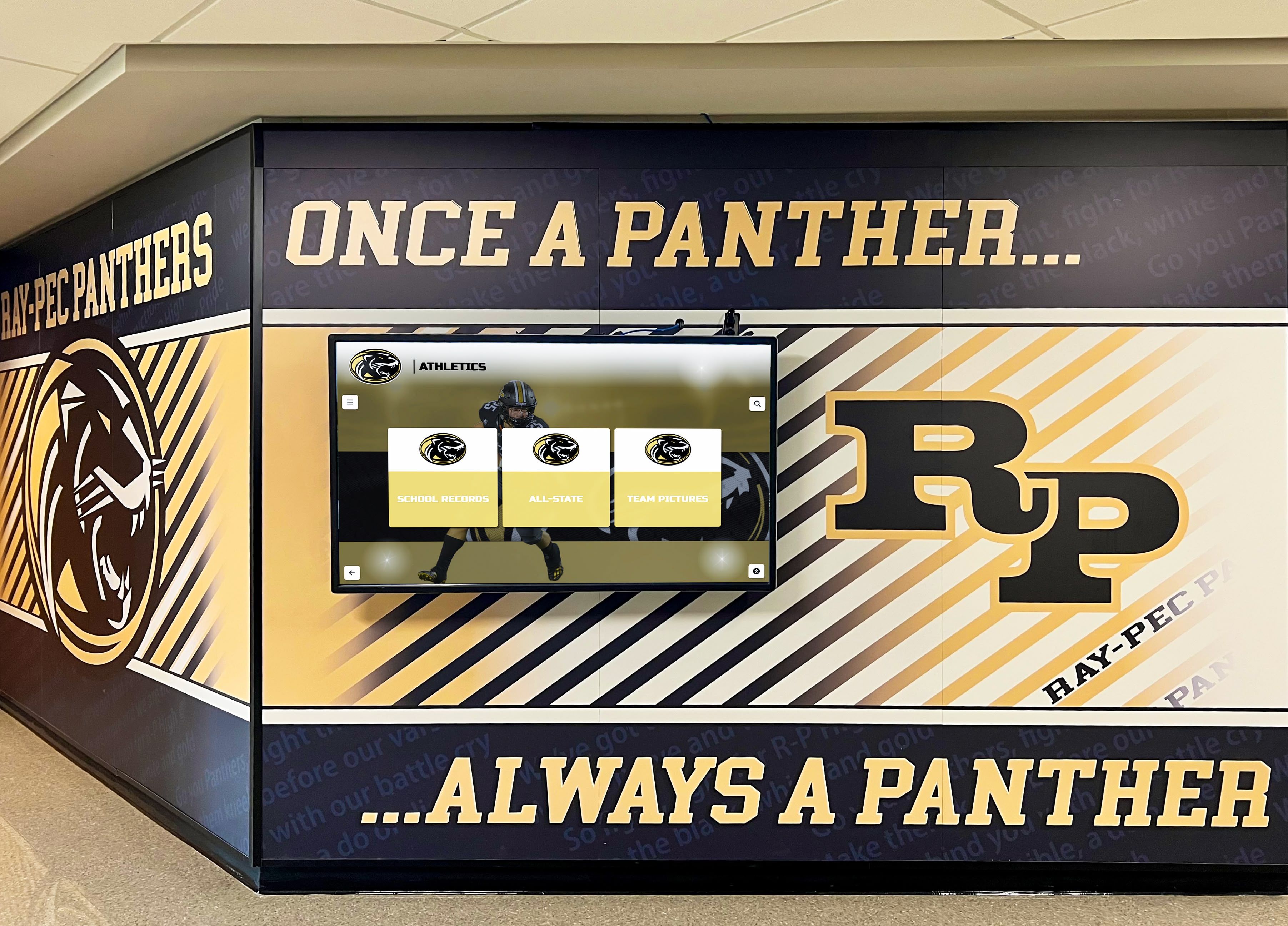
High-Traffic Common Areas: Main entrances, lobby spaces, and commons areas where students, staff, parents, and visitors naturally congregate ensure broad exposure. These prime locations display your most comprehensive recognition content—complete halls of fame, all-sport achievements, and historical archives.
Sport-Specific Context Locations: Placing displays in gyms, weight rooms, or training facilities allows contextually relevant content. Your basketball hall of fame beside the competition gym resonates more powerfully than the same content in an administrative hallway. Sport-specific recognition displays in relevant venues inspire current athletes training in the same spaces as hall of fame predecessors.
Academic and Activities Recognition Zones: Don’t limit touchscreens to athletic applications. Displays near performing arts spaces, STEM labs, or library entrances display academic achievements, arts recognition, and activity excellence reaching non-athletic students and reinforcing that your recognition culture celebrates diverse talents.
Alumni Gathering Spaces: If your school includes dedicated alumni rooms, booster club meeting areas, or fundraising event venues, touchscreens in these spaces directly engage supporters most likely to deepen involvement when reminded of institutional excellence and tradition.
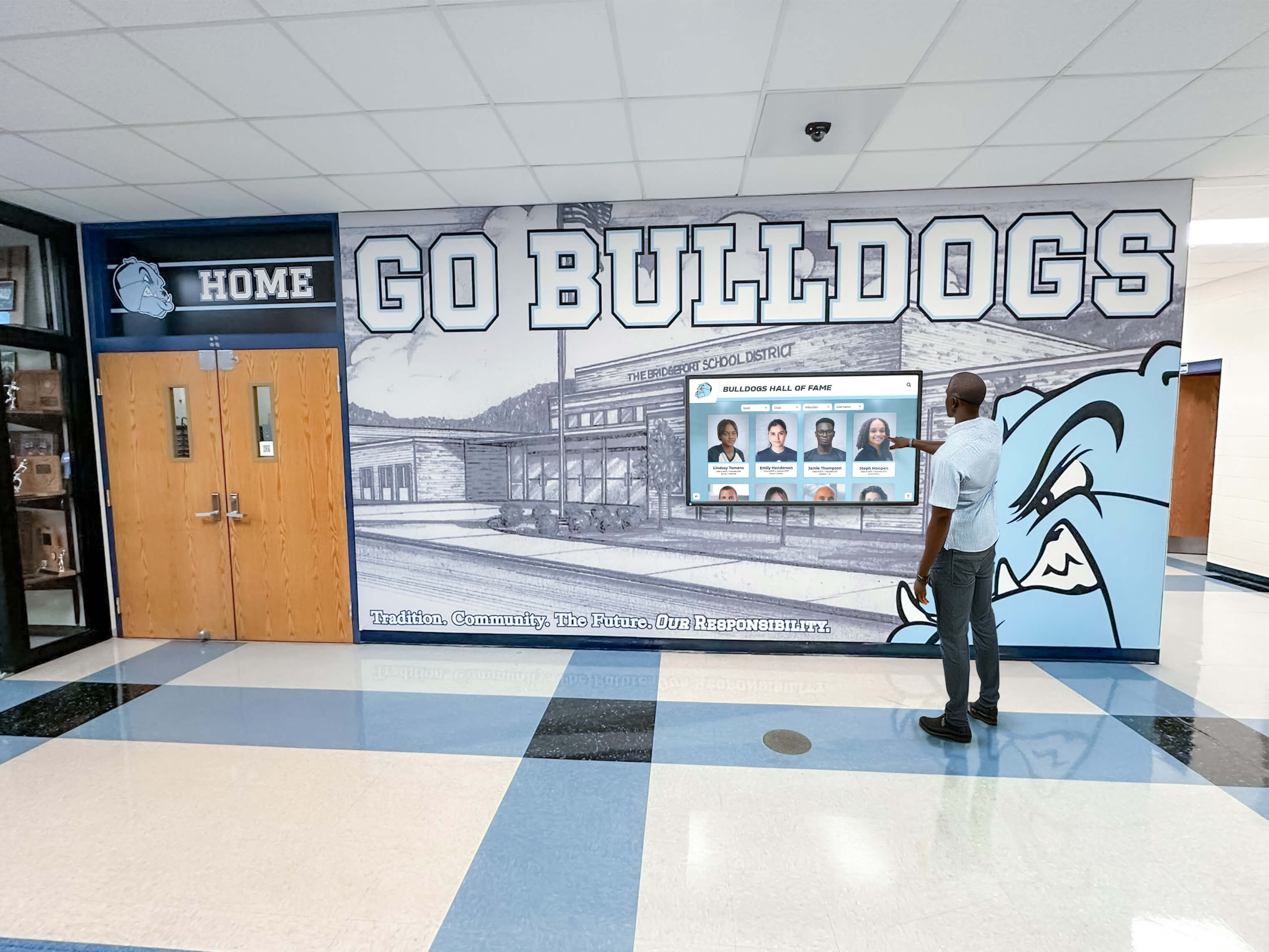
Strategic Duplication: Some content warrants display in multiple locations. Your current season varsity rosters belong in both main lobbies (community visibility) and competition venues (athlete recognition during games). Rocket’s unlimited screen model lets you show the same content everywhere it adds value without worrying about per-location fees.
Content Strategy for Multi-Display Networks
Managing content across multiple touchscreens requires balancing consistency with location-appropriate customization:
Unified Core Content: Certain recognition categories—complete halls of fame, historical timelines, school record boards—should appear identically across all displays ensuring any visitor can access comprehensive content regardless of which touchscreen they encounter.
Location-Specific Customization: Layer contextually relevant content atop core libraries. Your gym touchscreen emphasizes athletic recognition while including academic excellence; library displays lead with scholars while including athletic achievements. Users get specialized relevant content without artificial restrictions excluding broader recognition categories.
Seasonal Content Rotation: Update all displays simultaneously for in-season sport spotlights, championship celebrations, or current-year senior recognition while maintaining permanent historical content. Rocket’s centralized management enables instant network-wide updates without touching individual devices.
Discovery Pathways: Design intuitive navigation letting users explore from featured content to comprehensive archives. Someone viewing current basketball stars in the gym touchscreen should easily discover historical basketball excellence, then explore other sports if interested—the platform should facilitate organic exploration rather than restricting access.
Resources on digital hall of fame implementation provide frameworks for developing content strategies that scale across multiple display locations.
Technical Considerations for Reliable Multi-Screen Operations
Ensuring consistent performance across distributed touchscreen networks requires attention to infrastructure and maintenance:
Network Connectivity Requirements: Every touchscreen needs reliable internet connectivity—either hardwired Ethernet (preferred for reliability) or robust WiFi. Conduct site surveys confirming adequate network coverage before installation, particularly in older buildings where WiFi wasn’t designed for high-traffic interactive kiosk locations.
Display Quality Consistency: Using identical or similar touchscreen models across your network simplifies maintenance, ensures consistent user experiences, and streamlines replacement part inventories. Mixing consumer-grade and commercial displays or various manufacturers complicates operations as different units age differently and require distinct troubleshooting approaches.
Environmental Factors: Consider each installation environment. High-traffic hallways require commercial-grade displays with impact-resistant screens. Naturally lit spaces need high-brightness panels preventing washout. Gyms with temperature fluctuations require displays rated for wider operating ranges than climate-controlled lobbies.
Access Control and Security: Touchscreens in unsupervised locations require kiosk-mode lockdown preventing users from accessing device settings, browsing the broader internet, or tampering with configurations. Rocket’s platform provides locked-down browser access preventing these issues while maintaining full interactive functionality for recognition content.
Maintenance Schedules: Establish routine maintenance addressing accumulated fingerprints, touchscreen calibration drift, and software updates across your network. Multi-screen deployments benefit from systematic approaches—monthly cleaning schedules, quarterly functionality checks, and annual hardware inspections—preventing minor issues from degrading user experiences.
Questions to Ask Digital Signage Vendors Before Signing Contracts
Avoiding multi-screen hidden costs requires asking pointed questions during vendor selection:
Pricing Structure Clarification
“Does your base pricing include multiple displays, or are additional screens charged separately?” Demand explicit per-screen cost breakdowns. If vendors quote “starting at” prices, require complete pricing for your actual planned deployment size.
“Are there campus, building, or geographic restrictions on single subscriptions?” Clarify whether your subscription covers displays across multiple facilities, physically separated buildings, or district-wide implementations.
“What fees apply when we add displays in the future?” Even if initial deployment fits within base pricing, understand scaling costs before you commit. Can you add screens freely, or do quantity thresholds trigger pricing tier changes?
“Are there content zone, stream, or customization limits affecting multi-screen deployments?” Determine if unique content per display triggers additional fees versus showing identical content across all screens.
Licensing and User Access Limitations
“How many content administrators can manage displays under base licensing?” Multi-screen networks often involve multiple staff members. Understand whether administrator accounts cost extra and whether role-based permissions exist for distributed management.
“Are there content storage, file size, or multimedia limitations?” Recognition programs accumulate substantial media libraries. Ensure “unlimited content” claims truly mean unlimited, particularly when deploying multiple displays accessing the same asset libraries.
“Can we move displays between locations or reassign licenses to different hardware?” Facilities evolve. Confirm you can relocate touchscreens freely or swap hardware without license penalties, re-purchases, or vendor intervention.
Resources on selecting digital signage platforms outline comprehensive evaluation criteria beyond pricing considerations.
Support and Operational Considerations
“Is technical support priced per installation or organization-wide?” Some vendors charge support fees per display rather than per customer. Clarify whether you’re purchasing support once for your entire network or separately for each screen.
“What are realistic content management time requirements for multi-screen networks?” Request estimates for typical weekly content management hours based on networks similar to your planned deployment. Generic answers like “very easy” or “minimal time” warrant skepticism—demand specifics from reference customers.
“Can reference customers describe their experience scaling from one to multiple displays?” Speaking with schools that expanded deployments reveals whether vendors honored initial pricing models or introduced unexpected costs during growth phases.
Hardware and Integration Requirements
“Can we use our existing displays or select our preferred hardware?” Vendor-specific hardware requirements lock you into potentially expensive or limited equipment choices. Platform-agnostic software provides flexibility and prevents hardware lock-in.
“Are there minimum hardware specifications or required accessories?” Understanding complete hardware requirements—media players, specific touchscreen technologies, mounting systems—prevents discovering mid-implementation that your chosen displays won’t work or require expensive adapters.
“Does software licensing include hardware or are they purchased separately?” Bundled hardware-software offers seem simple but often hide per-device economics and prevent you from sourcing more cost-effective hardware independently.
Case Study: District-Wide Recognition Network Without Per-Screen Penalties
A mid-sized school district implemented comprehensive recognition across three campuses—middle school, high school, and athletic complex—using Rocket Alumni Solutions:
Deployment Scope: Seven total touchscreens—two at the middle school (main entrance and commons), three at the high school (main lobby, gym, cafeteria), and two at the athletic complex (weight room and field house).
Traditional Vendor Quote: Initial quotes from broadcast digital signage vendors ranged from $2,100-$3,500 annually for software alone (7 screens × $25-$50/month) plus $20,000-$28,000 in hardware and installation. The district’s technology director noted that all quotes included per-campus or per-building multipliers despite unified athletic and activities programs shared across facilities.
Rocket Implementation: Single subscription covering all seven touchscreens across three campuses ($3,800 annually), plus identical hardware costs (~$24,000 for quality commercial touchscreens and installation). First-year investment of $27,800 compared favorably to traditional vendor totals of $22,000-$31,500.
Operational Reality: Most importantly, the district discovered that traditional vendor approaches required managing separate content libraries per campus due to licensing restrictions. Rocket’s unified platform lets athletic directors and activities coordinators manage all seven displays from a single dashboard, updating district-wide recognition instantly across every touchscreen.
Three-Year Analysis: After three years, traditional vendors would have cost $6,300-$10,500 in recurring software fees versus $11,400 for Rocket. Rocket’s higher annual cost bought substantially superior recognition-specific functionality, dramatically simpler management, and flexibility to add more touchscreens without additional software fees as the district expands recognition programs.
When the district added two more touchscreens in year four (new high school wing and middle school gym), Rocket’s cost remained $3,800 annually while traditional vendors would have increased to $2,700-$4,500 annually ($27-$50 × 9 screens). The unlimited screen model transformed from cost-neutral initially to substantial savings as deployment scaled.
Web Accessibility Extends Recognition Beyond Physical Displays
Rocket’s value proposition transcends unlimited physical touchscreens through comprehensive web accessibility:
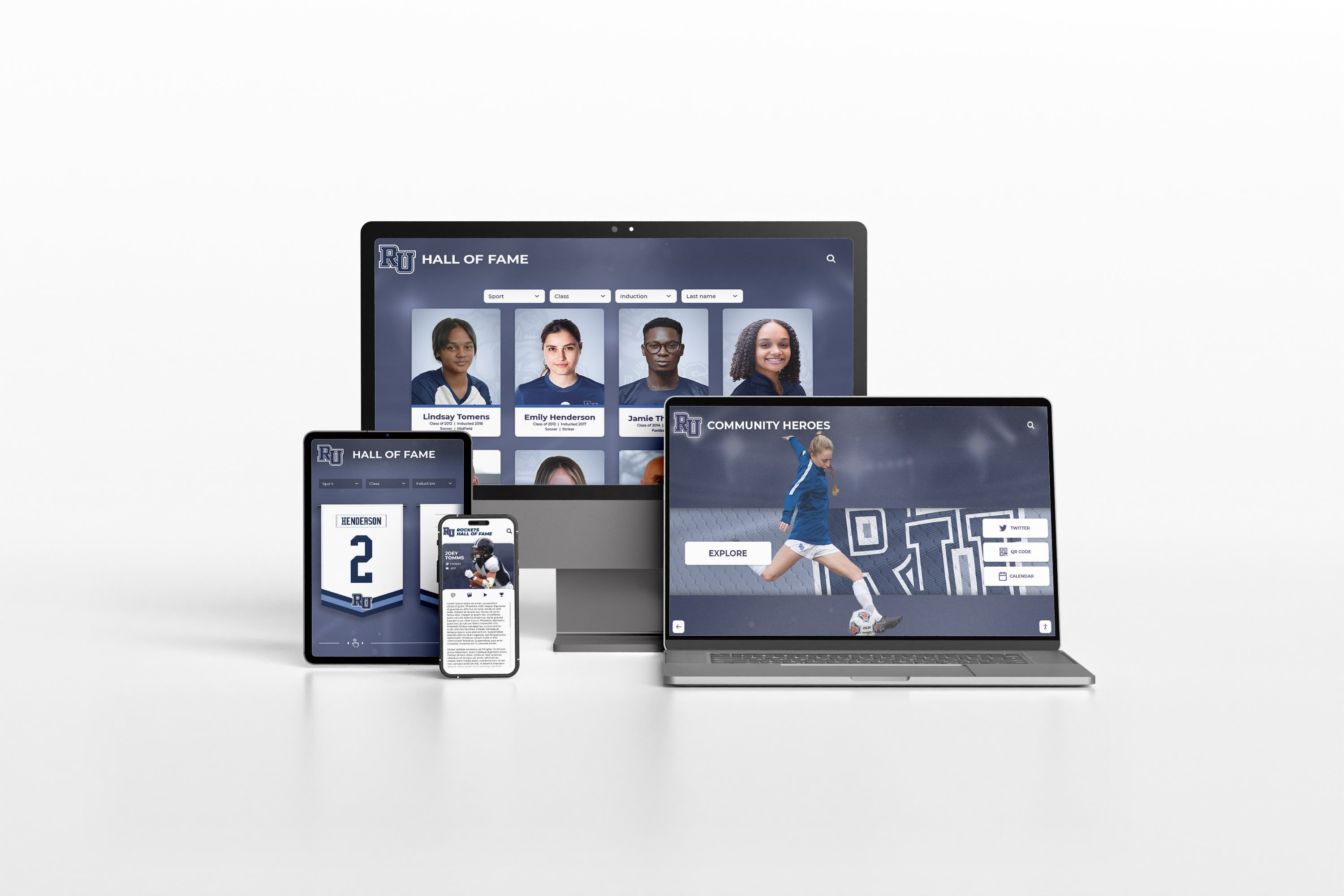
Desktop and Mobile Access: Every profile, achievement, photo, video, and historical item accessible on physical touchscreens also displays beautifully on desktop computers, tablets, and smartphones. Alumni exploring recognition content from across the country access identical content as visitors to your physical touchscreens without limitations.
Social Sharing and Discovery: Web-accessible recognition enables social media sharing, direct linking to specific profiles, and search engine discovery. Your hall of fame inductees can share their recognition with friends and family worldwide, creating organic promotion while deepening emotional connections with your institution.
Recruitment and Advancement Applications: Prospective student-athletes researching your programs, college coaches evaluating recruits, and potential donors exploring institutional excellence all access complete recognition content remotely. Physical touchscreens serve on-campus communities; web access extends reach to everyone else who matters to your programs.
QR Code Bridges: Rocket enables QR codes connecting physical spaces to digital content. Print QR codes on event programs, championship banners, or facility plaques letting anyone with a smartphone instantly access related recognition content, statistics, photos, and videos supplementing physical artifacts with rich digital storytelling.
This omnichannel approach means “unlimited screens” actually understates Rocket’s value—you’re not just eliminating physical touchscreen limits but accessing recognition everywhere through every device your community uses.
Common Objections to Unlimited Screen Models
Athletic directors evaluating Rocket’s unlimited screen pricing sometimes raise concerns worth addressing:
“If There’s No Per-Screen Fee, Are There Other Hidden Costs?”
Rocket’s straightforward pricing includes software platform access, unlimited physical touchscreens, unlimited content and media storage, all administrators and user accounts, complete web accessibility, ongoing software updates and enhancements, and technical support. Additional costs exist only for optional services: custom branding and design work, professional content development assistance, hardware purchases (touchscreens, media players), installation and mounting services, and dedicated training or white-glove onboarding.
These optional costs exist across all vendors and represent actual services or physical goods rather than artificial software limitations. The key difference: Rocket doesn’t charge more for functionality you’ve already purchased just because you want to use it in more locations.
“How Does Rocket Stay Profitable Without Per-Screen Revenue?”
Rocket’s business model generates revenue from comprehensive recognition programs rather than screen counts. A school investing in quality recognition—thorough content development, historical research, multimedia storytelling—pays appropriately for the platform enabling that excellence regardless of how many physical locations display the results.
This approach aligns Rocket’s success with customer outcomes. Schools benefit from broader touchscreen visibility inspiring more students, engaging more alumni, and building stronger culture. Rocket wants to encourage that visibility rather than restrict it through per-screen penalties that artificially limit recognition reach for economic rather than functional reasons.
“Should We Start Small and Scale, or Deploy Multiple Screens Initially?”
Both approaches work with Rocket’s pricing model. Many schools start with single lobby installations, validate community engagement, develop content libraries, and then expand to additional locations once they’ve proven the concept. Others implement comprehensive networks immediately across multiple high-visibility locations.
The unlimited screen model removes economic pressure from this decision—choose whatever implementation strategy serves your community best without software licensing influencing your facilities strategy. Start small if you prefer measured rollout, or go comprehensive if you want immediate campus-wide visibility. Software costs remain constant either way.
Resources on touchscreen kiosk implementation provide guidance for phased versus comprehensive deployment strategies.
Transparent Pricing Enables Better Recognition Programs
Hidden multi-screen costs in digital signage licensing create perverse incentives that undermine recognition program effectiveness.
When software vendors charge per screen, schools face pressure to limit touchscreen deployments to minimum viable locations rather than placing displays everywhere they add value. Athletic directors make artificial choices—gym or lobby? Competition venue or training facility?—because budget constraints force prioritization that wouldn’t exist with honest pricing models.
This artificial scarcity hurts everyone. Students training in weight rooms never see the strength records they’re chasing because your single touchscreen lives in the main lobby where administrators preferred it. Alumni visiting for games can’t explore hall of fame content because your display resides in the main building rather than the competition gym they’re actually visiting. Recognition content you’ve invested substantially in developing reaches a fraction of potential audience because per-screen fees make comprehensive deployment economically unrealistic.
Rocket’s unlimited screen model eliminates these artificial limitations. Put touchscreens everywhere they create value—competition venues, training facilities, common areas, alumni spaces, academic wings. Show relevant content in contextually appropriate locations. Provide multiple discovery points ensuring everyone in your community encounters recognition programs regardless of which facilities they frequent.
The unlimited screen approach transforms software from a constraint limiting recognition reach into an enabler amplifying institutional culture and community engagement across every corner of your campus where excellence deserves celebration.
Building Recognition Culture Through Comprehensive Visibility
The most effective recognition programs operate through distributed visibility rather than single display installations.
Schools implementing multiple touchscreens across campuses report that recognition culture strengthens as more students encounter excellence celebrations in their daily routines. The athlete training in the weight room who sees strength records daily feels different pressure and inspiration than one who occasionally walks past a main lobby display. The performing arts student passing the library touchscreen showcasing theatre excellence experiences recognition relevance in ways that athletic-only displays in gyms don’t provide.
Comprehensive multi-screen networks also solve equity challenges in recognition programs. When single touchscreen locations prioritize athletics (common in competition gym placements), non-athletic students rarely encounter recognition validating their achievements. Multiple displays in diverse locations enable contextually appropriate content reaching every student where they spend time—academic recognition near classrooms and libraries, performing arts in auditorium spaces, athletics in gyms and competition venues, service learning in common areas.
This distributed approach builds inclusive culture celebrating diverse excellence across your entire educational program rather than privileging particular activities through display location advantages.
Future-Proofing Recognition Through Scalable Platforms
Educational facilities evolve continuously—new construction adds buildings, renovations reconfigure spaces, enrollment growth demands expanded common areas, and program development creates recognition needs in previously unconsidered locations.
Per-screen licensing models penalize this natural evolution. Every facility change potentially triggers new software costs as you add displays in new buildings, relocate touchscreens to better locations, or expand programs into additional venues. These ongoing costs create reluctance to optimize recognition placement even when facility changes make previous locations suboptimal.
Rocket’s unlimited screen model future-proofs your recognition programs. Renovate freely, expand confidently, relocate thoughtfully—your software investment moves with you without penalties or restrictions. The touchscreens you deploy today work identically in tomorrow’s facilities without license modifications or additional fees.
This flexibility proves particularly valuable for growing districts and institutions undergoing facility improvements. Your recognition platform investment remains sound regardless of how your physical facilities evolve over coming decades.
Making Recognition Investment Decisions That Serve Your Community
Athletic directors and administrators evaluating digital recognition systems serve their communities best by refusing to accept artificial limitations that exist for vendor profit rather than functional necessity.
Per-screen licensing creates unnecessary complexity, restricts program effectiveness, and extracts higher costs without delivering corresponding value. When you ask vendors to justify why the software managing your content on one screen can’t manage identical content on five screens without additional fees, honest answers prove elusive because no legitimate technical or operational rationale exists—only revenue maximization strategies.
Rocket Alumni Solutions structures pricing around what actually matters: the quality and comprehensiveness of recognition content you’re celebrating, the sophistication of platforms enabling that celebration, and the support helping you create recognition programs that inspire students and engage communities. How many physical touchscreens you use to display that content simply doesn’t affect vendor costs enough to justify per-screen fees—so Rocket doesn’t charge them.
One subscription. Unlimited touchscreens. No hidden costs. The way digital recognition pricing should work.
Schools ready to explore recognition platforms designed around customer success rather than artificial limitations benefit from seeing how purpose-built systems operate without per-screen restrictions or hidden fees. Book a demo to discover how unlimited screen deployment transforms recognition programs by eliminating software as an artificial constraint on where and how you celebrate excellence across your campus.































