




Athletic directors, school administrators, and facilities managers researching touchscreen recognition systems often encounter a concerning pattern: software vendors who disclaim hardware responsibility, leaving buyers to navigate manufacturer warranties, coordinate with third-party installers, and troubleshoot failures across multiple support channels. This fragmented approach transforms what should be turnkey solutions into ongoing technical burdens.
Organizations implementing digital record boards or interactive recognition displays need reliable hardware that works consistently for years without requiring internal IT expertise to maintain. When hardware fails, schools shouldn’t spend days coordinating between screen manufacturers, computer suppliers, mount installers, and software providers to identify root causes and restore service.
Rocket Alumni Solutions operates differently. The company provides complete hardware bundles, manages the full kiosk stack from screen to software, and assigns dedicated Customer Success managers as single points of contact for any issue—from initial setup through years of operation. While OEM warranties exist in the background for component replacement, Rocket owns the outcome: uptime.
The Problem with Software-Only Vendors
Many interactive display software companies adopt a business model that maximizes their revenue while minimizing their operational responsibilities. They sell software licenses or subscriptions, recommend “compatible hardware,” and explicitly disclaim responsibility for hardware selection, installation quality, or ongoing equipment reliability.
This approach creates several problems for organizations deploying touchscreen recognition systems:
Fragmented Support Channels: When displays malfunction, buyers contact software vendors who redirect them to hardware manufacturers. Hardware manufacturers point to installation issues. Installers blame software configurations. Each support interaction requires explaining the entire system architecture to new technicians unfamiliar with the complete deployment.
Finger-Pointing Between Vendors: Determining whether touchscreen failures stem from software bugs, hardware defects, network configurations, or installation errors requires technical expertise most schools lack. Vendors protect themselves contractually by blaming other components in the stack, leaving buyers to arbitrate disputes while their displays remain offline.
Expertise Gaps in Installation: Software vendors recommend “any qualified AV installer” without verifying that installers understand the specific requirements of interactive touchscreen kiosks. Poor mounting decisions, inadequate power configurations, or improper network setup create ongoing reliability problems that emerge weeks or months after installation when warranty periods have expired and installers have moved to other projects.
Hidden Costs in Integration: Software-only vendors advertise subscription prices without disclosing the full cost of hardware procurement, professional installation, ongoing maintenance contracts, or replacement parts. Organizations discover true costs only after committing to platforms and purchasing hardware that proves incompatible or insufficient.
No Accountability for Uptime: When recognition displays remain dark for days or weeks while support tickets bounce between vendors, nobody owns the outcome. Software companies met their contractual obligations by providing working software. Hardware manufacturers fulfilled warranties by shipping functional components. Yet the system remains broken because nobody coordinates the resolution.

Organizations implementing digital trophy case displays or athletic recognition walls need vendors who own the complete solution—not companies optimizing for legal liability protection through careful contract language.
Rocket’s Full-Stack Ownership Model
Rocket Alumni Solutions built its business model around complete hardware and software integration with single-point accountability. The company provides commercial-grade touchscreen bundles, coordinates professional installation through vetted partners, manages the complete technology stack, and assigns dedicated Customer Success managers who remain responsible for system uptime throughout the relationship.
Hardware Selection and Quality Standards
Rocket engineers commercial touchscreen bundles specifically designed for continuous operation in high-traffic institutional environments. The company tests screen durability, touch sensitivity, processing performance, thermal management, and long-term reliability before recommending hardware to clients.
Hardware packages include commercial-grade touchscreens rated for 16+ hours daily operation rather than consumer displays designed for occasional home use. Components feature fanless cooling for silent operation, tempered glass construction for durability against impacts, and capacitive touch technology delivering responsive interaction after years of continuous use.
Rocket manages relationships directly with commercial display manufacturers, ensuring access to business-class support channels, advance replacement programs, and product roadmaps that inform long-term system planning. Schools avoid navigating consumer-focused return policies or waiting in retail support queues when business-critical displays require service.
The company maintains hardware inventory for rapid replacement when failures occur. Rather than waiting for manufacturers to process warranty claims, ship replacement units, and coordinate installation appointments, Rocket stocks commonly needed components for immediate deployment when systems require restoration.

Organizations deploying interactive kiosk solutions benefit from vendor expertise in matching hardware specifications to specific environments—screen brightness for high-ambient-light locations, mounting configurations for different wall materials, and network requirements for reliable connectivity.
Complete Kiosk Stack Expertise
Rocket’s team maintains deep expertise across every layer of the interactive display technology stack: hardware specifications, operating system configurations, network architecture, security implementations, content management platforms, and user experience design. This comprehensive understanding enables rapid diagnosis when problems occur and prevents common configuration mistakes that create downstream reliability issues.
Operating System Configuration: Rocket configures operating systems specifically for kiosk operation—disabling unnecessary services that consume resources, implementing automatic restart schedules to maintain performance, configuring watchdog processes that detect and recover from application crashes, and hardening security to prevent unauthorized access or malware infections.
Network Architecture: The team designs network configurations that balance reliable connectivity with security requirements. Recommendations cover VLAN segmentation, firewall rules, bandwidth allocation, backup connectivity options, and remote management access that enables troubleshooting without physical device access.
Power Management: Proper power configuration prevents common failure modes. Rocket specifies appropriate circuit capacity, recommends battery backup solutions for areas with unreliable power, configures graceful shutdown during power loss, and implements automatic recovery when power restores.
Content Optimization: The platform optimizes media assets for smooth touchscreen performance—compressing images without visible quality loss, encoding video for efficient streaming, caching content locally to reduce network dependency, and implementing progressive loading so interfaces remain responsive even when retrieving large media files.
Security Hardening: Kiosk security requires balancing public accessibility with system protection. Rocket implements browser lockdown modes that prevent users from accessing underlying operating systems, configures automatic session timeouts to reset displays between users, monitors for tampering attempts, and maintains system update schedules that apply security patches without disrupting operation.
This multi-layer expertise matters when diagnosing problems. Slow touchscreen response could stem from insufficient processing power, network bandwidth limitations, unoptimized media assets, background processes consuming resources, or thermal throttling from inadequate cooling. Rocket’s team evaluates the complete stack rather than guessing at single-component causes.
Installation Coordination and Quality Control
Rocket coordinates professional installation through experienced AV integrators who understand the specific requirements of interactive touchscreen deployments. The company provides detailed installation specifications, reviews site plans before installation begins, and conducts post-installation testing to verify that systems meet performance standards.
Installation specifications cover mounting height and viewing angles optimized for touch interaction, power and network connectivity requirements, environmental considerations like direct sunlight or temperature extremes, and accessibility compliance to ensure ADA conformance for public installations.
The company evaluates installation quality through systematic testing: touch accuracy across the entire screen surface, brightness uniformity, network connectivity and throughput, content loading performance, and system stability during extended operation. Issues identified during commissioning receive correction before final acceptance and payment to installers.
For organizations deploying school digital signage systems, professional installation eliminates common mistakes: screens mounted too high for comfortable touch interaction, inadequate network infrastructure causing slow content updates, poor cable management creating maintenance hazards, or mounting solutions incompatible with wall construction creating safety risks.
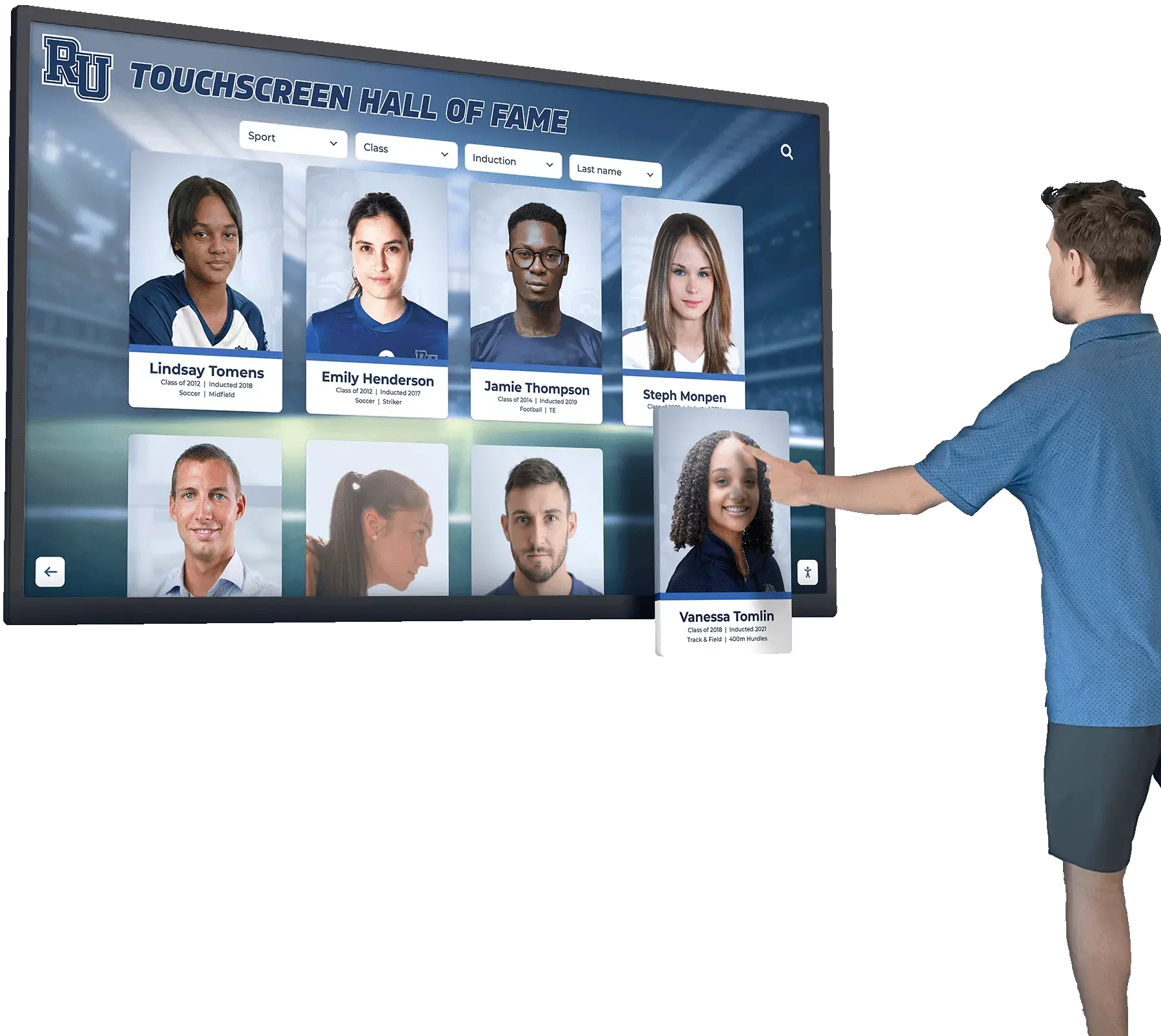
Rocket remains involved throughout installation projects rather than simply forwarding contractor referrals. The team answers technical questions from installers, provides remote support during commissioning, and validates that completed installations meet specifications before releasing projects for operational use.
Customer Success as Single Point of Contact
Every Rocket client receives a dedicated Customer Success manager who serves as their single point of contact for all hardware, software, and service issues. This assignment eliminates the need to navigate corporate phone trees, explain system configurations to different technicians with each support call, or coordinate between multiple vendors when problems span hardware and software boundaries.
Customer Success managers maintain complete documentation of each client’s deployment: hardware configurations, network architecture, custom content implementations, user access permissions, and support history. This continuity enables efficient troubleshooting without repeatedly gathering background information with each support interaction.
When issues arise, Customer Success managers own the resolution regardless of underlying cause. If touchscreens fail, managers coordinate warranty replacements with manufacturers, schedule installation appointments, verify repair quality, and ensure systems return to operational status. Schools contact one person who takes responsibility for outcomes rather than managing vendor relationships independently.
Proactive Monitoring and Maintenance: Customer Success teams monitor system health remotely—tracking uptime, identifying performance degradation before failures occur, applying software updates during maintenance windows, and addressing emerging issues before they disrupt operation. Organizations receive notifications about planned maintenance and can schedule updates during low-traffic periods.
Rapid Response for Critical Issues: When displays fail during high-visibility events or important operational periods, Customer Success managers prioritize restoration. The team maintains escalation paths to engineering resources, accesses hardware replacement inventory, and coordinates emergency service calls to minimize downtime.
Training and Onboarding Support: Customer Success managers provide ongoing training for administrative staff managing content updates, answer questions about feature capabilities, share best practices from other client implementations, and help organizations maximize value from their recognition displays over time.
Feedback Loop to Product Development: Customer Success teams communicate client needs and pain points to product development, influencing roadmap priorities and ensuring that platform evolution addresses real-world operational requirements rather than theoretical feature lists.
Organizations deploying touchscreen kiosk solutions benefit from vendors who maintain long-term relationships focused on success rather than transactional sales focused on contract signatures and initial deployment.
How Rocket Handles Hardware Issues
Understanding how Rocket manages hardware failures demonstrates the practical value of full-stack ownership. The company’s approach prioritizes rapid restoration while handling all coordination with OEMs and service providers behind the scenes.
Issue Reporting and Triage
When clients experience hardware problems—displays not powering on, touch functionality failing, image quality degrading, or systems becoming unresponsive—they contact their Customer Success manager through direct communication channels. No automated phone systems or general support queues requiring case number references and wait times.
Customer Success managers perform initial triage to determine issue severity and likely causes. They guide clients through diagnostic steps when simple fixes might restore service immediately: checking power connections, rebooting systems, or adjusting configuration settings. For issues requiring deeper investigation, managers access systems remotely to evaluate logs, test functionality, and identify root causes without requiring on-site visits for every problem.
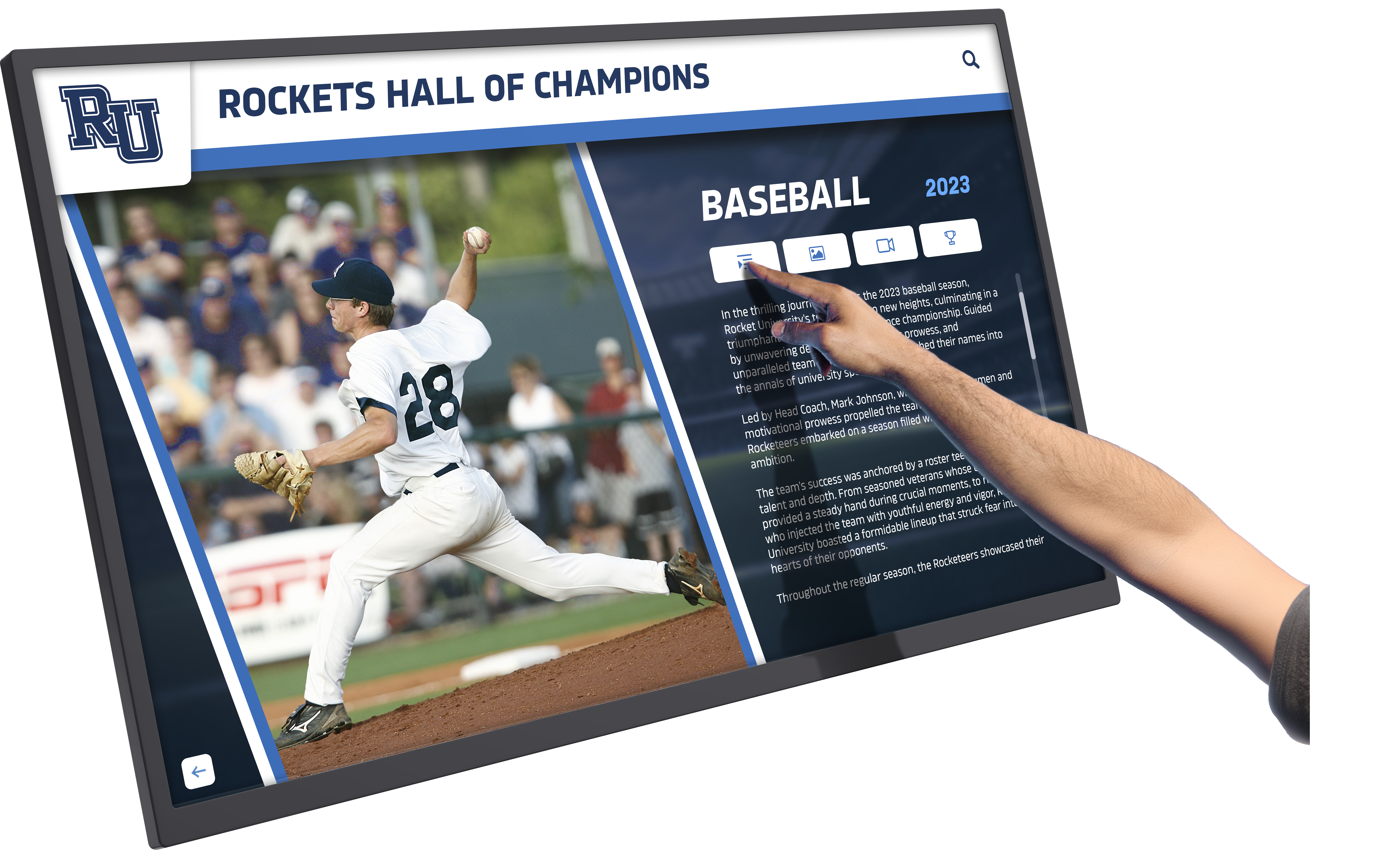
Critical Issue Prioritization: The team prioritizes issues based on operational impact. Displays failing during major events, affecting high-traffic recognition areas, or impacting multiple simultaneous installations receive immediate escalation and expedited service. Customer Success managers communicate realistic restoration timelines and provide status updates throughout resolution processes.
Warranty Management and Replacement
When hardware component failures require warranty service or replacement, Rocket manages all interactions with manufacturers. Schools avoid navigating warranty claim processes, providing purchase documentation, shipping defective units for evaluation, or tracking replacement shipments.
Customer Success managers initiate warranty claims, provide necessary documentation from company records, coordinate return shipping using prepaid labels, track replacement unit delivery, and schedule installation appointments for swap-outs. The entire process operates transparently from client perspectives—they report problems and receive notifications when service completes.
For failures occurring within manufacturer warranty periods, replacement parts arrive at no charge beyond any deductibles specified in service agreements. For out-of-warranty failures, Rocket provides clear cost quotes before proceeding with repairs, offers upgrade options when replacing aging components, and helps organizations make informed decisions about repair versus replacement economics.
Advance Replacement Options: For critical installations where extended downtime creates unacceptable impacts, Rocket offers advance replacement service. The company ships replacement hardware immediately upon failure notification, clients install new equipment, and defective units return afterward for warranty processing. This approach minimizes downtime to shipping transit times rather than waiting through warranty evaluation periods.
Coordinating On-Site Service
Hardware repairs requiring on-site service—screen replacements, mount adjustments, or wiring corrections—involve coordinating with local service providers or installation contractors. Rocket manages these relationships, schedules service appointments, provides technicians with system-specific documentation, and verifies completed work meets quality standards.
Organizations avoid searching for qualified service providers, evaluating contractor capabilities, negotiating service rates, or providing technical specifications to technicians unfamiliar with interactive touchscreen systems. Customer Success managers handle logistics while clients simply provide facility access during scheduled service windows.
After service completion, Rocket validates that systems operate correctly through remote testing and client verification. If initial repairs prove incomplete or create new problems, the team coordinates return visits without additional client coordination burden.
Root Cause Analysis and Prevention
Following hardware failures, Customer Success teams conduct root cause analysis to determine whether issues stem from component defects, environmental factors, installation quality, or usage patterns. This analysis informs recommendations for preventing recurrence.
If failures result from environmental conditions like excessive heat, humidity, or dust infiltration, Rocket recommends protective measures or alternative mounting locations. If installation quality caused problems, the company works with contractors to correct issues or engages different installers for future projects. If component selection proved inadequate for specific use cases, hardware specifications receive updates for replacement units.
Organizations implementing athletic facility recognition displays benefit from vendors who learn from failure patterns and continuously improve deployment practices rather than treating each incident as isolated without broader implications.
Client Reviews: Hardware and Support Experience
Schools and organizations deploying Rocket Alumni Solutions consistently highlight the value of integrated hardware support and Customer Success responsiveness in their reviews and testimonials. These real-world experiences demonstrate how full-stack ownership delivers practical benefits over software-only approaches.
Many athletic directors specifically note the contrast between Rocket’s approach and previous experiences with fragmented vendor relationships. One common theme: the relief of having single-point accountability when problems occur rather than coordinating between multiple companies who each disclaim responsibility for complete system operation.
Facilities managers appreciate hardware quality that withstands demanding institutional environments. Touchscreens remain responsive after years of continuous use by students, athletes, and visitors. Commercial-grade construction survives accidental impacts that would damage consumer displays. Systems operate reliably without requiring constant IT intervention or maintenance.

Administrators value the Customer Success model providing direct access to knowledgeable support staff who understand their specific installations. Rather than explaining system configurations repeatedly to different technicians with each support call, clients work with dedicated managers who maintain institutional knowledge about deployments and can provide contextual guidance.
Technology directors note that Rocket’s remote monitoring and proactive maintenance prevents many problems before they impact operations. Rather than discovering display failures when visitors complain or events get disrupted, teams receive notifications about emerging issues with enough lead time to schedule maintenance during convenient windows.
The rapid response to critical issues receives consistent praise. When displays fail before major events or during high-visibility periods, Customer Success teams prioritize restoration with urgency matching organizational needs. Schools appreciate vendors who understand the timing pressures of academic calendars and athletic seasons.
Installation quality and post-installation support earn specific mentions. Organizations note that Rocket-coordinated installations proceed smoothly with professional results, and that any issues identified during commissioning receive prompt correction. The contrast with past experiences involving contractor disputes, incomplete installations, or systems delivered non-functional is frequently highlighted.
Long-term relationships built through ongoing Customer Success engagement prove valuable as organizations expand deployments, update content strategies, or add new features. Having trusted advisors who understand institutional contexts enables better planning and execution than transactional vendor relationships focused solely on initial sales.
Hardware Specifications and Options
Rocket offers several touchscreen hardware configurations designed for different installation environments, budget requirements, and usage patterns. All options feature commercial-grade components selected for institutional durability and long-term reliability.
Standard Touchscreen Bundles
Standard bundles include commercial touchscreens available in 32-inch, 43-inch, 50-inch, and 55-inch sizes with capacitive touch technology delivering responsive multi-touch interaction. These displays feature 1080p or 4K resolution depending on screen size, LED backlighting providing consistent brightness, tempered glass construction for durability, and integrated computing modules running optimized kiosk operating systems.
Standard packages include wall-mount hardware supporting both flush-mount and surface-mount installations, all necessary cabling for power and network connectivity, and configuration services preparing systems for immediate content deployment upon installation. Organizations receive turnkey solutions requiring only facility access and network connectivity to begin operation.
Enhanced Mounting Systems
Enhanced mounting options provide custom-branded frames, surface-recessed installation for flush appearance, custom color finishes matching institutional branding, and integrated nameplate areas for permanent signage identifying display purposes. These aesthetic enhancements create polished professional appearances particularly important for high-visibility locations like main lobbies or athletic facility entrances.
Surface-recessed mounting systems integrate touchscreens into walls with only screen surfaces visible, creating clean appearances without protruding equipment or visible mounting hardware. This approach works particularly well in renovated facilities where modern recognition displays complement updated architectural finishes.
Wonderwall Recognition Systems
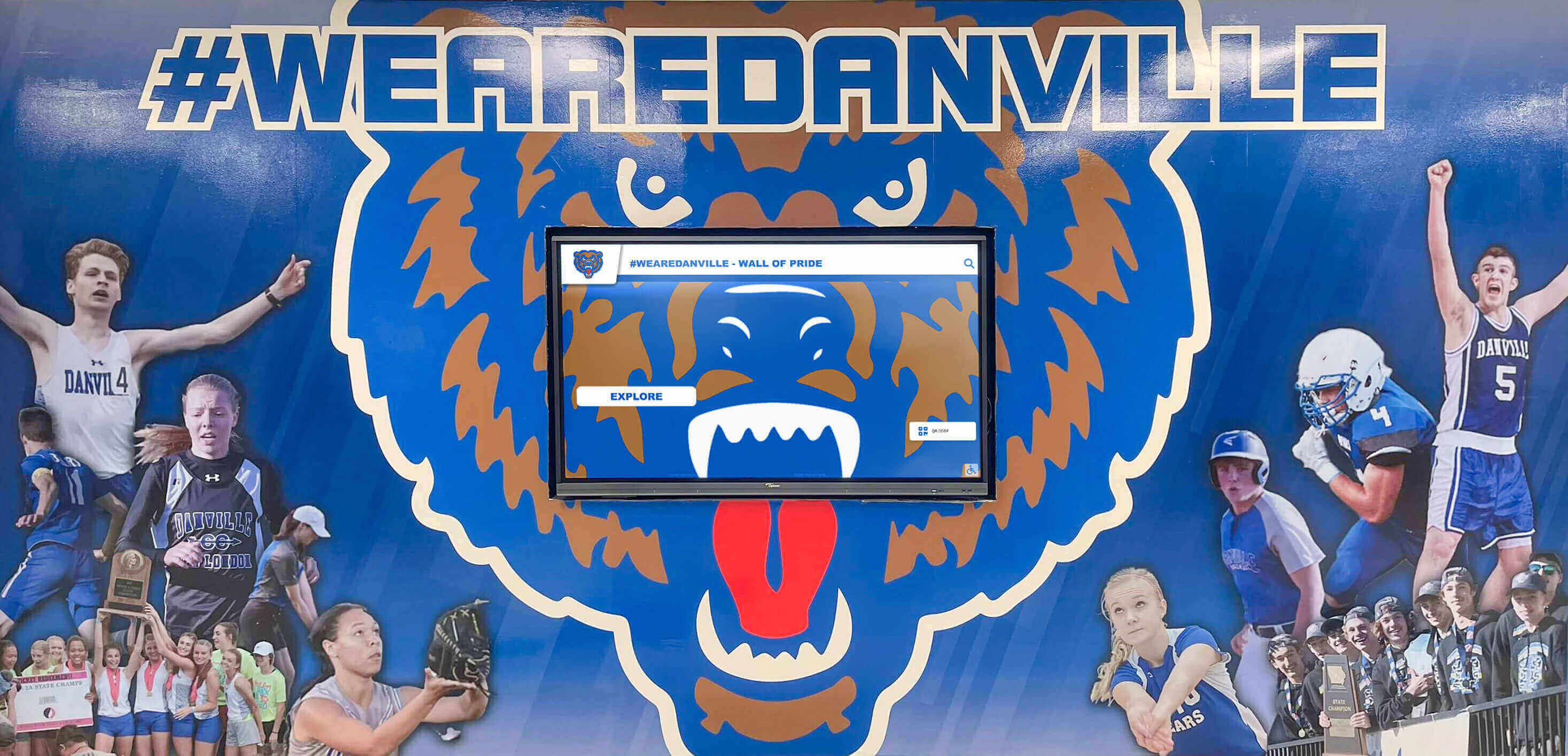
Wonderwall systems combine interactive touchscreens with large-format fabric graphics creating striking recognition environments. Commercial touchscreens mount within custom graphic panels spanning entire walls, integrating digital interactivity with traditional visual impact of printed recognition displays.
Wonderwall implementations work particularly well for athletic hall of fame displays combining championship banners, team photos, and historical imagery with interactive touchscreens providing detailed athlete profiles and record books. The graphic components create immediate visual impact for passing visitors while touchscreens enable deeper exploration for engaged users.
Fabric graphics use dye-sublimation printing on tension fabric mounted in infinity frames allowing easy graphic swaps when updating designs or rotating seasonal content. This flexibility supports evolving recognition programs without requiring complete system replacement.
Outdoor and High-Brightness Options
Organizations requiring outdoor installations or displays in high-ambient-light environments can specify high-brightness commercial panels delivering 2500+ nits luminance for visibility in direct sunlight. These displays feature ruggedized enclosures with IP65 weatherproofing, thermal management for operation in temperature extremes, and anti-glare treatments maintaining touch accuracy in bright conditions.
Outdoor installations require additional considerations around network connectivity, power infrastructure, and physical security that Rocket’s team addresses during planning phases. The company provides guidance on placement, orientation, maintenance access, and protective measures ensuring long-term reliable operation in challenging environments.
Comparing Full-Stack vs. Software-Only Approaches
Understanding the practical differences between integrated full-stack providers and software-only vendors helps organizations make informed decisions about recognition display investments.
Initial Procurement and Setup
Full-Stack Approach (Rocket): Single procurement relationship providing complete hardware and software bundles with coordinated installation. Organizations receive comprehensive quotes covering all costs from equipment through commissioning, simplified purchasing through single vendor invoices, and accountability for complete working systems upon delivery.
Setup proceeds through guided processes with experienced installers working from detailed specifications, remote support during commissioning, and validation testing before final acceptance. Organizations transition directly from project completion to operational use without additional integration work.
Software-Only Approach: Separate procurement for software licenses, display hardware, mounting equipment, installation services, and ongoing support. Organizations coordinate multiple vendors with different payment terms, separate contracts with varying warranty conditions, and responsibility for ensuring component compatibility.
Setup requires managing multiple contractor schedules, resolving conflicts when components prove incompatible, and debugging configuration issues across vendor boundaries. Organizations often require internal IT resources to bridge gaps between vendors who each deliver partial solutions without accountability for integrated operation.
Ongoing Operations and Support
Full-Stack Approach (Rocket): Single support contact for all hardware and software issues, proactive monitoring identifying problems before failures occur, coordinated warranty service managed by vendor, and continuous optimization through Customer Success relationships. Organizations incorporate recognition displays into operations without maintaining specialized technical expertise internally.
Support relationships deepen over time as Customer Success managers learn institutional contexts and can provide increasingly relevant guidance. Long-term partnerships enable strategic planning around display network expansions, content strategy evolution, and feature enhancement timing.
Software-Only Approach: Multiple support relationships requiring issue diagnosis before determining which vendor to contact, finger-pointing between vendors when problems span boundaries, self-service hardware warranty claims requiring documentation and coordination, and reactive problem-solving only when failures disrupt operations.
Organizations maintain technical expertise internally or retain consultant relationships to manage vendor coordination, troubleshoot integration issues, and ensure component compatibility during upgrades or expansions. Support relationships remain transactional focused on specific incidents rather than building strategic partnerships.
Long-Term Value and Total Cost
Full-Stack Approach (Rocket): Predictable costs through comprehensive service agreements, extended effective lifespan through proactive maintenance, efficient problem resolution minimizing operational disruptions, and continuous improvement through software updates and feature additions delivered automatically.
Organizations investing in digital recognition displays optimize total cost of ownership through reliable operation, minimal internal IT burden, and vendor relationships that support institutional success rather than simply fulfilling contract minimums.
Software-Only Approach: Variable costs from separate hardware maintenance, unexpected failure expenses when warranty gaps exist, productivity losses from extended downtime during vendor coordination, and potential system replacement when component obsolescence forces difficult upgrade decisions.
Hidden costs emerge from internal time spent managing vendor relationships, troubleshooting integration problems, and maintaining technical expertise about system architecture. Organizations discover that apparent savings from lower software subscription costs get offset by higher operational burdens and support expenses.
Implementation Process: From Purchase to Operation
Understanding Rocket’s implementation process demonstrates how full-stack ownership translates into practical deployment efficiency and successful operational transitions.
Initial Consultation and Planning
Implementation begins with Customer Success teams conducting site assessments to understand facility conditions, usage requirements, and organizational objectives. Consultations cover intended installation locations, existing network infrastructure, power availability, environmental considerations, accessibility requirements, and content strategies.
Rocket provides recommendations on hardware specifications appropriate for specific environments, mounting approaches compatible with wall construction and aesthetic preferences, network architecture supporting reliable connectivity, and installation timing minimizing disruption to ongoing operations.
Organizations receive detailed project plans outlining timelines, resource requirements, coordination needs, and success criteria. Clear communication establishes realistic expectations and ensures all stakeholders understand their roles throughout implementation.
Hardware Procurement and Configuration
Following project approval, Rocket procures specified hardware through manufacturer relationships, configures operating systems for kiosk operation, installs software platforms with client-specific branding and settings, and pre-loads initial content when available before shipping.
Hardware arrives at installation sites ready for mounting and network connection. Pre-configuration eliminates on-site troubleshooting of software installations, operating system settings, or network configurations—installers focus solely on physical mounting and connectivity verification.
Quality control processes verify that all components function correctly, touch calibration meets accuracy standards, software platforms operate smoothly, and systems recover properly from power cycles before equipment leaves Rocket’s facilities. This testing catches defects or configuration problems before installation, preventing project delays from faulty equipment discoveries at client sites.
Professional Installation and Commissioning
Rocket coordinates with professional installers who receive detailed installation specifications, access to technical support during installation, and clear success criteria for project completion. Installation teams mount displays at specified heights and orientations, establish power and network connectivity, verify touch accuracy across screen surfaces, and conduct load testing confirming content displays correctly.
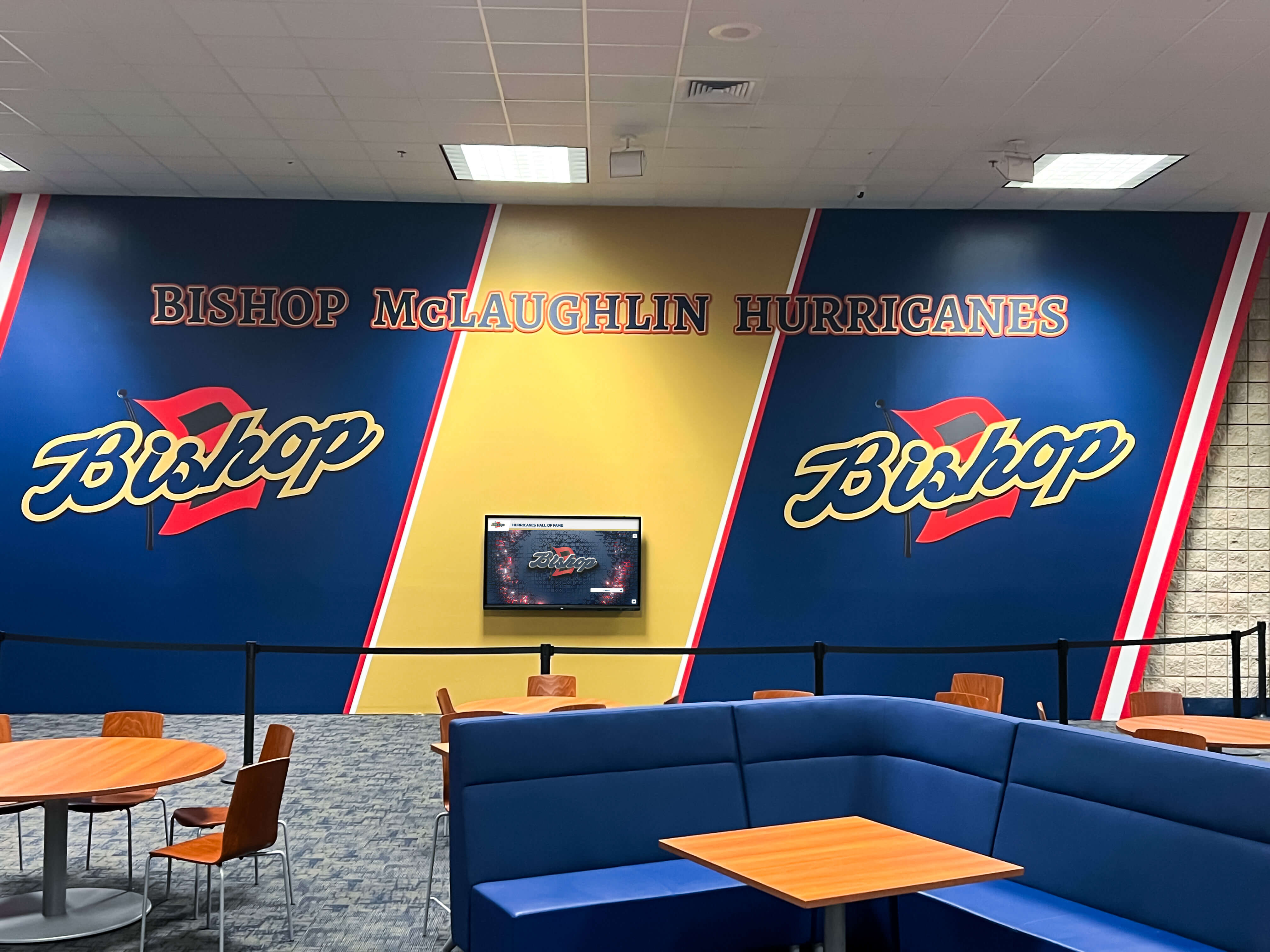
Customer Success managers participate remotely during commissioning, validating that installations meet specifications, testing all system functionality, documenting any issues requiring correction, and approving final acceptance only after verifying complete operational readiness.
Organizations receive training on content management platforms, guidance on best practices for recognition programs, documentation covering system operation and basic troubleshooting, and direct contact information for ongoing Customer Success support.
Ongoing Support and Optimization
Following installation, Customer Success relationships continue through regular check-ins, proactive monitoring of system health, support for content strategy questions, and coordination of any required service or updates. Organizations incorporate recognition displays into institutional operations with confidence that expert support remains readily accessible when needed.
Rocket provides continuous software updates delivering new features, security patches, performance improvements, and platform enhancements without requiring client action beyond scheduling update windows during convenient times. Hardware monitoring identifies emerging problems before failures occur, enabling preventive maintenance that maximizes uptime.
Long-term relationships support strategic initiatives like expanding display networks to additional locations, evolving content strategies based on engagement analytics, or integrating recognition displays with other institutional systems. Customer Success teams serve as trusted advisors rather than vendors fulfilling minimum contractual obligations.
Why Full-Stack Ownership Matters for Schools
Educational institutions face unique operational constraints that make full-stack ownership particularly valuable compared to software-only approaches requiring internal technical management.
Limited IT Resources: Most schools operate with lean IT departments managing diverse technology ecosystems across multiple buildings and user populations. Adding complex touchscreen systems requiring coordination between multiple vendors creates unsustainable support burdens. Full-stack providers eliminate coordination needs, allowing schools to incorporate recognition displays without expanding IT staffing.
Budget Predictability: School budgets require accurate long-term cost forecasting. Fragmented vendor relationships with separate hardware maintenance, software subscriptions, installation services, and support contracts create unpredictable costs when warranties expire, equipment fails, or vendors change terms. Comprehensive service agreements provide predictable annual costs that simplify budget planning.
Operational Continuity: Schools operate on strict calendars with high-visibility events that cannot tolerate display failures. Athletic championships, alumni gatherings, prospective student tours, and donor recognition ceremonies require working systems. Vendors who own uptime outcomes and prioritize rapid restoration during critical periods deliver reliability schools require.
Non-Technical Administrative Staff: Content management for recognition displays typically falls to athletic directors, development officers, or administrative staff without technical backgrounds. Platforms designed for non-technical users combined with responsive support for questions enable successful operation without requiring specialized training or IT involvement for routine tasks.
Long-Term Institutional Memory: School leadership transitions regularly through retirements, career advancement, and role changes. Vendor relationships providing continuity through documented system history, consistent Customer Success contacts, and institutional knowledge prevent information loss during leadership transitions that would complicate future maintenance or expansion decisions.
Organizations implementing school recognition displays need partners who understand educational environments and design support models matching institutional operational realities rather than assuming technical resources typical in corporate environments.
Hardware Durability in Institutional Environments
Commercial touchscreen displays must withstand demanding institutional environments where thousands of users interact with systems annually under varying conditions. Rocket’s hardware selection prioritizes durability characteristics essential for long-term reliable operation.
High-Traffic Usage Patterns
School recognition displays experience concentrated usage during specific periods: before classes, during lunch periods, after athletic events, at parent nights, and during alumni gatherings. These usage spikes create thermal loads from continuous operation and mechanical stress from repeated touch interactions.
Commercial touchscreens feature capacitive touch technology maintaining sensitivity and accuracy through millions of touch cycles. Tempered glass construction withstands impacts from accidental contact or overly enthusiastic interaction. Fanless cooling systems eliminate mechanical failure points while managing heat dissipation during extended operation periods.
Rocket tests hardware under simulated institutional usage patterns before recommending equipment to clients. This validation ensures specified displays maintain performance characteristics through years of operation rather than degrading prematurely under usage levels exceeding manufacturer specifications designed for lighter consumer applications.
Environmental Challenges
School installations face environmental challenges: direct sunlight through windows creating glare and heat loads, HVAC systems cycling between temperature extremes during occupied and unoccupied periods, humidity from weather conditions and facility activities, and dust infiltration in high-traffic corridors and athletic facilities.
Selected hardware includes anti-glare screen treatments maintaining visibility in bright ambient light, wide operating temperature ranges supporting function through typical facility temperature variations, sealed construction preventing dust infiltration into sensitive electronic components, and robust mounting solutions maintaining alignment despite building settling or vibration.
Organizations installing digital displays in athletic facilities particularly benefit from hardware selected for durability in challenging environments where equipment must function reliably despite temperature fluctuations, humidity exposure, and continuous heavy use.
Vandalism Resistance and Security
Public installations require protection against vandalism, theft attempts, and unauthorized access to system controls. Hardware specifications address these security concerns through tempered glass construction resisting deliberate damage attempts, secure mounting preventing equipment removal without tools, tamper-resistant port covers protecting connection interfaces, and lockdown software configurations preventing unauthorized system access.
Rocket’s mounting solutions integrate touchscreens securely into wall structures with fasteners accessible only through controlled facility areas. Cable management conceals wiring within walls rather than exposing vulnerable external connections. Operating system configurations disable access to settings and administrative functions for public users while maintaining remote management access for authorized administrators.
These security measures protect institutional investments while ensuring that recognition displays remain operational and professional in appearance despite installation in unsupervised public areas.
Conclusion: Evaluating Hardware Support in Vendor Selection
Organizations researching touchscreen recognition displays should evaluate vendor hardware support models as carefully as software capabilities. The apparent cost savings from software-only providers often translate into higher total ownership costs, operational burdens, and reliability risks that undermine recognition program effectiveness.
Full-stack providers like Rocket Alumni Solutions who supply integrated hardware and software bundles, coordinate professional installation, manage the complete technology stack, and assign dedicated Customer Success managers for single-point accountability deliver practical advantages that prove valuable throughout years of operation.
When evaluating vendors, consider these questions:
- Who owns the outcome when hardware fails—do you coordinate between vendors or contact one responsible party?
- How quickly can systems be restored when displays malfunction before critical events?
- Does the vendor maintain deep expertise across the complete technology stack or only software layers?
- Will you receive proactive monitoring and maintenance or only reactive support after problems occur?
- Can you access knowledgeable support staff who understand your specific installation or only general help desks?
- Does the vendor select hardware specifically for institutional durability or recommend consumer-grade alternatives?
- Who manages warranty claims, coordinates replacement shipments, and schedules installation appointments?
Organizations prioritizing long-term reliability, operational simplicity, and total cost optimization benefit from vendors who own hardware responsibility rather than disclaiming involvement beyond software delivery. Recognition displays serve institutional missions for decades when built on solid foundations of quality hardware, expert integration, and committed ongoing support.
Rocket Alumni Solutions’ approach demonstrates that software companies can own hardware outcomes when they choose to prioritize client success over minimizing their operational responsibilities. The question isn’t whether software vendors can own hardware—it’s whether they choose to.
Ready to explore a recognition display solution backed by complete hardware support and dedicated Customer Success? Book a demo to discuss how Rocket Alumni Solutions’ full-stack approach delivers reliable operation and peace of mind for schools, athletic programs, and organizations nationwide.































