




Organizations deploying interactive touchscreen kiosks in 2026 confront a software marketplace divided between purpose-built solutions designed for specific applications and generic platforms attempting to serve every possible use case. Choosing incorrectly results in implementations that frustrate users, burden staff with complex management workflows, and ultimately fail to deliver the engagement and operational efficiency that justified initial investment.
This guide evaluates nine leading interactive touchscreen kiosk software platforms available in 2026. The comparison examines content management capabilities, user experience design, deployment flexibility, hardware compatibility, ongoing maintenance requirements, and total cost of ownership. Whether implementing recognition displays, wayfinding systems, museum exhibits, or directory kiosks, understanding how each platform addresses real operational challenges determines success or disappointment.
The analysis focuses on factors determining long-term viability: Can non-technical staff manage content independently? Do visitors find interfaces intuitive enough for spontaneous interaction? Does the system maintain performance across multi-year lifecycles without expensive upgrades? These practical considerations matter more than feature lists or marketing claims when evaluating which platform genuinely serves organizational needs.
Critical Selection Criteria for Interactive Touchscreen Kiosk Software
Effective interactive kiosk software must satisfy three non-negotiable requirements: intuitive content management enabling staff without technical backgrounds to maintain current information, user interfaces designed for standing interaction by unfamiliar visitors, and technical architecture supporting reliable multi-year operation without constant troubleshooting. Systems failing any of these criteria become organizational burdens rather than assets, regardless of impressive demonstrations or comprehensive feature lists.
Content Management Reality
The person updating content daily rarely possesses technical training. Athletic directors, museum curators, facility managers, and coordinators need browser-based interfaces allowing updates during lunch breaks without IT involvement. Platforms requiring developer assistance for routine content changes inevitably display outdated information as staff avoid the friction of requesting technical support for simple modifications.
User Experience for Brief Interactions
Touchscreen kiosk users engage differently than website visitors or mobile app users. They stand rather than sit, interact briefly rather than browsing extensively, and abandon confusing interfaces immediately rather than persisting through poor design. Software must anticipate these behavioral patterns, providing obvious navigation, responsive touch targets sized for finger interaction, and information architecture enabling visitors to accomplish goals within 30-90 seconds.
Technical Reliability Over Time
Interactive kiosks operate continuously in public spaces where failures affect institutional reputation directly. Software must handle network interruptions gracefully, prevent unauthorized system access through kiosk lockdown features, update content without display downtime, and maintain consistent performance across operating system updates and hardware aging. Organizations need platforms designed for unattended operation rather than systems requiring frequent technical intervention.
1. Rocket Alumni Solutions: Purpose-Built Interactive Recognition
Best For: Schools, universities, athletic facilities, museums, donor recognition Rating: ⭐⭐⭐⭐⭐ 5.0/5.0
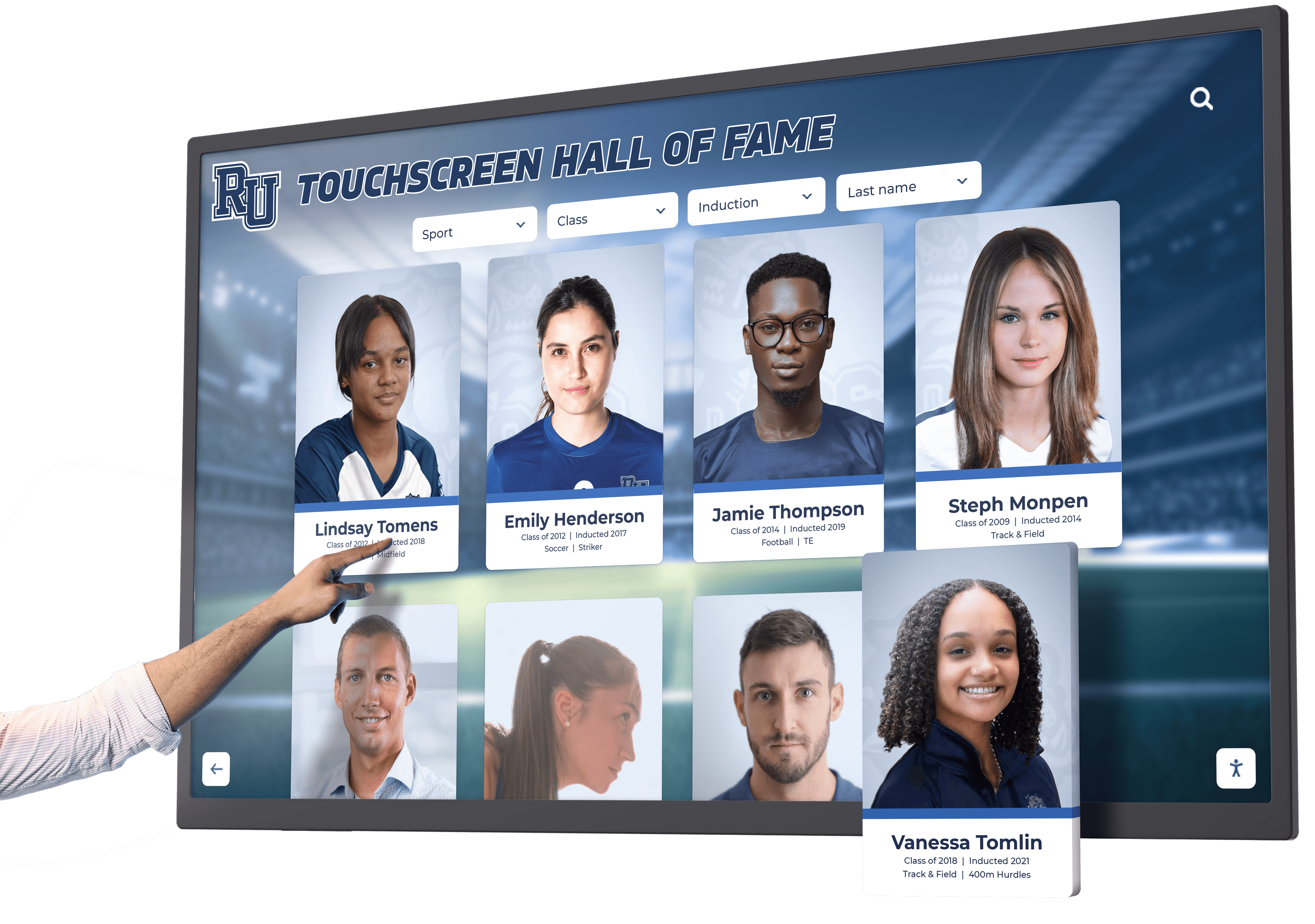
Rocket Alumni Solutions provides interactive touchscreen kiosk software designed specifically for recognition, achievement celebration, and institutional history preservation. The platform combines physical touchscreen displays with web-accessible content from unified management systems, enabling organizations to honor communities while creating searchable digital archives extending reach beyond physical installations.
Why Rocket Ranks First for Interactive Kiosks
Recognition-Specific Architecture: Unlike generic kiosk software adapted from announcement boards or directory systems, Rocket builds every feature around celebrating achievements and preserving institutional memory. The platform anticipates how schools honor athletes, how museums showcase collections, how nonprofits recognize donors, and how organizations preserve history. This purpose-built approach eliminates the adaptation and workarounds required when forcing generic software to serve specialized recognition needs.
Dual-Mode Engagement: Single platforms power both physical interactive touchscreen kiosks and mobile-responsive web interfaces without duplicate content management. Content published once appears instantly across physical displays and online access, dramatically simplifying operations while extending recognition reach to alumni across the country accessing content from smartphones.
Auto-Ranking Intelligence: Athletic record boards automatically sort and rank achievements chronologically and by performance level without manual intervention. When new records exceed previous achievements, the system updates rankings automatically while preserving complete historical progressions showing how records evolved across decades.
Unlimited Recognition Capacity: No artificial limits on profiles, photos, videos, or multimedia content. Organizations preserve complete achievement histories spanning decades without choosing what to exclude due to platform restrictions common in generic digital signage systems repurposed for recognition applications.
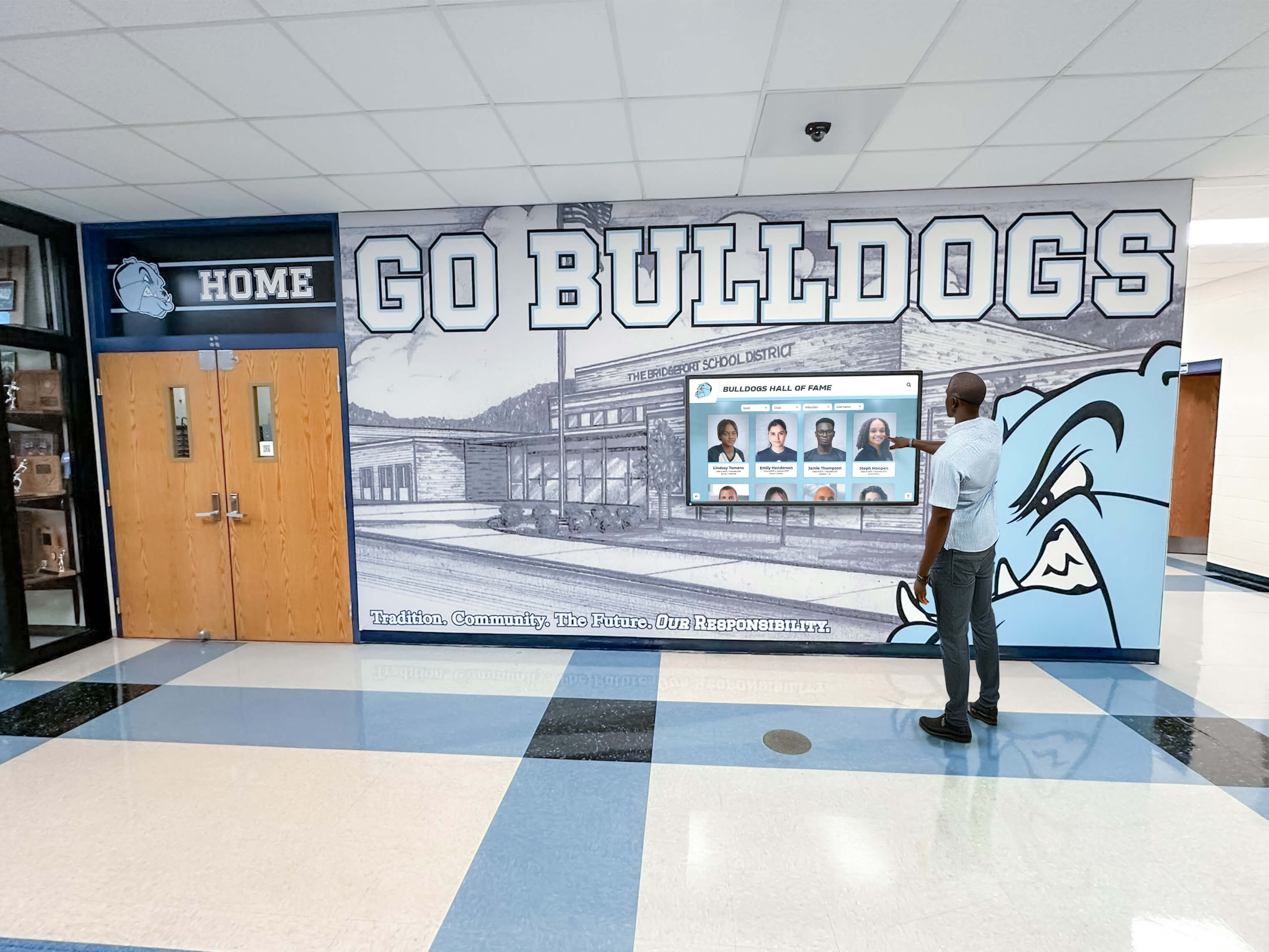
Intuitive Content Management: Non-technical staff manage updates through browser-based dashboards requiring no programming knowledge. Drag-and-drop interfaces, pre-built templates for athletics, academics, donors, arts, and history, plus bulk import tools enable efficient content creation maintaining professional quality without technical expertise.
Advanced Search and Discovery: Sophisticated search with autocomplete, smart filtering by category, year, sport, or achievement type, and related content recommendations transform passive viewing into active exploration. Visitors discover unexpected connections between teammates, achievements across eras, and personal links to institutional history, spending 5-10 minutes exploring rather than glancing briefly at static displays.
Professional Implementation Support: White-glove service from planning through launch and ongoing operations. Teams assist with content strategy, historical research, profile creation, hardware selection, professional installation, staff training, and launch events ensuring successful deployments. Organizations benefit from experience across 1,000+ installations rather than learning through trial and error.
Built-In ADA Compliance: Accessibility features including screen reader support, adjustable text sizing, keyboard navigation, and high-contrast display modes ensure inclusive access meeting compliance requirements without requiring custom development or additional accessibility audits.
Hardware Flexibility: Software runs reliably on various commercial-grade touchscreen displays from 43" to 86", various operating systems, and embedded computing modules or standard media players. Organizations select hardware matching budget and installation requirements rather than accepting vendor-mandated proprietary devices.
Implementation and Pricing
Rocket provides full-service implementation including hardware procurement recommendations, professional installation, content migration assistance, comprehensive staff training, and launch event planning. Complete single-display systems typically range $12,000-$35,000 including quality commercial-grade hardware, software licensing, implementation support, and first-year maintenance. Subsequent displays cost significantly less as software licensing and training scale efficiently.
Annual software licensing, cloud hosting, ongoing support, and continuous feature enhancements typically cost $1,500-$5,000 annually depending on installation size and feature requirements. Organizations receive regular software updates, technical support, content management assistance, and platform improvements without additional charges.
Ideal Use Cases
Schools implementing digital athletic record boards benefit from sport-specific templates, auto-ranking capabilities, and unlimited record holder capacity. Universities creating comprehensive halls of fame appreciate extensive multimedia support, searchable databases spanning decades, and web accessibility allowing alumni nationwide to explore achievements. Museums deploying interactive exhibit kiosks value rich content organization, intuitive visitor interfaces, and professional implementation assistance. Nonprofits implementing donor recognition displays appreciate frequent update capabilities, giving level categorization, and campaign progress visualization.
2. Intuiface: Professional No-Code Interactive Platform
Best For: Agencies, experience designers, custom interactive installations Rating: ⭐⭐⭐⭐ 4.0/5.0
Intuiface provides no-code interactive experience creation tools enabling designers and agencies to build custom touchscreen applications without programming. The platform emphasizes design flexibility, data connectivity, and multi-touch gesture support for creating sophisticated interactive experiences.
Core Capabilities
Intuiface uses visual composition tools allowing designers to arrange interface elements, define interactions, connect data sources, and specify behaviors through graphical interfaces rather than coding. The system supports complex multi-touch gestures, 3D model display, video playback, real-time data integration from various sources, and responsive layouts adapting to different screen sizes.
Content management occurs through Intuiface’s Composer application for creating experiences and Player software for displaying content on kiosks. The platform supports various hardware including Windows PCs, Android devices, and browser-based playback. Analytics track user interactions, popular content, session durations, and engagement patterns.
Strengths and Limitations
Intuiface excels when organizations require completely custom interface designs not achievable through template-based systems. Agencies building unique interactive experiences for museums, trade shows, or branded installations appreciate design freedom. The no-code approach reduces development costs compared to custom programming while maintaining significant creative control.
However, Intuiface requires design expertise even though coding isn’t necessary. Creating effective interfaces demands understanding interaction design principles, information architecture, and user experience considerations. Organizations without design staff or agency relationships struggle with the learning curve. The platform serves design professionals more effectively than administrators seeking simple content management.
Monthly subscription pricing ranges $75-$300 per screen depending on feature requirements and deployment scale. Organizations must factor design time for creating custom interfaces rather than using pre-built templates accelerating deployment.

Best Fit Scenarios
Design agencies creating custom installations for clients benefit from Intuiface’s creative flexibility. Museums with design teams building unique exhibit interfaces appreciate no-code development reducing programming costs. Corporations creating branded experience centers use Intuiface for custom interactive displays matching exact brand guidelines. Organizations requiring standard recognition functionality without extensive customization needs find purpose-built solutions like Rocket Alumni Solutions more efficient and cost-effective.
3. PandaSuite: Web-Based Interactive Content Creation
Best For: Marketing teams, educational content, mobile-first experiences Rating: ⭐⭐⭐⭐ 4.0/5.0
PandaSuite provides web-based tools for creating interactive content deployable across kiosks, tablets, mobile devices, and web browsers from single projects. The platform emphasizes responsive design, mobile optimization, and distribution flexibility across platforms.
Core Capabilities
PandaSuite’s browser-based editor enables creation of interactive experiences using drag-and-drop components, animation tools, and behavior triggers. Content creators build projects once, then deploy across multiple platforms automatically. The system supports various content types including image galleries, video playback, quizzes, forms, and interactive animations.
Projects publish as web applications, mobile apps, or kiosk experiences from unified content sources. This multi-platform approach helps organizations reach audiences across touchpoints without maintaining separate systems. Offline functionality ensures kiosks continue operating during network interruptions.
Strengths and Limitations
PandaSuite works well for organizations prioritizing mobile experiences alongside kiosk deployments. Educational institutions creating interactive learning content deployable across student tablets and public kiosks benefit from single-source multi-platform publishing. Marketing teams developing campaigns across digital touchpoints appreciate unified content management.
The platform focuses on interactive content creation rather than specialized recognition functionality. Organizations need to build recognition-specific features using generic interactive components rather than utilizing pre-built templates for halls of fame, donor walls, or achievement displays. Database management for large inductee collections requires additional development rather than coming built-in.
Pricing ranges from free for basic projects to $50-$200 monthly for professional features and commercial deployments. Organizations must evaluate whether multi-platform flexibility justifies adapting generic interactive tools to specific recognition needs versus using purpose-built platforms.
Best Fit Scenarios
Schools creating interactive educational content for both classroom tablets and lobby kiosks benefit from single-source cross-platform publishing. Museums developing exhibit content accessible via personal devices and on-site kiosks appreciate mobile optimization. Marketing departments creating campaigns across digital touchpoints use PandaSuite for unified content management. Organizations primarily focused on recognition displays without extensive mobile requirements find specialized platforms more efficient.
4. NoviSign: Digital Signage with Interactive Capabilities
Best For: Multi-purpose displays, retail, corporate communications Rating: ⭐⭐⭐ 3.5/5.0
NoviSign provides digital signage software with touchscreen interactive capabilities added to core content broadcasting functionality. The platform serves organizations managing displays showing scheduled content rotation with occasional interactive elements.
Core Capabilities
NoviSign enables content creation through template libraries, drag-and-drop screen layout tools, and scheduling interfaces. Organizations manage multiple displays showing various content mixes including announcements, videos, web pages, social media feeds, and interactive elements. Touch interactivity adds clickable zones triggering content changes, form submissions, or webpage launches.
Multi-screen management groups displays by location or content type, enabling centralized control across distributed installations. Cloud-based management allows updates from any internet-connected device. The system supports various media player hardware including Raspberry Pi, Android devices, and Windows computers.

Strengths and Limitations
NoviSign works when organizations need primarily broadcast digital signage with limited interactive components. Facilities displaying announcements, schedules, and promotional content with occasional directory or information kiosk functionality find the hybrid approach practical. Affordable pricing starting around $10-$20 monthly per screen appeals to budget-conscious organizations.
However, interactive capabilities remain limited compared to platforms designed specifically for user engagement. NoviSign handles scheduled content rotation more naturally than supporting deep content exploration. Organizations seeking sophisticated searchable databases, complex navigation structures, or extensive user interaction find the platform insufficient for primary kiosk applications. The system works better as digital signage with interactive features added versus dedicated interactive kiosk software.
Recognition-specific functionality requires workarounds using generic digital signage tools rather than specialized features for managing inductee profiles, achievement records, or multimedia storytelling. Organizations prioritizing engagement over scheduled content find purpose-built interactive platforms more suitable.
Best Fit Scenarios
Organizations managing displays primarily showing scheduled announcements with occasional interactive directory components find NoviSign’s hybrid approach practical. Small businesses displaying promotional content with interactive product catalogs appreciate affordable pricing. Facilities wanting to activate existing displays for multiple purposes use NoviSign for flexibility. Schools implementing comprehensive interactive recognition systems benefit from specialized platforms designed specifically for achievement celebration.
5. Touchpros: Retail-Focused Interactive Solutions
Best For: Retail stores, product showcases, commercial installations Rating: ⭐⭐⭐ 3.0/5.0
Touchpros specializes in interactive touchscreen solutions for retail environments, showrooms, and commercial applications. The platform emphasizes product display, catalog browsing, and purchasing facilitation rather than information delivery or recognition applications.
Core Capabilities
Touchpros provides touchscreen interfaces for browsing product catalogs, viewing specifications, comparing options, and facilitating purchase decisions. The system integrates with inventory management, customer relationship management, and point-of-sale systems common in retail environments. Interactive displays help customers explore product options independently before engaging sales staff.
Content management focuses on product information, pricing, specifications, and availability rather than multimedia storytelling or achievement recognition. The platform handles structured product data effectively through catalog import tools and database integration.
Strengths and Limitations
Touchpros serves retail and commercial applications effectively with features designed specifically for product showcases. Stores deploying interactive product browsers benefit from retail-specific functionality. Integration with commercial systems streamlines operations for businesses using touchscreens as sales tools.
However, the retail focus makes Touchpros unsuitable for recognition, educational, or informational kiosk applications. Schools, museums, nonprofits, and organizations implementing halls of fame, directories, wayfinding, or exhibit kiosks require fundamentally different content structures and user experiences than product catalogs provide.
Organizations outside retail contexts find specialized platforms designed for their specific applications more appropriate. The platform serves its target market effectively but lacks versatility for non-commercial interactive kiosk needs.
Best Fit Scenarios
Retail stores implementing interactive product browsers on sales floors benefit from commerce-focused features. Showrooms displaying large product catalogs use Touchpros for customer self-service exploration. Commercial installations requiring inventory integration and purchasing facilitation appreciate retail-specific capabilities. Educational institutions, museums, and organizations implementing recognition or informational kiosks require platforms designed for non-commercial content and engagement patterns.
6. Arreya: Cloud-Based Digital Signage Network Management
Best For: Corporate campuses, multi-location networks, enterprise deployments Rating: ⭐⭐⭐ 3.5/5.0
Arreya provides cloud-based digital signage management emphasizing network administration, content distribution, and display status monitoring across large installations. The platform targets enterprise organizations managing dozens or hundreds of displays across multiple locations.
Core Capabilities
Arreya’s cloud platform manages content distribution, display scheduling, and network monitoring through centralized dashboards. Organizations create content playlists, assign them to display groups, monitor operational status, and track content delivery across distributed networks. The system supports various display hardware, media players, and operating systems.
Template-based content creation, third-party data integration, emergency alert capabilities, and role-based permissions support complex organizational requirements. Analytics track display uptime, content performance, and proof-of-play reporting required for advertising or compliance purposes.

Strengths and Limitations
Arreya excels at managing large display networks requiring centralized control and distributed content creation. Corporations managing signage across regional offices appreciate cloud-based administration eliminating IT travel for content updates. Healthcare systems distributing wayfinding content across hospital campuses benefit from network management capabilities. Enterprise pricing and complexity match large organizational requirements.
However, interactive touchscreen capabilities remain secondary to broadcast signage functionality. Organizations seeking sophisticated user engagement through content exploration find Arreya designed primarily for passive viewing of scheduled content. Network management features benefit large installations but add unnecessary complexity and cost for smaller deployments.
Recognition-specific functionality requires custom development rather than pre-built templates or specialized workflows. Organizations implementing athletic halls of fame or donor recognition walls benefit from purpose-built platforms anticipating recognition workflows rather than adapting enterprise digital signage tools.
Best Fit Scenarios
Large organizations managing 50+ displays across multiple buildings or locations benefit from centralized network management. Enterprises requiring content approval workflows, proof-of-play reporting, and emergency alert capabilities appreciate enterprise features. Single-location deployments or organizations managing fewer displays find Arreya’s complexity and cost disproportionate to needs. Schools implementing recognition kiosks benefit from specialized platforms designed for engagement rather than enterprise network management.
7. HallofFameWall.com: Niche Recognition Specialist
Best For: Halls of fame, sports recognition, focused recognition applications Rating: ⭐⭐⭐⭐ 4.5/5.0
HallofFameWall.com provides specialized digital recognition solutions focused exclusively on hall of fame applications. The platform offers straightforward implementation for organizations seeking dedicated recognition displays without broader digital signage needs.
Core Capabilities
HallofFameWall.com delivers web-based hall of fame platforms displaying inductees through profile pages, photo galleries, achievement timelines, and biographical information. The system emphasizes simple content management through browser interfaces enabling administrators to add inductees, upload media, and maintain recognition content independently.
Pre-built templates designed specifically for sports, academic, community, and organizational recognition accelerate implementation. Organizations customize branding, color schemes, and layouts matching institutional identity while using proven information architecture. Mobile-responsive design ensures content displays effectively across devices.
Strengths and Limitations
HallofFameWall.com’s focused mission delivers simplified solutions for straightforward recognition needs. Organizations wanting online halls of fame without complex requirements appreciate purpose-built functionality. Reasonable pricing and simple implementation reduce barriers for programs with limited budgets and technical resources.
The platform emphasizes web-based recognition over physical touchscreen kiosk deployments. Organizations prioritizing physical lobby installations alongside online access may need supplementary solutions for touchscreen hardware management. Limited multimedia capabilities compared to comprehensive platforms restrict rich storytelling through video, audio, and interactive timelines.
Simplicity benefits organizations with straightforward needs but constrains those requiring sophisticated features like auto-ranking records, complex search and filtering, extensive multimedia integration, or advanced engagement analytics. Organizations should evaluate whether focused simplicity or comprehensive capability better serves long-term recognition objectives.
Best Fit Scenarios
Small athletic programs creating online-only halls of fame benefit from affordable, purpose-built functionality. Organizations wanting simple recognition solutions without extensive customization needs appreciate straightforward implementation. Schools requiring both physical touchscreen installations and web access alongside advanced features like auto-ranking may find more comprehensive platforms like Rocket Alumni Solutions better suited to complete requirements.
8. TouchWall.us: Specialized Interactive Recognition
Best For: Interactive walls of fame, touchscreen recognition displays, educational institutions Rating: ⭐⭐⭐⭐ 4.5/5.0
TouchWall.us delivers interactive touchscreen recognition solutions designed for schools, universities, and organizations celebrating achievements through digital displays. The platform combines physical touchscreen hardware with content management software specifically for recognition applications.
Core Capabilities
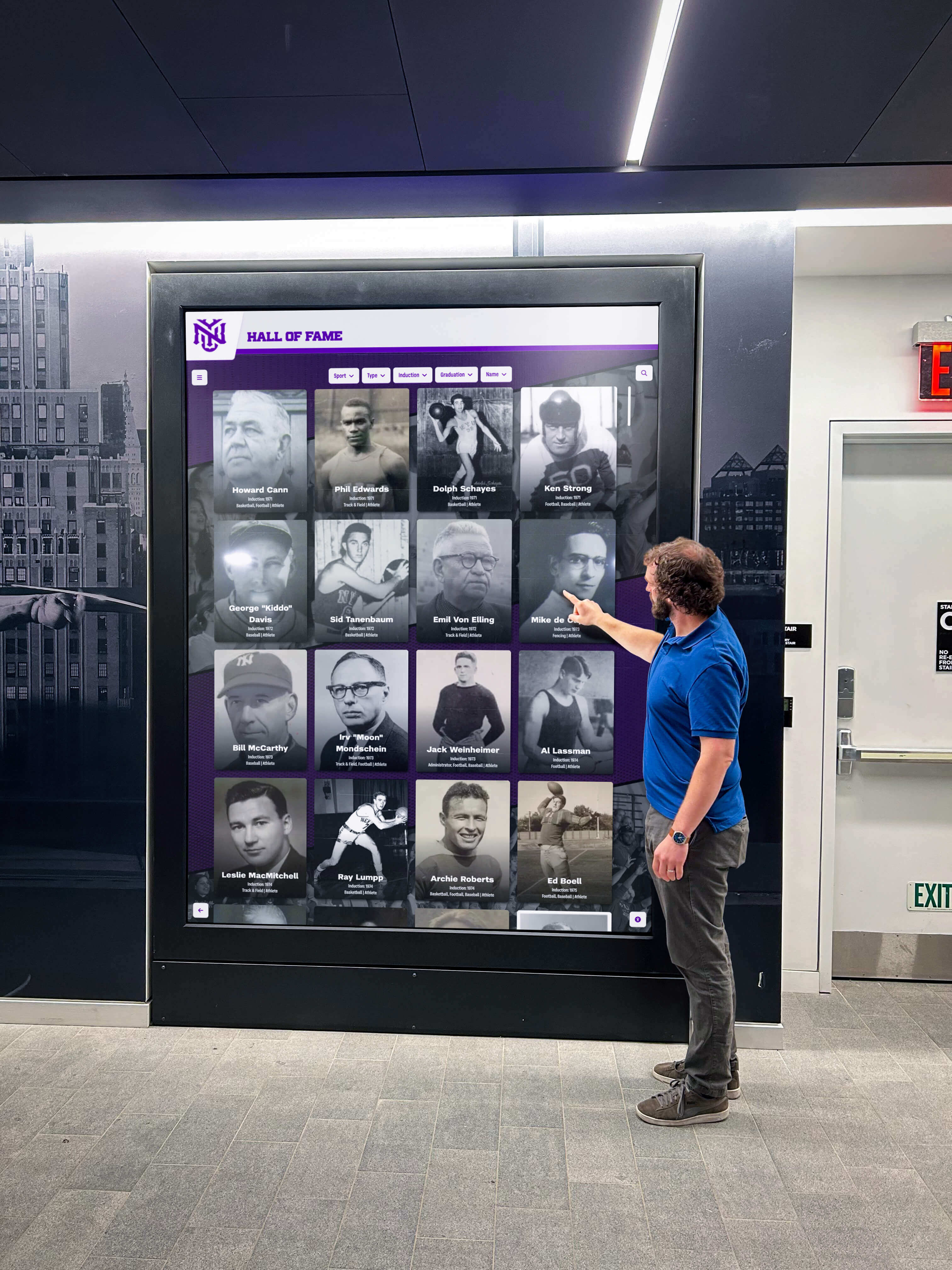
TouchWall.us provides complete systems including touchscreen displays, embedded computing, content management software, and implementation services. Organizations receive turnkey solutions eliminating hardware procurement research and system integration challenges. Templates designed for athletic records, academic achievement, and recognition accelerate deployment.
Browser-based content management enables non-technical staff to add profiles, upload media, and maintain recognition content without IT involvement. The system supports search functionality, category filtering, and multimedia integration bringing achievements to life through photos, videos, and statistics.
Strengths and Limitations
TouchWall.us focuses specifically on recognition applications, delivering solutions designed for celebrating achievements rather than adapted from generic digital signage platforms. Schools appreciate education-focused features and implementation support understanding institutional needs. Turnkey hardware-software bundles simplify procurement and eliminate integration challenges.
The platform serves organizations primarily implementing physical touchscreen displays rather than emphasizing web-accessible content extending reach beyond physical locations. Organizations wanting robust mobile experiences and web-based recognition alongside touchscreen kiosks may require solutions providing equal emphasis on both delivery channels.
Feature sets focus on core recognition functionality rather than advanced capabilities like auto-ranking athletic records, sophisticated engagement analytics, or extensive customization options. Organizations with straightforward recognition needs find focused functionality appropriate, while those requiring comprehensive capabilities should evaluate whether simplified approaches serve long-term objectives.
Best Fit Scenarios
Schools implementing single or small numbers of recognition kiosks benefit from turnkey solutions including hardware, software, and implementation services. Organizations preferring specialized recognition platforms over adapting generic digital signage appreciate purpose-built functionality. Institutions requiring comprehensive features like auto-ranking, extensive multimedia support, and robust web accessibility alongside physical displays should evaluate whether TouchWall.us capabilities match complete requirements.
9. DonorsWall.com: Donor Recognition Specialist
Best For: Nonprofit donor recognition, fundraising campaigns, capital campaigns Rating: ⭐⭐⭐⭐ 4.5/5.0
DonorsWall.com specializes in digital donor recognition solutions for nonprofits, schools, hospitals, and organizations conducting fundraising campaigns. The platform focuses exclusively on honoring supporters and visualizing campaign progress through digital displays and web-based recognition.
Core Capabilities
DonorsWall.com provides templates designed specifically for donor walls including giving level categorization, campaign progress visualization, donor listing by contribution tier, and timeline displays showing support history. Organizations manage donor information, contribution amounts, recognition preferences, and public messaging through administrative interfaces.
Privacy controls enable organizations to respect donor preferences regarding public recognition, allowing anonymous donations while still counting contributions toward campaign totals. The system handles complex recognition scenarios including memorial gifts, corporate matching, pledge fulfillment over time, and multi-year commitments.
Strengths and Limitations
DonorsWall.com’s specialized focus delivers functionality anticipating nonprofit needs better than generic platforms. Organizations conducting capital campaigns appreciate purpose-built tools for showing campaign progress, recognizing supporters by giving level, and updating displays as new contributions arrive. Integration with fundraising databases streamlines donor data synchronization.
The platform serves donor recognition exclusively rather than supporting broader institutional recognition including athletics, academics, or organizational history. Schools wanting comprehensive solutions honoring achievements across multiple domains alongside donor recognition require platforms supporting diverse content types rather than specialized single-purpose tools.
Physical touchscreen kiosk deployment receives less emphasis than web-based recognition displays. Organizations prioritizing lobby touchscreen installations alongside online recognition may need supplementary solutions for hardware management and kiosk-optimized user interfaces.
Best Fit Scenarios
Nonprofits conducting capital campaigns benefit from specialized donor recognition functionality. Schools implementing comprehensive recognition programs honoring achievements across athletics, academics, and philanthropy require platforms supporting diverse recognition types from unified systems. Organizations seeking donor recognition exclusively without broader institutional celebration needs find DonorsWall.com’s focused approach appropriate.
Key Decision Factors for Selecting Interactive Kiosk Software
Choosing appropriate interactive touchscreen kiosk software requires evaluating platforms against specific organizational requirements rather than selecting based on marketing claims or feature checklists. These critical dimensions determine long-term success or disappointment.
Primary Application Purpose
Different applications require fundamentally different software capabilities. Recognition displays celebrating achievements demand searchable databases, multimedia storytelling, and historical preservation. Wayfinding kiosks need map integration, location search, and route guidance. Directory systems require organizational hierarchies, contact information, and search functionality. Museum exhibits need rich media support, accessibility features, and content curation tools.
Generic platforms attempting to serve all purposes typically excel at none. Purpose-built solutions designed for specific applications deliver superior results within their domains. Organizations should prioritize platforms designed for their primary use case rather than selecting versatile tools requiring extensive adaptation.
Content Management Reality
The person maintaining content determines platform viability. Systems requiring developer involvement for routine updates inevitably display outdated information as staff avoid requesting technical assistance for simple changes. Organizations must honestly assess internal technical capabilities and select platforms matching available expertise.
Browser-based content management eliminates software installation requirements, enabling updates from any internet-connected device. Drag-and-drop interfaces reduce learning curves compared to database administration tools or custom content management systems. Pre-built templates accelerate content creation while maintaining professional quality without design expertise.
Hardware Integration Approach
Organizations already owning suitable displays prefer software-only solutions running on existing hardware. New deployments benefit from integrated hardware-software packages eliminating procurement research and compatibility concerns. Budget constraints affect whether commercial-grade displays or consumer hardware provide acceptable quality and reliability.
Platform-independent software allows hardware selection based on budget, installation requirements, and performance needs rather than vendor-mandated proprietary devices. Organizations should evaluate whether hardware flexibility or integrated turnkey solutions better serve specific situations.
Web Accessibility Requirements

Physical kiosks serve visitors present at installations, but web-accessible content extends reach to remote audiences. Alumni exploring recognition from across the country, donors checking campaign progress from home, or prospective families researching institutions online benefit from mobile-responsive web interfaces displaying identical content available on physical displays.
Platforms providing unified management for both physical kiosks and web access eliminate duplicate data entry and maintenance burden. Organizations should evaluate whether reaching remote audiences matters enough to prioritize platforms supporting both delivery channels from single content sources.
Budget and Total Ownership Cost
Interactive kiosk implementations incur costs beyond initial software licensing. Complete budgets account for content creation time, ongoing maintenance labor, hardware for physical displays, professional installation, staff training, and annual software updates. Organizations should evaluate total ownership costs rather than comparing software licensing fees exclusively.
Free or low-cost platforms may incur higher internal labor costs for setup, customization, and ongoing maintenance. Purpose-built solutions command higher prices but include implementation assistance, specialized features reducing content management time, and ongoing support eliminating internal technical burden. Evaluating total cost including internal labor provides accurate comparison.
Long-Term Maintenance Capacity
Recognition systems remain in service for 5-10 years, requiring ongoing content updates, software maintenance, and occasional hardware service. Organizations must honestly assess capacity for maintaining systems long-term rather than focusing exclusively on initial deployment.
Vendor-managed cloud platforms shift security updates, software maintenance, and infrastructure operations to providers equipped to handle technical responsibilities. Self-hosted solutions require internal IT resources or contracted support for maintaining systems across their lifecycles. Total ownership cost calculations must account for multi-year maintenance requirements.
Implementation Best Practices for Interactive Touchscreen Kiosks
Selecting appropriate software represents only one component of successful implementation. Organizations maximizing kiosk effectiveness follow systematic approaches addressing content development, user experience design, physical installation, and ongoing optimization.
Content Strategy and Preparation
Successful kiosk implementations begin with comprehensive content planning defining information architecture, navigation structure, content update workflows, and media asset requirements. Organizations should inventory existing content, identify gaps requiring creation, and establish processes for maintaining currency.
Content preparation typically requires more time than anticipated, particularly when creating recognition content from historical records, photographing inductees, or producing video interviews. Allocating sufficient resources for content development prevents launch delays and incomplete initial offerings undermining system credibility.
User Experience Testing
Touch interfaces must accommodate diverse users including elderly visitors, children, people with disabilities, and individuals unfamiliar with touchscreen technology. Testing with representative user groups identifies navigation confusion, overly small touch targets, confusing terminology, or accessibility barriers before public launch.
User testing often reveals assumptions about obvious navigation or interface conventions that confuse actual visitors. Observing users attempting to accomplish goals highlights usability problems invisible to designers familiar with content. Iterating based on user feedback dramatically improves final experience quality.
Physical Installation Considerations
Kiosk placement significantly affects usage. High-traffic locations maximize visibility, but positioning must allow comfortable standing interaction without blocking hallway flow. Lighting conditions affect screen visibility, with glare from windows or overhead fixtures reducing readability. Mounting height should accommodate wheelchair users and children while remaining visible to standing adults.
Professional installation including clean cable management, secure mounting, proper power supply, and network connectivity creates positive institutional impressions. Consumer displays on rolling carts undermine recognition program importance regardless of content quality. Organizations should budget adequately for installations matching assigned program significance.
Staff Training and Documentation
Staff managing kiosks require training on content management interfaces, common troubleshooting procedures, and accessing vendor support. Documentation preserving institutional knowledge prevents system abandonment when personnel transitions occur.
Training should cover not just system operation but also program policies about selection criteria, content standards, update schedules, and quality expectations. Documenting these policies ensures consistency across staff changes and maintains program integrity over time.
Choosing the Right Interactive Touchscreen Kiosk Software for Your Organization
The best interactive touchscreen kiosk software for your organization depends entirely on specific requirements, technical resources, budget parameters, and long-term objectives. Purpose-built platforms like Rocket Alumni Solutions excel when organizations prioritize recognition applications requiring specialized features, comprehensive implementation support, and proven reliability across hundreds of installations. Generic digital signage platforms with interactive capabilities serve organizations balancing scheduled announcements with occasional interactive content. Specialized niche solutions work for organizations with focused single-purpose requirements accepting limited versatility.
Organizations achieve optimal outcomes when systematically evaluating platforms against realistic capability assessments rather than selecting based on feature lists, vendor demonstrations, or pricing alone. Successful implementations combine appropriate technology selection with thoughtful content development, user experience testing, professional installation, comprehensive training, and ongoing management commitment.
The distinction between exceptional and disappointing interactive kiosk deployments rarely stems from technology limitations. More commonly, failures result from mismatched platform capabilities to organizational needs, unrealistic assessment of internal technical resources, inadequate content development, or insufficient ongoing management commitment. Organizations addressing these factors systematically position themselves for successful implementations delivering genuine value across multi-year lifecycles.
Whether implementing new recognition programs, replacing underperforming systems, or expanding existing installations, investing time in thorough evaluation prevents expensive mistakes while increasing likelihood that chosen solutions genuinely serve institutional objectives. The right platform becomes transparent infrastructure enabling focus on what matters most—engaging audiences, celebrating achievements, preserving history, and building lasting connections with communities.
Ready to explore how purpose-built interactive touchscreen kiosk software transforms institutional recognition and community engagement? Book a demo to discover capabilities specifically designed for celebrating achievements while creating engaging experiences impossible with generic platforms.
Disclaimer: This comparison is based on publicly available information as of March 2026. All product names and trademarks belong to their respective owners. Comparative statements reflect Rocket Alumni Solutions’ interpretation of available data and may change over time. All trademarks are property of their respective owners. Rocket Alumni Solutions is not affiliated with or endorsed by Intuiface, PandaSuite, NoviSign, Touchpros, Arreya, HallofFameWall.com, TouchWall.us, or DonorsWall.com. This content was produced by or on behalf of Rocket Alumni Solutions.































