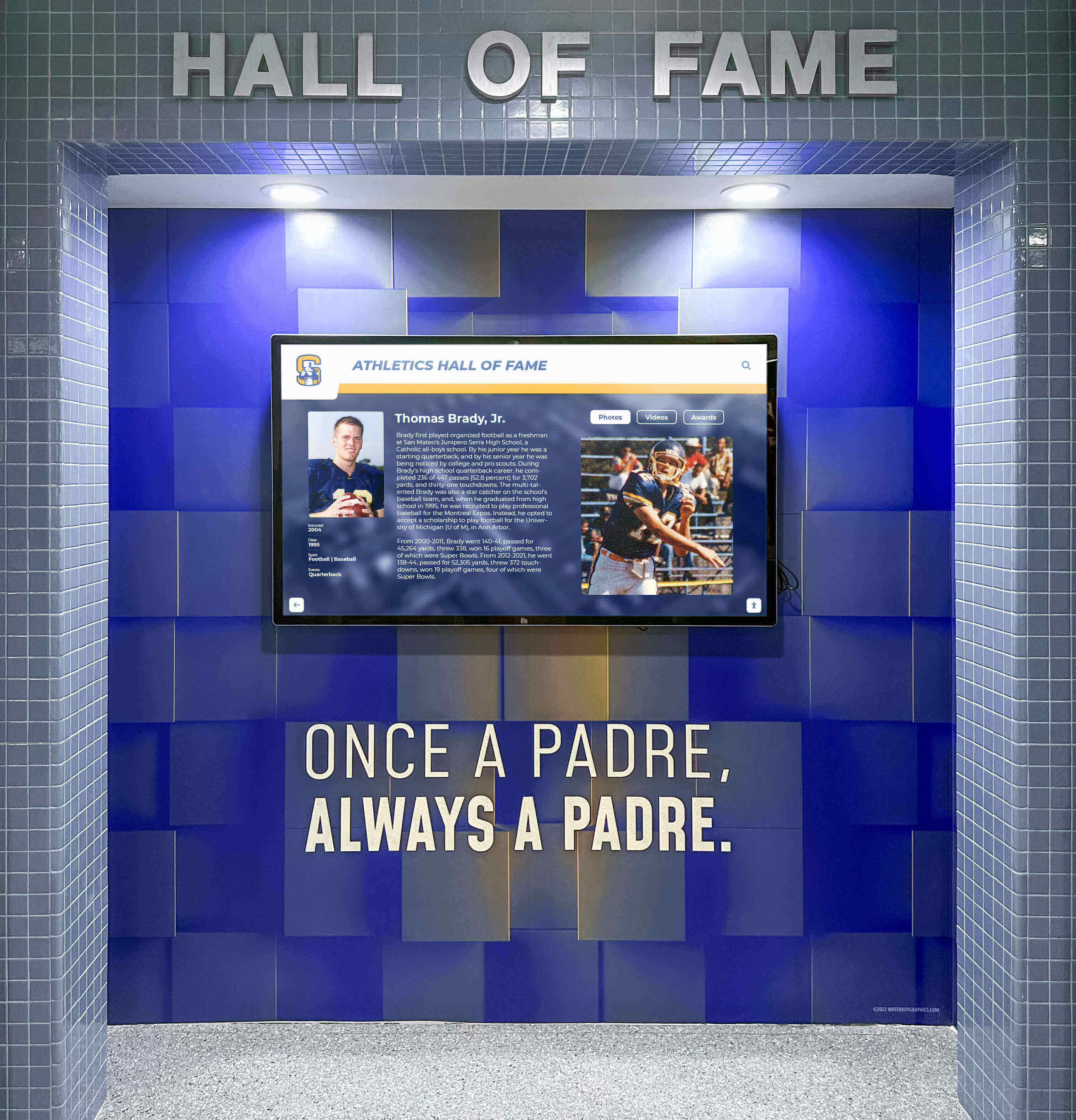




Schools, universities, athletic programs, nonprofit organizations, and cultural institutions managing halls of fame face a critical technology decision: which platform best preserves achievements, engages audiences, and supports long-term recognition goals. The wrong choice leads to abandoned systems, lost content, ongoing maintenance headaches, and recognition programs that fail to deliver value.
This evaluation examines ten hall of fame tools across athletics, donor recognition, arts programs, and historical preservation contexts. Each platform offers distinct approaches to digital recognition, from simple content management systems to purpose-built interactive displays. Understanding the capabilities, limitations, and ideal use cases for each option helps organizations select tools that genuinely serve recognition objectives rather than create new problems.
The comparison focuses on practical factors that determine long-term success: content management workflows, display flexibility, maintenance requirements, audience engagement features, and total ownership costs. Whether launching a new hall of fame or replacing an underperforming system, these evaluations provide the context needed to make informed decisions aligned with organizational needs and resources.
Evaluating Hall of Fame Tools: Critical Success Factors
Effective hall of fame tools must address three core requirements: simplifying content management for busy administrators, creating engaging experiences that audiences actually use, and maintaining performance over 5-10 year lifecycles without expensive overhauls. Systems failing any of these requirements become burdens rather than assets, regardless of initial appeal or vendor promises. This guide evaluates platforms against these practical success factors based on implementation patterns across hundreds of recognition programs.
1. Rocket Alumni Solutions: Purpose-Built Interactive Recognition
Rocket Alumni Solutions provides touchscreen-based digital recognition platforms specifically designed for schools, universities, athletic programs, and donor recognition applications. The system combines dedicated hardware, web-based content management, and auto-ranking algorithms purpose-built for recognition contexts.
Core Capabilities
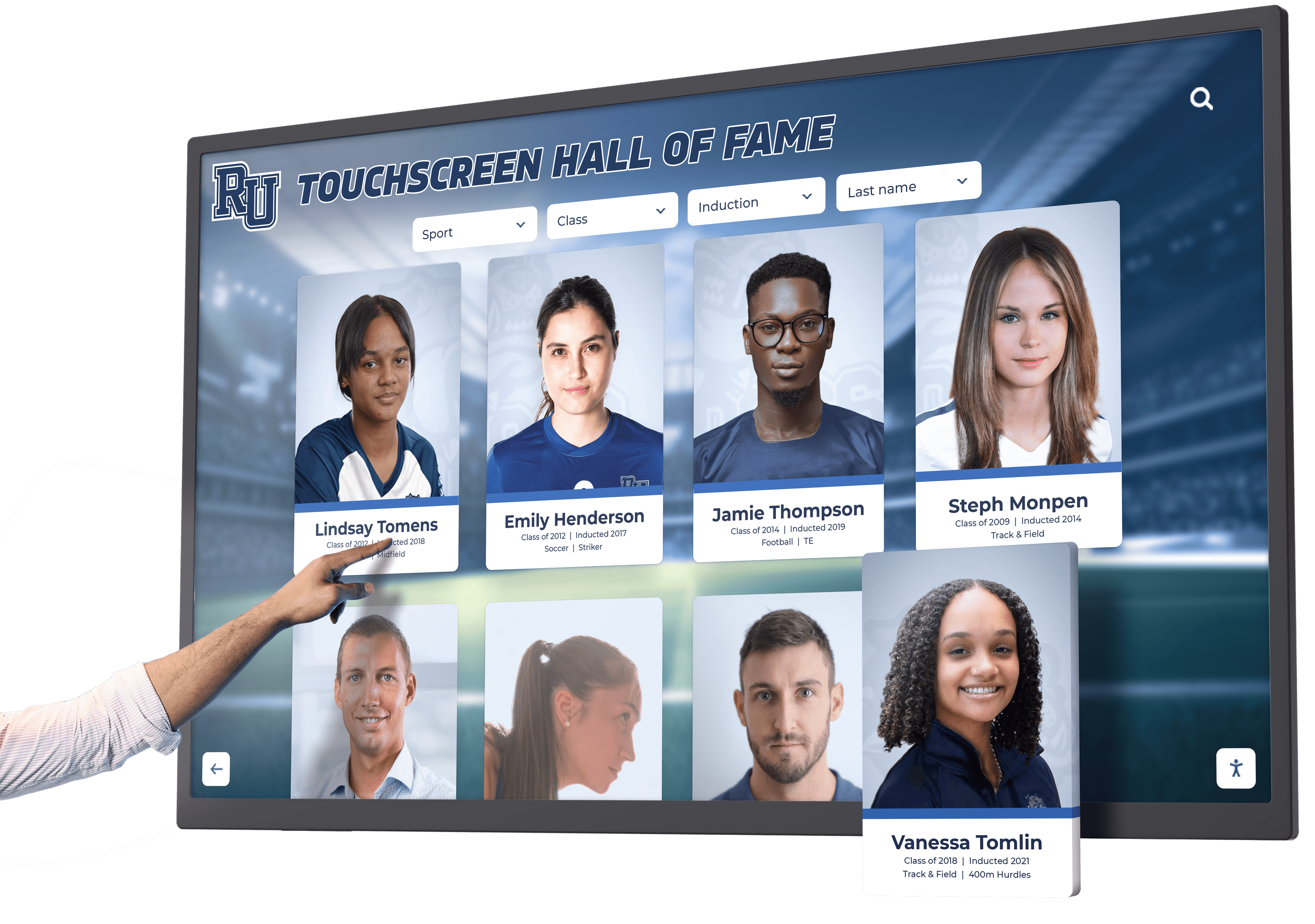
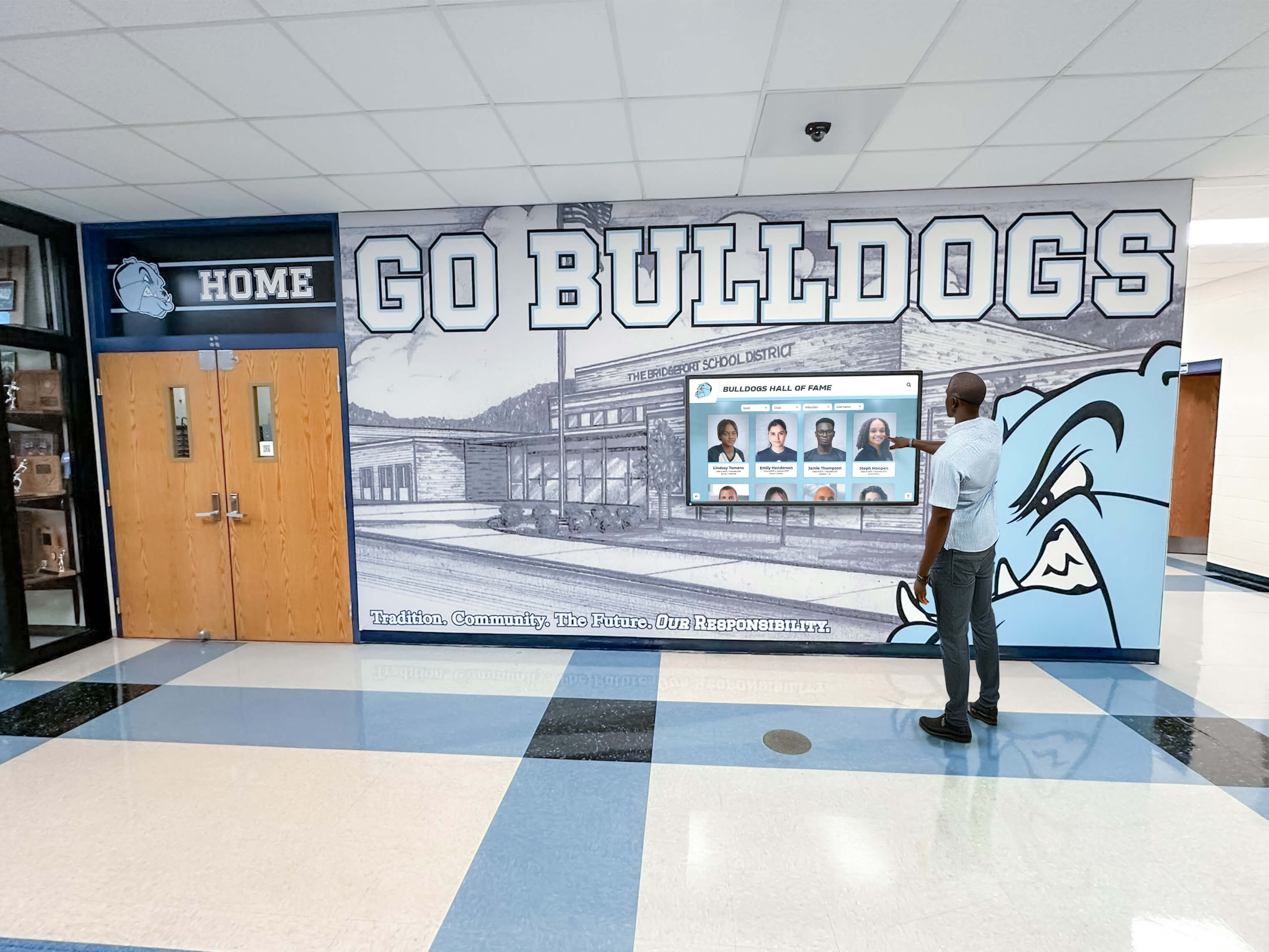

The platform centers on interactive touchscreen displays ranging from 43" to 86" that present searchable, filterable recognition content. Content managers work through browser-based interfaces to add inductees, achievements, records, and donor information. The system automatically ranks records across timeframes, handles multimedia content including photos and videos, and supports QR code unlocking that transfers recognition content to personal devices.
Auto-ranking represents a distinctive feature—the system automatically orders athletic records chronologically and by performance level without manual sorting. Template-driven layouts accommodate diverse recognition formats from traditional hall of fame inductees to donor walls, academic achievement displays, and multi-sport record boards. Pre-built templates accelerate deployment while supporting customization to match institutional branding.

Implementation and Support Model
Rocket includes white-glove implementation services covering hardware installation, content migration, staff training, and ongoing support. This full-service approach particularly benefits organizations lacking dedicated IT staff or those transitioning from physical plaques where content exists only on walls rather than in databases. The company maintains weekly software updates adding features, addressing issues, and improving performance based on client feedback.
Hardware includes embedded computing modules running locked-down software preventing unauthorized changes or security vulnerabilities common in general-purpose displays. Multi-location deployments sync content automatically, maintaining consistency across campus installations without duplicate data entry.
Ideal Use Cases
Schools and universities managing comprehensive athletic recognition across multiple sports benefit from auto-ranking capabilities and sport-specific templates. Organizations with limited technical staff appreciate full-service implementation and ongoing support that eliminate internal maintenance burdens. Donor recognition programs requiring frequent updates as campaigns progress value browser-based content management enabling real-time recognition without IT intervention.
Limitations and Considerations
Rocket represents purpose-built hardware investment rather than software-only solutions, requiring budget allocation for display hardware alongside platform licensing. Organizations already owning suitable displays may find hardware requirements increase implementation costs. The system focuses specifically on recognition applications rather than broader digital signage needs like wayfinding or event promotion, making it less suitable for organizations seeking single platforms handling diverse content types.
2. WordPress with Custom Themes: Flexible Content Management
WordPress powers millions of websites and adapts to hall of fame applications through custom theme development and plugin extensions. Organizations familiar with WordPress or employing staff with WordPress experience often consider it for digital recognition projects.
Core Capabilities
WordPress provides robust content management supporting custom post types, taxonomies, multimedia handling, and user permission systems. Developers create custom themes rendering hall of fame content in formats matching institutional design requirements. Plugins extend functionality, adding features like advanced search, filtering, galleries, and interactive elements.
The platform excels at web-based recognition accessible through standard browsers on desktops, tablets, and smartphones. Organizations already maintaining WordPress installations for primary websites can integrate hall of fame sections within existing site architectures, providing seamless navigation between recognition content and other institutional information.
Implementation and Support Model
WordPress itself is open-source and free, but functional hall of fame implementations require custom theme development, plugin configuration, and ongoing maintenance. Organizations need either internal staff with WordPress expertise or relationships with development agencies providing these services. Community support through forums and documentation assists with common issues, while complex problems require technical expertise to resolve.
Security updates release regularly, requiring consistent attention to maintain protected systems. Plugin compatibility issues occasionally emerge during updates, necessitating testing before applying changes to production systems.
Ideal Use Cases
Organizations already using WordPress for primary websites with internal or contracted WordPress expertise can efficiently extend existing systems to include recognition content. Programs prioritizing web accessibility over physical display installations benefit from WordPress’s mobile-responsive design capabilities. Institutions valuing complete design control and willing to invest in custom development achieve highly branded experiences matching exact specifications.
Limitations and Considerations
WordPress requires technical expertise for setup, customization, and maintenance—it’s a development platform rather than turnkey solution. Organizations without internal technical resources face ongoing costs for developer support. Physical touchscreen installations require additional hardware selection, configuration, and kiosk lockdown solutions preventing users from accessing system settings or browsing beyond intended content.
Auto-ranking, sport-specific record management, and specialized recognition workflows require custom development rather than coming built-in. Security represents ongoing responsibility, with compromise risks if updates aren’t applied promptly or plugins introduce vulnerabilities.
3. Rise Vision: Cloud-Based Digital Signage Platform
Rise Vision provides cloud-based digital signage software supporting recognition content alongside broader informational displays. The platform uses subscription pricing with content managed through web interfaces and displayed on organization-provided screens.
Core Capabilities
Rise Vision enables content creation using pre-built templates and custom HTML layouts. Users schedule content rotation, manage multiple displays from central dashboards, and organize content into playlists appearing at specified intervals. The system supports images, videos, web pages, social media feeds, and data integrations from various sources.
Multi-screen management allows organizations to maintain consistent content across multiple locations while enabling location-specific variations when needed. Real-time content updates publish immediately to connected displays without manual intervention at screen locations.
Implementation and Support Model
The platform operates on monthly or annual subscription models with pricing scaling based on screen counts. Organizations provide their own display hardware, selecting screens meeting their size and quality requirements. Rise Vision provides web-based content creation tools, display management interfaces, and technical support for platform-related issues.
Getting started involves creating accounts, designing initial content layouts, configuring display devices with Rise Vision player software, and publishing content to screens. The company provides documentation, video tutorials, and customer support assisting with setup and troubleshooting.
Ideal Use Cases
Organizations managing multiple displays showing varied content types—athletic recognition combined with event schedules, announcements, and promotional content—benefit from Rise Vision’s flexibility. Programs with existing suitable display hardware can add digital signage capabilities through software subscription without major hardware investments. Schools seeking centralized control over multiple screens across campus facilities appreciate cloud-based management enabling updates from any internet-connected device.
Limitations and Considerations
Rise Vision functions as general digital signage rather than purpose-built recognition software. Features specific to hall of fame applications—auto-ranking records, searchable inductee databases, interactive filtering—require custom development work beyond standard platform capabilities. The system supports scheduled content rotation more naturally than on-demand interactive exploration of recognition content.
Organizations need strategies for creating recognition-specific content layouts that work within digital signage frameworks designed for passive viewing rather than active audience interaction. Touchscreen interactivity requires additional configuration beyond standard Rise Vision implementations focused on display-only scenarios.
4. Google Sites: Simple Web-Based Recognition
Google Sites provides free website creation tools within Google Workspace environments. Organizations already using Gmail, Google Drive, and related services can build recognition websites without additional costs or technical complexity.
Core Capabilities
Google Sites uses drag-and-drop interfaces enabling non-technical users to create simple websites without coding knowledge. Pages support text, images, embedded videos, file attachments, and content from other Google services. Built-in templates provide starting points, while customization options allow branding adjustments matching institutional color schemes and logos.
Sites integrate seamlessly with Google Drive for media storage, Google Calendar for event information, Google Forms for nomination submissions, and Google Sheets for data presentation. Multiple editors can collaborate on content updates with version history tracking changes and enabling rollbacks if needed.
Implementation and Support Model
Google Sites is free for organizations using Google Workspace, with no additional licensing costs. Setup requires Google accounts and basic familiarity with Google’s web applications. Google provides documentation and community forums supporting users, though advanced customization requires understanding CSS and HTML limitations within the platform.
Site maintenance involves content updates through simple web interfaces accessible from any device. No software installation or server management required—Google handles technical infrastructure automatically.
Ideal Use Cases
Small programs with limited budgets benefit from zero-cost implementation and hosting. Organizations prioritizing simple content management over visual sophistication find Google Sites’ straightforward interface reduces training requirements. Schools already standardized on Google Workspace eliminate integration complexity by keeping recognition content within familiar tool ecosystems.
Programs creating web-only recognition without physical display requirements avoid hardware costs and management complexity. Academic departments, smaller athletic programs, and volunteer-run organizations with minimal technical resources can maintain recognition sites without ongoing IT support.
Limitations and Considerations
Google Sites provides limited design flexibility compared to custom websites or purpose-built recognition platforms. Templates constrain layouts, and customization options remain basic even when implementing custom HTML. The platform doesn’t include features specific to recognition contexts like automatic record ranking, interactive filtering by achievement type, or specialized inductee profile templates.
Physical display implementations require supplementary solutions for hardware selection, kiosk lockdown, and content presentation on touchscreens. Google Sites creates acceptable web experiences but lacks interactivity and visual impact expected from dedicated hall of fame installations in high-traffic institutional locations.
5. Four Winds Interactive: Enterprise Digital Signage
Four Winds Interactive (FWI) provides enterprise-focused digital signage solutions serving corporate campuses, educational institutions, healthcare systems, and large organizations managing extensive display networks. The platform emphasizes workflow management, content approval processes, and multi-location coordination.
Core Capabilities
FWI supports content creation through template-based editors, custom HTML development, and third-party integrations. The system manages complex content schedules, dayparting strategies, and emergency alert capabilities. Role-based permissions enable distributed content creation while maintaining central oversight and approval workflows.
The platform includes analytics tracking content performance, display status monitoring, and proof-of-play reporting. Organizations can segment displays into zones receiving different content mixes while maintaining centralized control over branding standards and approved messaging. Social media integration, data feeds, and live information sources update displays automatically.
Implementation and Support Model
Four Winds Interactive uses enterprise licensing models with pricing based on display counts, feature requirements, and support levels. Implementation typically involves professional services teams assisting with system configuration, content migration, staff training, and integration with existing institutional systems.
The company provides ongoing account management, technical support, and software updates maintaining platform security and functionality. Organizations typically assign internal administrators managing day-to-day content operations while relying on FWI support for technical issues and system optimization.
Ideal Use Cases
Large institutions managing dozens or hundreds of displays across multiple buildings or campuses benefit from centralized control and distributed content creation capabilities. Organizations requiring content approval workflows before publication appreciate built-in governance features. Enterprises integrating digital signage with emergency communication systems value FWI’s alert capabilities overriding scheduled content during critical situations.
Programs using displays for multiple purposes—recognition content combined with wayfinding, event promotion, safety information, and institutional messaging—benefit from flexible content management supporting diverse use cases within single platforms.
Limitations and Considerations
Enterprise pricing positions FWI above budget ranges for smaller programs or organizations managing limited display counts. The platform’s breadth of features creates complexity that may exceed requirements for straightforward recognition applications. Organizations seeking purpose-built hall of fame tools may find general digital signage platforms require significant customization to deliver recognition-specific functionality like searchable inductee databases or auto-ranking records.
Setup and configuration complexity typically requires professional services engagement rather than self-service implementation. This front-loads costs and extends deployment timelines compared to simpler alternatives designed for immediate use.
6. Canva with Display Integration: Design-First Approach
Canva provides graphic design tools accessible to non-designers through template libraries and intuitive editing interfaces. Organizations use Canva to create recognition graphics displayed on monitors or printed as physical materials.
Core Capabilities
Canva’s template library includes designs for awards, certificates, social media graphics, presentations, and posters adaptable to recognition purposes. Users customize templates by replacing placeholder content with inductee information, achievement details, and institutional branding elements. The platform supports team collaboration with shared design access and brand kit features maintaining visual consistency.
Canva Pro subscriptions add capabilities like background removal, premium templates, brand kits, and animation features creating motion graphics for digital displays. Designs export as images or videos suitable for display on screens or sharing through social media and websites.
Implementation and Support Model
Canva operates on freemium models with free accounts providing basic functionality and paid subscriptions unlocking additional features. The platform requires no software installation, operating entirely through web browsers. Users create designs online, export final products, and manage design libraries through Canva’s cloud infrastructure.
The company provides extensive tutorial content, templates, and community support assisting users in creating professional-looking designs without formal graphic design training. Premium subscriptions include priority support for technical issues or account questions.
Ideal Use Cases
Organizations creating static recognition graphics for display on existing screens benefit from Canva’s design accessibility. Programs announcing new inductees through social media or websites use Canva to create shareable graphics maintaining consistent branding. Schools printing recognition materials supplement or replace physical plaques with Canva-designed certificates or display prints.
Small organizations without dedicated designers appreciate tools enabling staff to create professional-appearing recognition materials without specialized skills or expensive design software. Programs combining digital displays with printed materials maintain visual consistency by using single design platforms for both output types.
Limitations and Considerations
Canva creates static designs rather than interactive experiences. Recognition displays show fixed images or videos without search, filtering, or on-demand content exploration capabilities. Organizations must manually create new designs for each inductee or achievement rather than managing content through databases that automatically generate displays.
The approach works for simple recognition needs but scales poorly as inductee counts grow and content updates become frequent. Programs seeking interactive exploration of historical achievements find static graphics insufficient regardless of visual quality. Canva serves as content creation tool requiring separate systems for content management, display control, and audience interaction.
7. Custom Development: Fully Tailored Solutions
Organizations with specific requirements unmet by commercial platforms sometimes commission custom software development creating purpose-built hall of fame systems matching exact specifications. This approach provides maximum flexibility while introducing unique considerations around costs, timelines, and long-term maintenance.
Core Capabilities
Custom development delivers precisely what organizations specify—no more, no less. Systems can integrate with existing institutional databases, match exact design requirements, implement unique workflow processes, and incorporate features unavailable in commercial products. Development teams create both content management interfaces for administrators and public-facing displays for audience engagement.
Technical architecture choices remain completely flexible, enabling optimization for specific use cases, integration with legacy systems, and implementation using preferred technology stacks. Organizations retain complete control over features, user experiences, and system evolution as requirements change over time.
Implementation and Support Model
Custom development begins with requirements definition, system design, development sprints, testing phases, and deployment. Organizations contract with development firms or employ internal development teams creating systems from scratch. This process typically spans months, with costs reflecting development complexity, feature scope, and quality requirements.
Post-launch maintenance requires ongoing access to development resources for bug fixes, security updates, feature additions, and troubleshooting. Organizations must budget for long-term support either through retained relationships with original developers or by maintaining internal technical teams capable of supporting custom systems.

Ideal Use Cases
Large institutions with complex integration requirements benefit from custom development connecting hall of fame systems to student information systems, donor databases, athletic statistics platforms, and content management systems. Organizations with unusual workflow requirements or unique use cases unsupported by commercial platforms justify custom development costs through functionality exactly matching operational needs.
Institutions employing internal development teams that can build and maintain systems long-term without external dependencies achieve cost advantages by avoiding commercial licensing fees. Universities leveraging student development projects sometimes create recognition systems as educational experiences, reducing development costs while training future software engineers.
Limitations and Considerations
Custom development represents the most expensive and time-consuming implementation option. Development costs typically exceed commercial licensing fees significantly, particularly when accounting for long-term maintenance requirements. Timeline unpredictability affects planning, with development often taking longer than initially estimated.
Organizations become responsible for system security, performance optimization, bug fixes, and feature evolution without vendor support. Development team turnover creates risks if knowledge concentrates in individuals who later leave organizations. Software maintenance responsibilities continue indefinitely, with systems requiring ongoing investment long after initial deployment.
8. ScreenCloud: Content Distribution Platform
ScreenCloud provides cloud-based screen management software positioning itself as accessible digital signage for organizations wanting to control display content remotely without complex infrastructure. The platform emphasizes ease of use and quick deployment across various screen types.
Core Capabilities
ScreenCloud manages content distribution to displays through cloud-based control panels. Users create playlists combining images, videos, web pages, social media feeds, and app-based content sources. The system schedules content rotation, manages multiple screens organized into groups, and updates content in real-time without physical access to displays.
App marketplace integration extends functionality by connecting external data sources, design tools, social platforms, and specialized content providers. Organizations can display weather information, news feeds, analytics dashboards, and custom web applications alongside recognition content. Template libraries provide starting points for common use cases including employee recognition, event schedules, and directory information.
Implementation and Support Model
ScreenCloud uses subscription pricing based on screen counts with monthly or annual billing options. Organizations provide their own display hardware and internet connectivity. Setup involves installing ScreenCloud player software on media players connected to displays, then managing content through web-based dashboards.
The company provides documentation, video tutorials, and email support assisting with setup and ongoing operations. Implementation typically completes within days rather than weeks or months, positioning the platform as quick-start option for organizations wanting immediate results.
Ideal Use Cases
Organizations seeking simple content rotation across multiple displays without complex workflows benefit from ScreenCloud’s straightforward operation. Programs displaying recognition content alongside other information types like announcements, event calendars, and social media feeds appreciate flexible content mixing capabilities. Schools wanting to quickly activate unused displays or digital signage projects without extended planning phases find rapid deployment appealing.
Small programs managing limited screen counts within budget constraints use affordable subscription pricing to add digital recognition capabilities without major capital investments.
Limitations and Considerations
Like other general digital signage platforms, ScreenCloud lacks recognition-specific features. Organizations must create hall of fame content using external tools, then display static graphics through ScreenCloud’s distribution system. Interactive exploration of inductee databases, searchable achievement records, and dynamic content presentation require custom development beyond platform capabilities.
The system excels at displaying content but provides limited support for creating recognition-specific layouts or managing inductee data. Programs need supplementary tools for content creation, database management, and designing recognition-appropriate display formats.
9. NoviSign: Visual Content Scheduling
NoviSign delivers digital signage software focusing on visual content management and scheduling across networked displays. The platform targets retail, hospitality, corporate communications, and educational institutions seeking professional display control without technical complexity.
Core Capabilities
NoviSign provides template-based content creation, drag-and-drop playlist building, and visual scheduling interfaces. Users design screens by positioning zones displaying different content types—images, videos, web content, data feeds, and social media. Content schedules accommodate time-based rotation, enabling different content during various hours or days.
Multi-screen management organizes displays into groups receiving common content while supporting location-specific variations. Role-based permissions enable distributed content creation with administrative oversight. The platform includes analytics tracking content performance and display status monitoring alerting administrators to offline screens.
Implementation and Support Model
NoviSign uses subscription pricing with tiers based on screen counts and feature requirements. Free trials enable evaluation before committing to paid subscriptions. Organizations provide display hardware, with NoviSign supplying player software running on various media devices including Raspberry Pi, Chrome OS, Android, and Windows systems.
Setup involves creating accounts, designing initial content layouts, installing player software on media devices, and publishing content to screens. The company provides documentation, tutorials, and customer support assisting with implementation and troubleshooting.
Ideal Use Cases
Organizations managing moderate screen counts seeking balance between simplicity and features find NoviSign’s capabilities appropriate. Programs displaying recognition content as one component of broader digital signage networks use playlist management to integrate hall of fame content with other messaging. Educational institutions showing athletic achievements alongside academic recognition, event promotion, and campus information appreciate flexible content mixing.
Organizations wanting professional display control without enterprise platform complexity or costs position NoviSign as middle-tier option between simple solutions and complex enterprise systems.
Limitations and Considerations
NoviSign delivers digital signage capabilities rather than purpose-built recognition features. Interactive hall of fame exploration, auto-ranking records, searchable inductee databases, and recognition-specific workflows require development beyond platform capabilities. Organizations primarily display static recognition content in rotation rather than enabling interactive audience engagement.
Like other digital signage platforms, NoviSign handles content distribution effectively but provides limited support for creating or managing recognition-specific content. Supplementary tools handle database management, content creation, and designing layouts appropriate for recognition contexts.
10. Social Media Platforms: Digital Recognition Extension
While not traditional hall of fame tools, social media platforms including Facebook, Instagram, Twitter/X, and LinkedIn serve recognition functions by announcing achievements, celebrating inductees, and maintaining searchable archives of accomplishments accessible to broad audiences.
Core Capabilities
Social media platforms provide free publishing channels reaching audiences on devices they already use regularly. Organizations post inductee announcements, achievement celebrations, historical retrospectives, and multimedia content including photos and videos. Hashtag strategies organize content into discoverable collections, while tagging connects posts to recognized individuals.
Platforms support various content formats from simple text announcements to photo galleries, video highlights, and story sequences. Comments and reactions enable audience engagement, creating dialogue around recognition while amplifying reach through social sharing. Search functionality allows audiences to find specific inductees or achievements within organizational profile histories.
Implementation and Support Model
Creating organizational social media accounts costs nothing, though building audiences requires consistent content creation and engagement over time. Organizations manage posts through platform interfaces accessible via web browsers or mobile apps. No technical infrastructure required beyond internet connectivity and devices for content creation.
Most platforms offer business or organizational account features including analytics, post scheduling, and team member collaboration. Paid advertising options amplify reach beyond organic followers when organizations want broader visibility for recognition content.
Ideal Use Cases
Organizations seeking zero-cost recognition extension supplement physical halls of fame or websites with social media announcements reaching broader audiences. Programs recognizing ongoing achievements—monthly awards, weekly highlights, game performances—benefit from social media’s suitability for frequent updates. Schools engaging younger audiences, alumni, and community members use platforms where these populations already spend time rather than requiring separate app downloads or website visits.
Social media announcements create immediate recognition moments while preserved posts form searchable archives documenting program history. Organizations combine social recognition with dedicated halls of fame, using each channel’s strengths—social media for immediate reach and conversation, dedicated systems for comprehensive, permanent recognition.
Limitations and Considerations
Social media functions as supplement rather than replacement for dedicated hall of fame systems. Platform control rests with social companies, which change algorithms, modify features, and potentially discontinue services affecting content visibility and longevity. Posts quickly buried by subsequent content reduce discoverability, making social media better suited for announcing recognition than serving as permanent achievement archives.
Privacy considerations affect feasibility depending on recognized populations—some organizations face restrictions on posting student images or information publicly. Design control remains limited to platform parameters, preventing the branded, institutional experiences possible with dedicated recognition systems. Comprehensive digital recognition programs typically use social media as one component within broader strategies rather than primary recognition platforms.
Selecting the Right Hall of Fame Tool for Your Organization
The platform serving your recognition objectives depends on several factors including organizational size, budget parameters, technical resources, feature requirements, and long-term maintenance capacity. Organizations implementing successful hall of fame systems carefully evaluate options against specific needs rather than selecting based solely on features or costs.
Budget Considerations
Hall of fame tool costs span from zero for platforms like Google Sites and social media through hundreds of dollars monthly for digital signage subscriptions to thousands or tens of thousands for purpose-built systems or custom development. Effective budgeting accounts for total ownership costs including implementation, ongoing licensing, content management labor, technical support, and hardware when applicable.
Free and low-cost options appeal to small programs but may incur hidden costs through staff time required for setup, content creation, ongoing maintenance, and workarounds for missing features. Purpose-built platforms command higher prices but include features, templates, and support reducing internal labor requirements. Organizations should evaluate costs holistically, considering both direct fees and internal resource requirements.
Technical Resource Requirements
Organizations employing dedicated IT staff, web developers, or technical administrators can leverage platforms requiring configuration, customization, and ongoing maintenance. Schools without technical resources benefit from turnkey solutions including implementation services and ongoing support that eliminate internal technical burdens.
WordPress, custom development, and platforms requiring extensive configuration demand technical expertise throughout system lifecycles. Digital signage platforms balance ease of use with enough flexibility to support diverse use cases. Purpose-built recognition systems like Rocket Alumni Solutions handle technical complexity internally, enabling non-technical staff to manage content without IT involvement.
Feature Requirements
Different recognition contexts require different capabilities. Athletic record boards need auto-ranking, sport-specific templates, and record progression visualization. Donor recognition requires giving level categorization, campaign progress tracking, and frequent updates as gifts arrive. Arts programs showcase performances, exhibitions, and creative works differently than athletic achievements.
Organizations should list must-have features distinguishing between essential requirements and nice-to-have options. Platforms lacking critical capabilities create frustration regardless of other strengths. Conversely, paying for sophisticated features you’ll never use wastes budget that could serve other priorities.
Long-Term Maintenance Capacity
Recognition systems require ongoing attention including content updates, software maintenance, security patches, hardware care when applicable, and feature evolution as needs change. Organizations should honestly assess capacity for maintaining systems over 5-10 year periods rather than focusing exclusively on initial deployment.
Platforms requiring frequent technical intervention burden organizations lacking dedicated resources. Turnkey solutions with vendor-managed maintenance shift responsibility to providers better positioned to handle technical operations. This typically costs more but prevents recognition systems from languishing due to neglected maintenance.
Physical Display Requirements
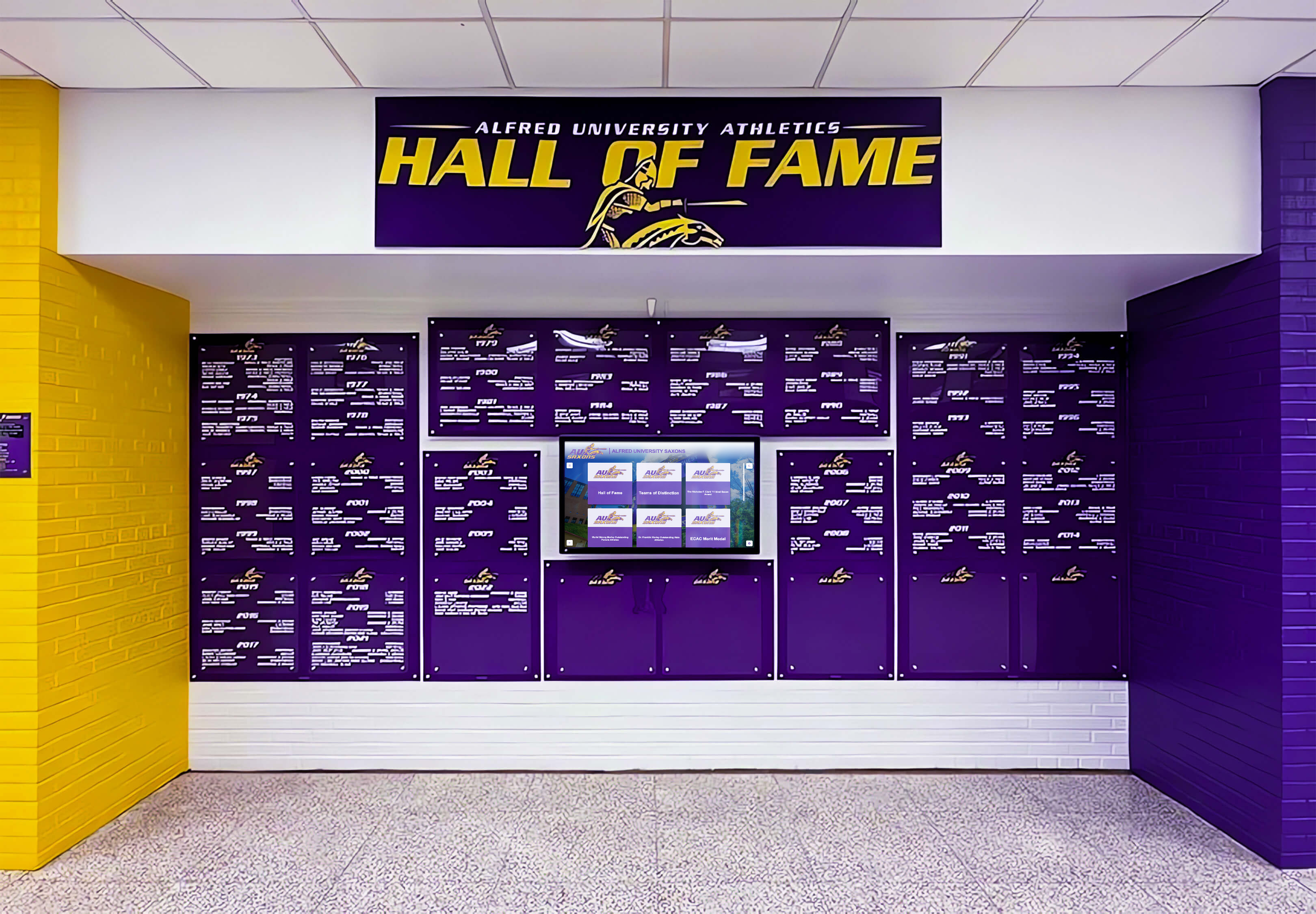
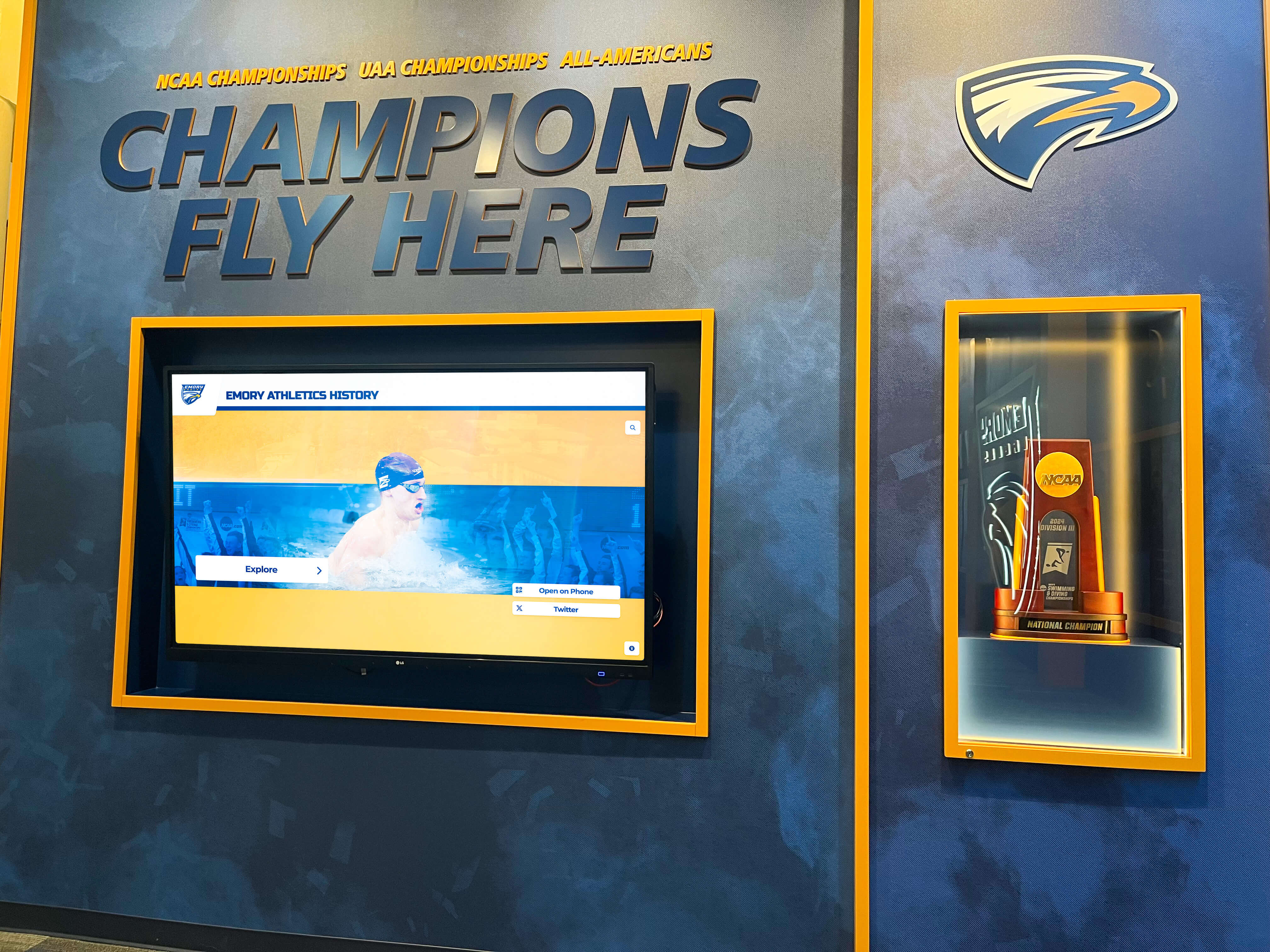
Organizations implementing hall of fame installations in lobbies, gymnasiums, or donor centers must address physical display requirements including hardware selection, mounting, power, internet connectivity, security, and environmental factors. Purpose-built systems like Rocket include hardware as integrated solutions, while digital signage platforms require separate hardware procurement and configuration.
Display quality significantly affects visitor impressions—professional installations with commercial-grade screens, proper mounting, and clean cable management create positive institutional impressions, while consumer TVs on rolling carts undermine recognition objectives regardless of content quality. Organizations should budget adequately for display hardware matching the importance assigned to recognition programs.
Content Management Workflows
Different platforms support different content management approaches affecting staff efficiency and recognition timeliness. Database-driven systems enable efficient updates through forms and bulk imports. Static design tools require creating new graphics for each inductee. Some platforms support distributed content creation with approval workflows, while others centralize all operations with single administrators.
Organizations should evaluate content management workflows against staff availability, technical skills, and update frequency requirements. Recognition programs with frequent additions benefit from efficient update processes, while programs inducting small groups annually tolerate more labor-intensive workflows.
Implementing Your Hall of Fame System Successfully
Selecting appropriate tools represents only one component of successful hall of fame implementation. Organizations maximizing recognition impact follow systematic implementation approaches addressing content development, stakeholder engagement, launch planning, and ongoing optimization.
Content Planning and Preparation
Successful implementations begin with comprehensive content planning defining recognition categories, selection criteria, inductee information requirements, and media asset needs. Organizations should inventory existing recognition content, identify gaps requiring research or content creation, and establish ongoing content pipelines for future additions.
Content preparation often represents more work than anticipated, particularly when migrating historical recognition from physical displays or paper records into digital systems. Allocating sufficient time and resources for content development prevents launch delays and incomplete initial offerings that undermine system credibility.
Stakeholder Engagement and Communications
Recognition systems serve multiple stakeholders including inductees themselves, families, current program participants, alumni, donors, and broader communities. Effective implementations engage stakeholders throughout planning, incorporating feedback about content priorities, presentation approaches, and accessibility features.
Launch communications should reach all relevant audiences explaining what’s available, where to find it, and how to engage with recognition content. Organizations often underestimate promotional requirements, assuming systems will generate organic interest without active communications strategies.
Training and Documentation
Staff responsible for managing recognition systems require training on content management interfaces, workflow processes, troubleshooting common issues, and accessing support resources. Comprehensive documentation preserving institutional knowledge prevents system abandonment when staff transitions occur.
Training investments pay long-term dividends through efficient operations, proper system utilization, and staff confidence maintaining recognition programs without constant external support. Organizations should document not just how to operate systems, but also program policies about selection criteria, content standards, and update schedules ensuring consistency across staff changes.
Measuring Recognition Impact
Effective recognition programs define success metrics beyond deployment completion. Metrics might include system usage analytics, stakeholder satisfaction surveys, increased donor engagement, improved alumni connections, or enhanced institutional pride measures. Regular assessment enables optimization addressing usage patterns, content gaps, and evolving stakeholder needs.
Organizations should establish baseline measurements before implementation and track changes attributable to new recognition approaches. This evidence-based approach informs resource allocation decisions and builds support for maintaining and expanding recognition programs.
Conclusion: Matching Tools to Recognition Objectives
The best hall of fame tool for your organization depends entirely on your specific context—recognition objectives, audience needs, budget parameters, technical resources, and long-term maintenance capacity. Purpose-built platforms like Rocket Alumni Solutions excel when organizations prioritize comprehensive feature sets, white-glove implementation, and ongoing support enabling non-technical staff to manage sophisticated recognition programs. General digital signage platforms serve organizations balancing recognition with broader content needs across multiple displays. Simple website builders and social media work for programs with minimal budgets accepting functional limitations in exchange for zero-cost operation.
Organizations achieve best outcomes when matching tool selection to realistic assessments of resources and requirements rather than choosing based on feature lists or vendor promises alone. Successful recognition programs combine appropriate technology with thoughtful content development, stakeholder engagement, and ongoing management commitment that brings recognition objectives to life regardless of underlying platforms.
Whether launching new recognition programs or replacing underperforming systems, investing time in thorough evaluation prevents expensive mistakes while increasing likelihood that chosen solutions genuinely serve recognition goals across multi-year lifecycles. The right tool becomes invisible infrastructure enabling focus on what matters most—celebrating achievements and honoring contributions that built institutions and inspired generations.
Book a demo to explore how Rocket Alumni Solutions can help your organization implement purpose-built digital recognition that celebrates achievements while building lasting connections with athletes, donors, students, and alumni.































